
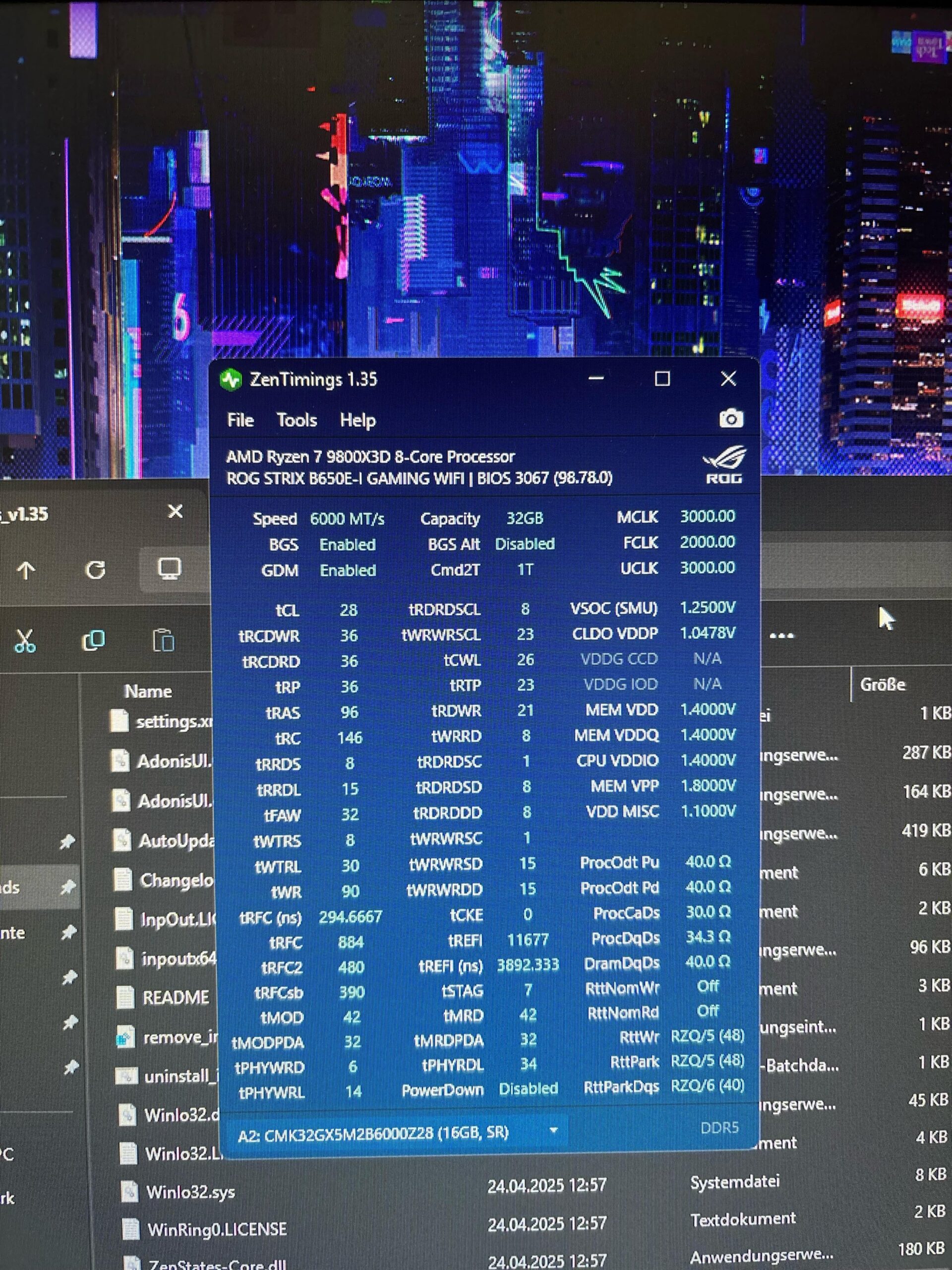
hey so im running expo I and i know that fclk uclk and mlck should all be on 3000. however when i try setting it bios goes into safe mode. also when i leave div1 mode on auto the system doesnt even post and i have to do a cmos reset. any help or is it just the cpu?
10 Comments
It’s not possible. Fclk doesn’t go above 2000 – 2200
Only at 2200, so no not really. Also, AM5 is 1:1:whole # or 1:2:whole #.
fclk @3000 will never boot, so no
fclk is infinity fabric, most likely u can’t set it higher than 2200
I believe there is actually a small latency benefit to running FCLK at 2/3 of mclk and uclk. For example, 3100 would be 2067, 3200, would be 2133. Most people focus on increasing FCLK as high as possible (basically 2200mhz) because the higher speed offsets the latency penalty, my opinion is just go for 6400 ram speed, 3200/2133.
you would need to run the memory at 4000-4400
it would be awful for performance but there is no other way to get 1:1:1, thats why you dont want to run 1:1:1 on AM5.
ok so addon: i thought best latency is when its 1:1:1?
FCLK is CPU internal clock, UCLK is the memory controller and MCLK is the memory and the stardand values are: 2000/3000/3000 (FCLK/UCLK/MCLK)
For FCLK 2033 and 2066 is garanteed to work, 2100 is almost sure, 2133 many can do it, 2166 good chips, 2200 amazing, 2233 are very rare and 2266 never saw.
UCLK 3000 is normal, 3100 good, 3200 great, 3300 amazing, 3400 never saw.
The best you can do right now is to set fclk as high as it will go (probably 2133mhz, max is 2200mhz), this parameter affect performance the most in my experience, that +7-10% increase translate into 7-10% performance increase of the whole ram. Then it is just about finding the lowest timing for each individual timing, which can be a bit time consuming (you cannot really move onto optimizing another timing until you are 100% sure all the previously optimized timings are 100% stable, otherwise you wont know what to adjust when you actually get an error during stress testing). The first 4 timings are most likely the best you can do, but stuff like tRAS tRC tRFCx tREFI and many other can definitely go much lower and they will increase a performance a lot.
There is actually a formula for setting tRFC2/sb, once you find the lowest stable tRFC, increase it so that it can be dividible by 32 (so if 500 is the lowest stable, set it as 512), and calculate tRFC2 = tRFC1 x 260 / 350 and again increase it until it is divisible by 32, and then tRFCsb=tRFC1 x 160 / 350 and increase until it is divisible by 32. These fomula have worked perfectly on 2 separate DDR5 kits for me, if I tried to go even a bit more aggressive i was getting errors. 2^14 which is 16384 and the result is 49151. If that is stable, add 8096, if the 57247 is unstable, subtract 4096 etc. until you get within 2048 from the stable threshold and that is your stable value. Simply work with high powers of 2 when finding the best value (higher is better with this particular timing).
With tREFI try max, which is 65535, and make sure the ram temperature doesnt go past 55-60°C. If it is not stable, lower it to some addition of high powers of two (there is a mathematical word for it which i forgot actually), so lets say 65535 is unstable, and you want to try somewhere around 50000. So subtract a high enough power of 2, in this case
Was stress testing I was using a combination of OCCT ram test and prime95 ram test (big ffts). OCCT is generally the quickest to find an error, usually it throws errors within 30 minutes if there is any instability, prime95 can sometimes run for hours until it fails, but any error means you have to adjust the timings otherwise you will get random crashes during daily use. Unlike with cpu and gpu where you can be a little unstable in stress tests and it will most likely run fine in normal everyday scenarios (gaming), with ram you have to be very strict, if a stress test throws random errors every couple hours, your apps or pc will crash from time to time, ram is very sensitive to this because even a single flipped bit can mean the whole calculation is wrong.
RAM that can do 8000MHz?