
RAM 1: Kingston Fury Renegade RGB 6400 CL32.
Latency 6000CL32: 90ns (default expo II)
Latency 6400CL32 A: 77.6ns (expo II /FLCK 2133/ SOC 1.3 otherwise wont work if ULCK=MEMCLK)
Latency 6400CL32 A+: 74.6ns Nitro mode ON + Nitro RX 1 / TX Data 3 / Control Line 1)
On all I used ULCK = MEMCLK
RAM 2: Lexar Ares 6000 CL26 –
Latency 6000CL26: ? (Expo I/II : SOC default – Doesnt boot -I did not know that I had to change SOC to make it boot, so I did not test it)
Latency 6000 custom: 75ns (76ns if I set ULCK=MEMCLK) I used same timmings as this guy who got 57.5ns WITH THE SAME RAM. Check the second picture on the post
https://quasarzone.com/bbs/qf_overclocking/views/340127
that does not makes sense, I am using same timmings
Latency 6400 custom : 68.1 ns using settings below:
FLCK 2133
28-38-36-40-64-48 65535-450-450-450 12-8-4-20-14-4-4-1-6-6-2-1-8-8-4-16
NITRO MODE OFF
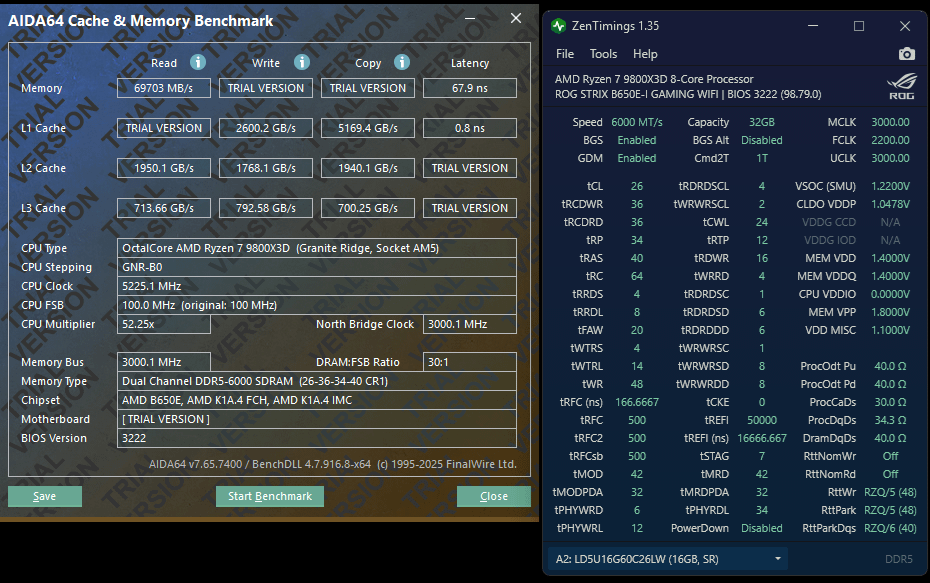
Latency 6000 custom: 67.9ns (FLCK:2200) https://i.imgur.com/SsjfzI8.png
I am using latest BIOS