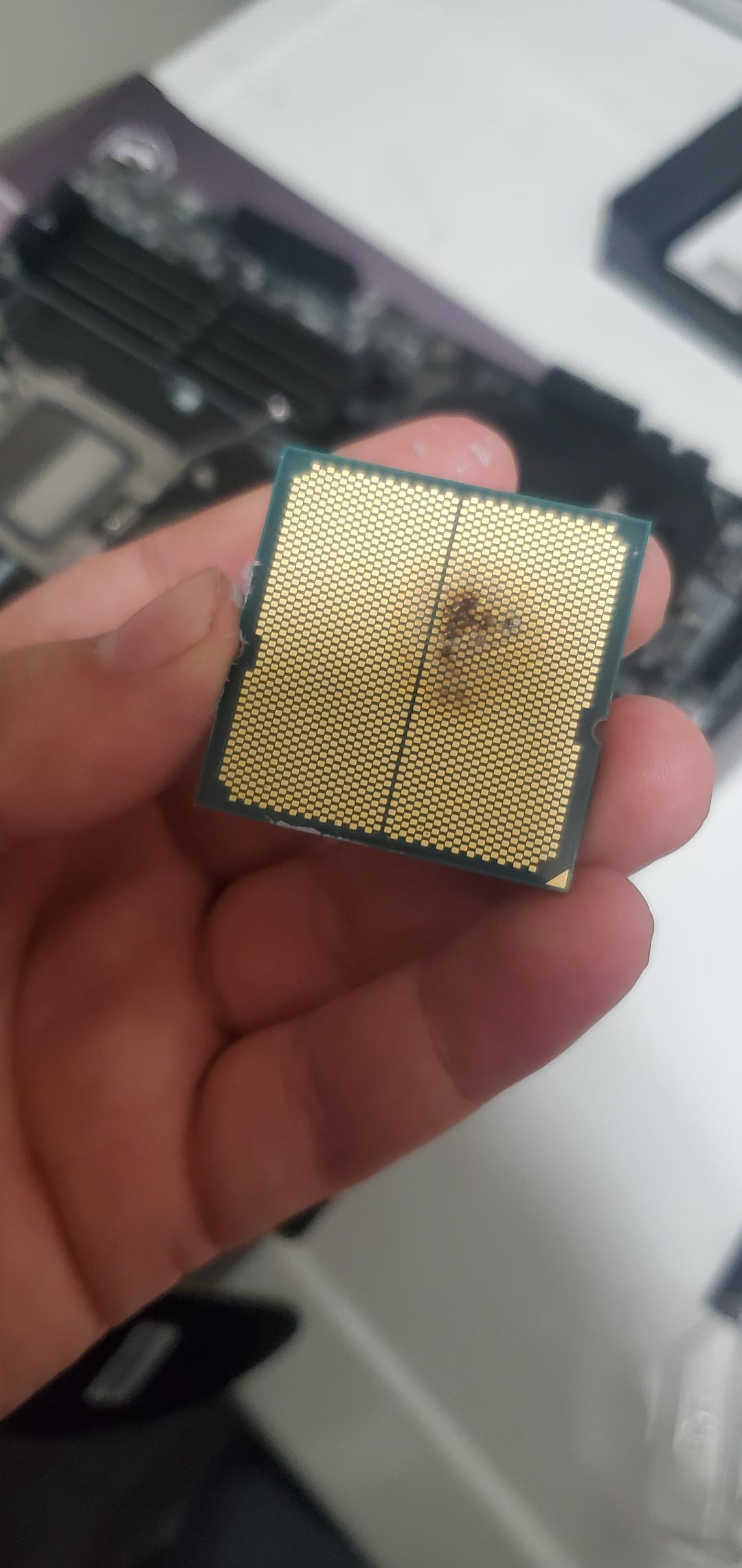
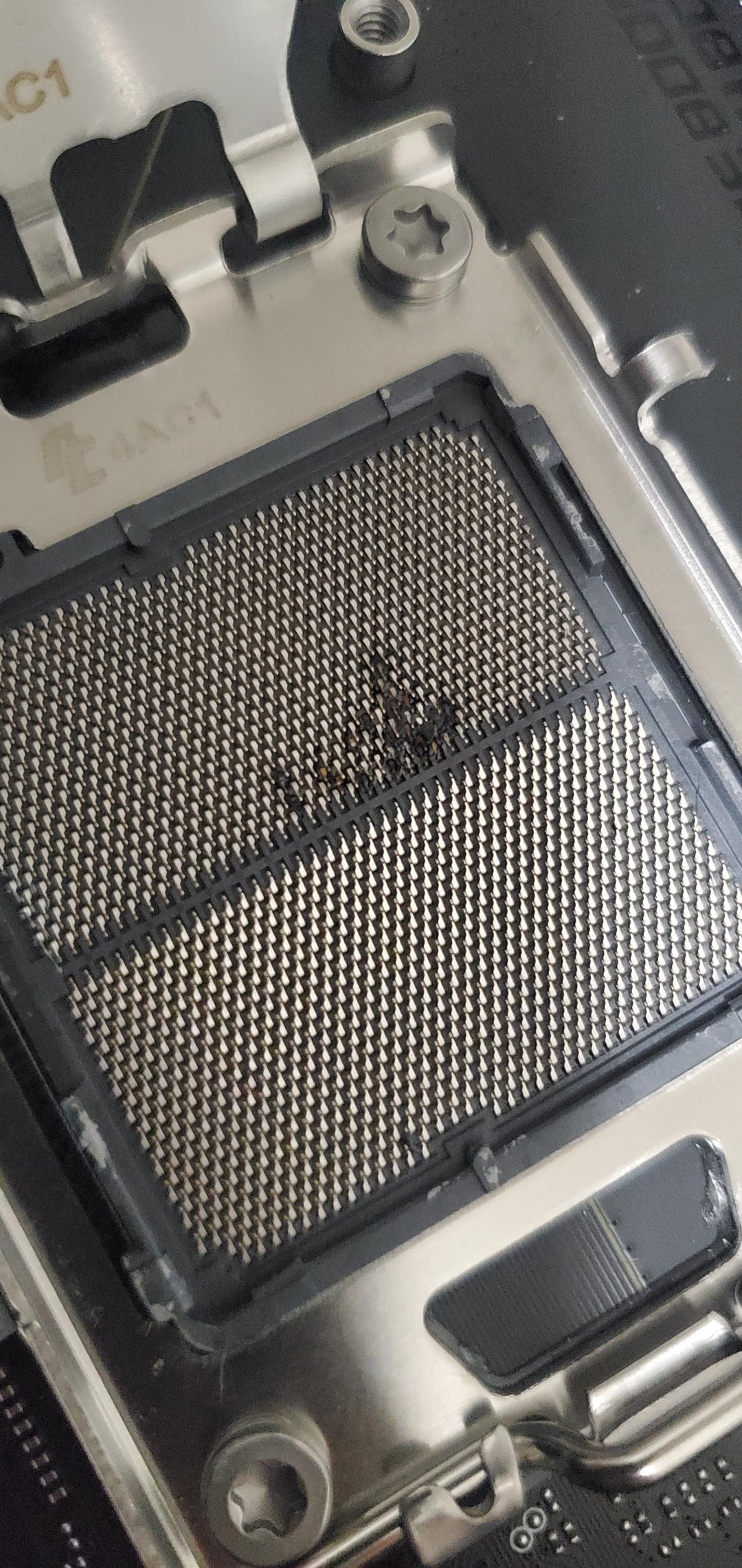
Looks like it was misaligned in the socket and blew up. The the left guide tab corner is snapped off which allowed it to seat crooked with the pins and pads misaligned that shorted.
OP how hard did you push down on the loading mechanism lever?!?!
It seems that the socket is damaged. Could it be that the processor was not properly seated? I saw the same problem in another post. Gamers Nexus made a video with the same problem.
if it didnt even post it had to have been seating improperly or had some FOD in there
Fitnessbrot
Hashtag feels Bad Man!
Atlesi_Feyst
Cpu socket user error claims another victim.
Birdo-the-Besto
*plays Taps*
Ok-League-3024
Would a warranty cover this? I’m hoping to get a 9990x3d when they come in stock. 125$ warranty doesn’t seem so bad
SpxUmadBroYolo
Yea those little indents are supposed to line up. And its snapped off. So you put it in wrong then clamped it down. Heard the cover maybe snap off and thought nothing of it then boom. Yup sad but it happens. You’ll be more careful next time im sure.
Ed1c1us
We have ween this before. Not seated properly. Don’t give us your sob story. Pay attention
Nubanuba
Should’ve played these when you were younger

wusurspaghettipolicy
Stop trying to install CPUs in the case when its upright.
clonxy
Rest In Pieces
NotTheBigBang
Heaven gained an angel
khrossjointz
Jesus Christ! How did you fray the damn PCB on the the CPU?! Did you just ram that shit and grind it in over and over?!
mig82au
There are locating features that make this idiot proof if you take a cursory glance at what you’re doing.
Instead you just fucking rammed it in at whatever orientation. JFC.
Iracle_TW
💀💀
elliotborst
Looks like you munted the CPU in upside down.
promooftheyear
Do people not read manuals or use guides nowadays? Looks like you messed up slotting the cpu in.
bunkSauce
You can tell by the damage to the plastic around the socket that the CPU was not properly seated. This causes improper connections that change the electrical behavior of at least some pins. Alternately, it could be thermal paste residue, and if it is one of the conductive pastes (liquid metal), it could also cause changes to the electrical behavior of pins.
The result can be exactly what you’re seeing. Improperly seated CPU causing excessive current on some lines, even potentially shorting to ground.
Hate to say it, man. But I think you put your CPU in wrong and may be told so during your RMA process.
Ninja_Slate
This post just made me even more terrified of putting the cpu into the socket 😭
LegioX1983
See.. you take the little triangle on the cpu and match it with the little triangle on the MB. That’s it
DanishNinja
User error.
infamousbugg
When in doubt, use more force.
AggravatingDay8392
idk why it feels like an abortion
jhTN59824
Looks like user error to me.
See Gamer’s Nexus video. If you improperly install the CPU, the plastic alignment nub on the bottom of the socket can be broken and cause the CPU to be installed at an angle (see the marring on the left side of your socket). This will cause the CPU pads to make contact with opposing ground and core voltage pins, thus causing a dead short to ground. Sorry this happened to you man.

30 Comments
Fucking oof. No clues?
asrock board and an x3d cpu?
Is this a mobo or CPU problem?
Looks like it was misaligned in the socket and blew up. The the left guide tab corner is snapped off which allowed it to seat crooked with the pins and pads misaligned that shorted.
OP how hard did you push down on the loading mechanism lever?!?!
https://preview.redd.it/fru70l06svve1.png?width=318&format=png&auto=webp&s=bf433464b92567117eef0695af0c1d5f1df8f0a8
It seems that the socket is damaged. Could it be that the processor was not properly seated? I saw the same problem in another post. Gamers Nexus made a video with the same problem.
[https://youtu.be/B9vLnNOBaSs?si=u7P2c9rXJB4IrCr0&t=469](https://youtu.be/B9vLnNOBaSs?si=u7P2c9rXJB4IrCr0&t=469) arround 07:49
For once it’s not an intel
User. Error.
if it didnt even post it had to have been seating improperly or had some FOD in there
Hashtag feels Bad Man!
Cpu socket user error claims another victim.
*plays Taps*
Would a warranty cover this? I’m hoping to get a 9990x3d when they come in stock. 125$ warranty doesn’t seem so bad
Yea those little indents are supposed to line up. And its snapped off. So you put it in wrong then clamped it down. Heard the cover maybe snap off and thought nothing of it then boom. Yup sad but it happens. You’ll be more careful next time im sure.
We have ween this before. Not seated properly. Don’t give us your sob story. Pay attention
Should’ve played these when you were younger

Stop trying to install CPUs in the case when its upright.
Rest In Pieces
Heaven gained an angel
Jesus Christ! How did you fray the damn PCB on the the CPU?! Did you just ram that shit and grind it in over and over?!
There are locating features that make this idiot proof if you take a cursory glance at what you’re doing.
Instead you just fucking rammed it in at whatever orientation. JFC.
💀💀
Looks like you munted the CPU in upside down.
Do people not read manuals or use guides nowadays? Looks like you messed up slotting the cpu in.
You can tell by the damage to the plastic around the socket that the CPU was not properly seated. This causes improper connections that change the electrical behavior of at least some pins. Alternately, it could be thermal paste residue, and if it is one of the conductive pastes (liquid metal), it could also cause changes to the electrical behavior of pins.
The result can be exactly what you’re seeing. Improperly seated CPU causing excessive current on some lines, even potentially shorting to ground.
Hate to say it, man. But I think you put your CPU in wrong and may be told so during your RMA process.
This post just made me even more terrified of putting the cpu into the socket 😭
See.. you take the little triangle on the cpu and match it with the little triangle on the MB. That’s it
User error.
When in doubt, use more force.
idk why it feels like an abortion
Looks like user error to me.
See Gamer’s Nexus video. If you improperly install the CPU, the plastic alignment nub on the bottom of the socket can be broken and cause the CPU to be installed at an angle (see the marring on the left side of your socket). This will cause the CPU pads to make contact with opposing ground and core voltage pins, thus causing a dead short to ground. Sorry this happened to you man.