I mean it is better than nothing. Try out some aluminium foil cones I think they work better
Brendon7358
Generally the motherboard comes with them so you shouldn’t have to buy them at all
Spazzticus
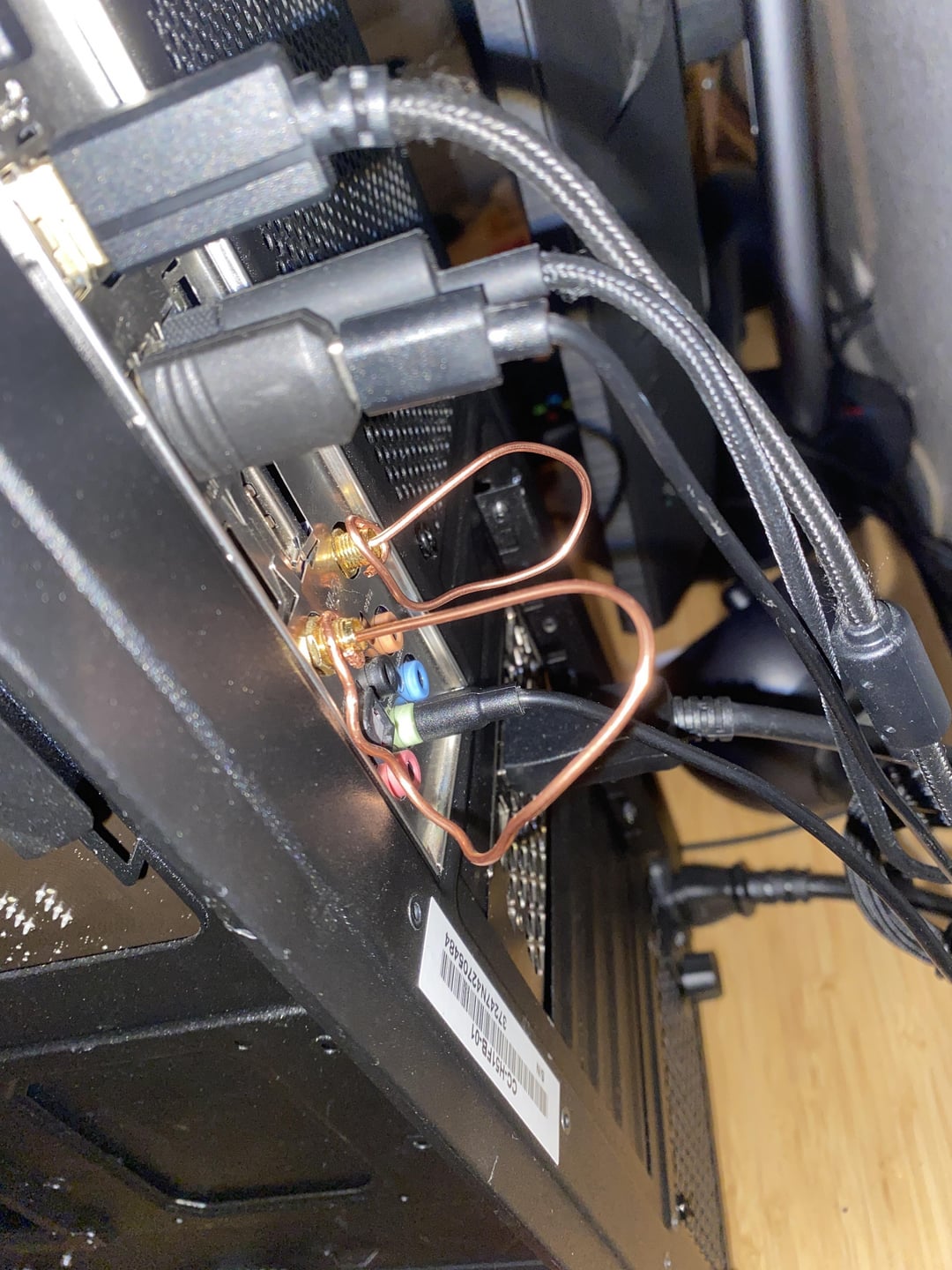
Basic RF math of 1/f gives an ideal length of 6cm for a 5GHz signal and you shouldn’t ground the inputs either. Basically cut a piece of copper wire to roughtly 6cm and poke it in the socket, leave the other end un-connected
RaptorPudding11
Yeah that looks real good there Jethro
revalucion

GhostsinGlass

SendMeAlarmbellNudes
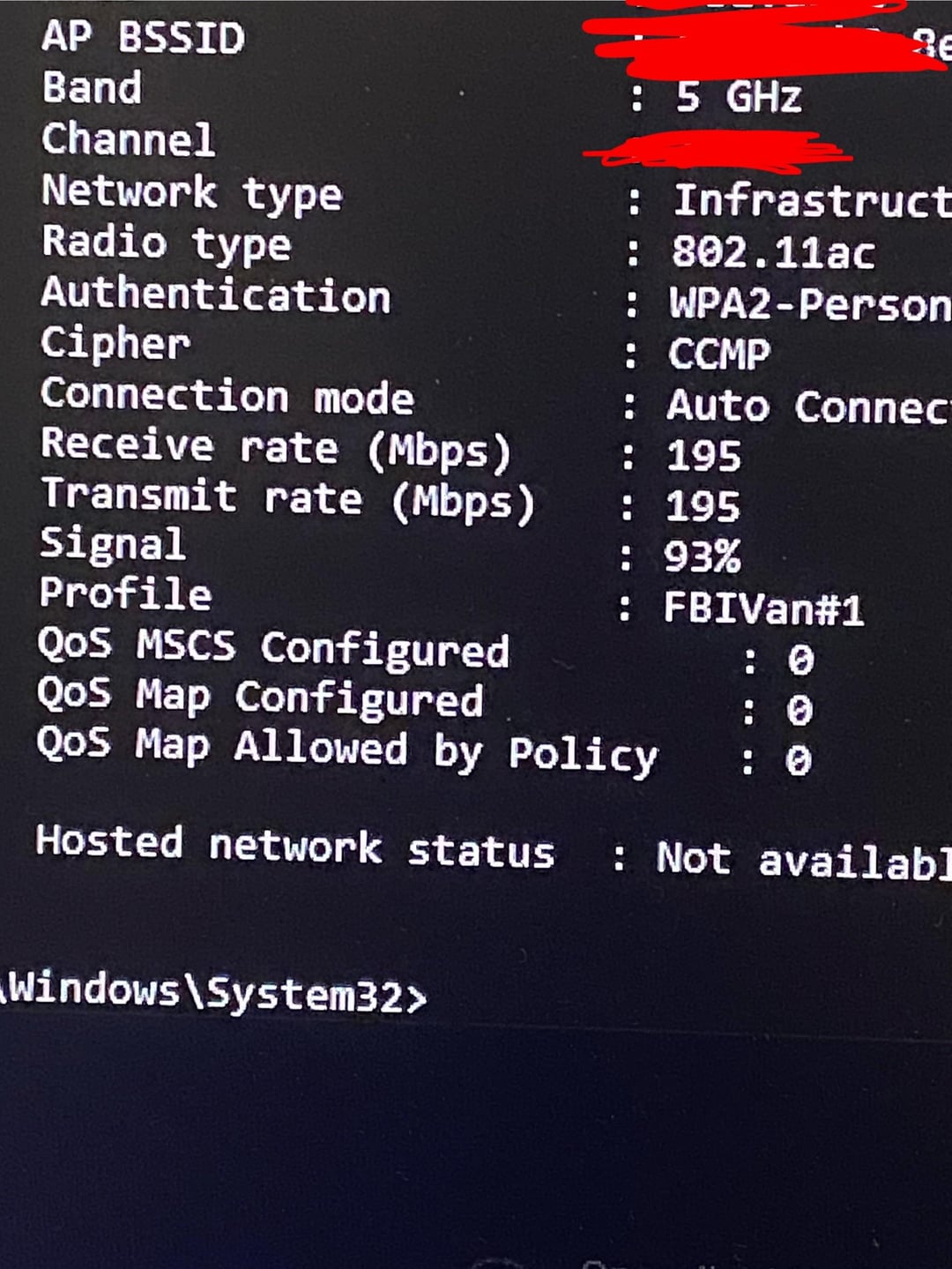
Why would you hide the channel lmao.
Linusalbus
Who needs to buy when your motherboard includes them.
Significant_Tea_4431
What in the RF burn is going on here?
NOOBIK123456789
r/redneckengineering
goatboat
Dad? Is that you? He used to build radial antennas out of coat hangers and tim horton donut boxes rather than pay for cable.
Measure those out better and they’ll perform just as good as any antenna.
A loop antenna should measure a full wavelength, or you could do them as folded dipoles. I would personally use the fact that 2.4 and 5.2 GHz are close to multiples of each other and do it as a loop at 5 GHz and folded dipole at 2.4 GHz.
perpetualperplex
Oh hey, it’s the guy I’m always fighting in GTAO that warps around like an anime character
ThermoFlaskDrinker
How can I do this but make it way bigger because my computer is on the other side of the house from the router? Do I need a giant coat rack?
CrakenV
r/redneckengineering
vegansgetsick
isnt such amount of copper more expensive than any antena ?😅
tailslol
not bad.
i like to buy laptop antennas ,
connecting them internally in a desktop pc
and hiding them behind a plastic part of the front panel.
works well and looks clean.
hopsinduo
I’ve got about 5 hanging around that I don’t use I’m wired baby!!!
HarderThanADiamond
thanks for everyones input I learned that I should infact not put the other end into the “ground” or the hole because it tampers with the connection even more. also thank yall for being kind to my crackhead copper rig.
xTeamRwbyx
Today I learned something I didn’t know could be done
GOKU0_09
Respect
HyeVltg3
You get an upvote.
I needed antennas a few months back after losing the ones that came with my motherboard. Had I seen this earlier I probably would have done this. I just gave up and purchased a 20ft Cat5e cable to go fully wired instead. Spare Antennas for mobos are expensive! same price as 20ft of cable so it was either stay wireless or just deal with a cable on the ground going from room A to B. (PC is just on the oposite side of the wall that I have the router near, wish I could just drill a hole through the wall, would only need like a 3ft cable if I could!)
*”Hey Brandine, fry us up some steaks. We got the google installed.”*
B1gFl0ppyD0nkeyDick
You would he MUCH better served cutting that wire to 6 inches and ONLY putting it in the center conductor. You’re shorting it and creating a high SWR which lowers your signal.
Tim_the_geek
There should be a resistor in that loop.. whatever BT antenna impedance is.
Stay144MhzAway
Depending on your proximity from your Wi-Fi source, you won’t have an issue without an antenna. I noticed I forgot to plug in my antenna after a move, when my bluetooth headphones would get disconnected after exiting the room. Not my proudest moment, given my background..
Bully_Mays69
I just hardwire my PC. I hate wifi. And the antenna makes my rig look stupid.
Notaredditguy20
i think that you should like shape it into coil like structure for (theoratically) better
bobattac
Unironically these work way better than no antennas
But you should order some from like AliExpress since they’re dirt cheap and will work a fair bit better
XxspsureshotxX
I did this when I was a kid but with a TV instead. I took an old AC power cord and cut the plastic off the copper and twisted the stands. Put that right in the antenna port. Worked like a charm. Pinned the other end to the wall where the connection was the best and got decent reception.
Valor_X
You can also use a paper clip, old DIY TV antenna trick
Archelaus_Euryalos
You should just buy some cheap ones. The motherboard Wi-Fi chip and amps probably work okay for now, but eventually, the rebounding signal will kill them.
raaneholmg
End of antenna is not supposed to be grounded. The ground is for shielding the coax cable, which is not relevant here.
LargeMonk857
Reminds me of people powering their ps2s with stripped cords when the end broke off
CompetitiveGuess7642
You are shorting out the antennas you fool.
teddyrupxin
Copper? In this economy?
-Roborat-
Because I have 2 gig internet and wanna use it
HereIsACasualAsker
some people really like things to not look getto-made.
tiandrad
OP also probably has a 5090 in their rig.
Hungry-Lion1575
PC building is as much beauty as it is braun.
Machlath
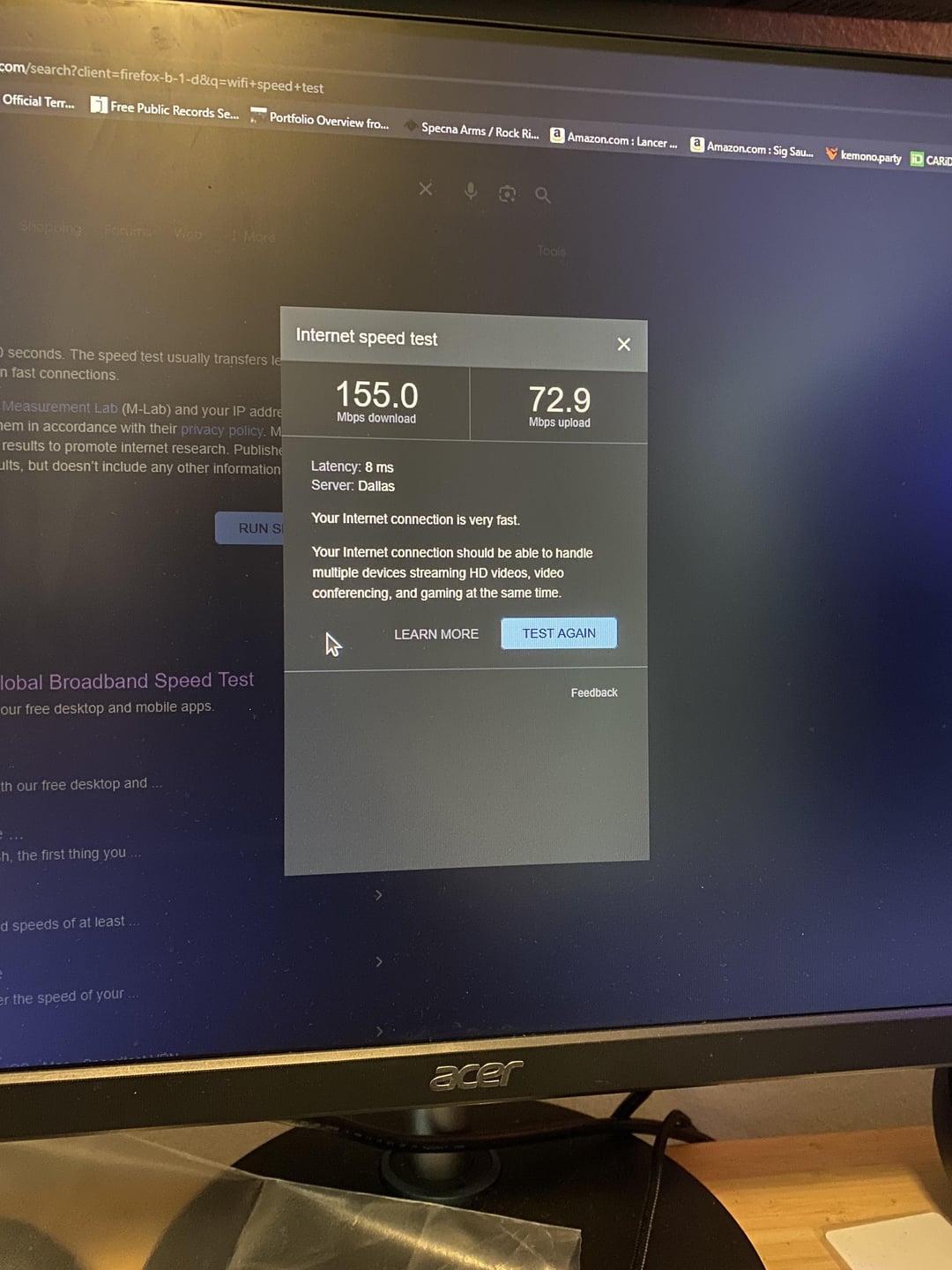
The speed fits the antennas quality 🤣
RustedSoup
You have better connection doing this than I do with a Ethernet cable 🥲
Morlacks
Cooper is cooper.
thescott2k
if you like messing with wires I have exciting news about the thing that looks like a big telephone cable port on your motherboard
Appropriate-Ranger59
Nice
joshbe1863
You can very easily make your own monopole from a wire cut to the right length which will perform pretty decent (not as well as a dipole). But this is not an antenna, you have just shorted your signal to ground. This might burn up the output stage of your transceivers.
TuNisiAa_UwU
This actually works surprisingly well, we have a TV in our classroom that allows us to connect via wi fi, they took away the antennas, so we could only connect from a few meters of distance.

49 Comments
I mean it is better than nothing. Try out some aluminium foil cones I think they work better
Generally the motherboard comes with them so you shouldn’t have to buy them at all
Basic RF math of 1/f gives an ideal length of 6cm for a 5GHz signal and you shouldn’t ground the inputs either. Basically cut a piece of copper wire to roughtly 6cm and poke it in the socket, leave the other end un-connected
Yeah that looks real good there Jethro


Why would you hide the channel lmao.
Who needs to buy when your motherboard includes them.
What in the RF burn is going on here?
r/redneckengineering
Dad? Is that you? He used to build radial antennas out of coat hangers and tim horton donut boxes rather than pay for cable.
Clearly no one saw the flair on the post.
https://preview.redd.it/mum0u1cn7mve1.png?width=600&format=png&auto=webp&s=3dd23fbac7f29dc3e7f2c7c7d0696bdd009759d1
Measure those out better and they’ll perform just as good as any antenna.
A loop antenna should measure a full wavelength, or you could do them as folded dipoles. I would personally use the fact that 2.4 and 5.2 GHz are close to multiples of each other and do it as a loop at 5 GHz and folded dipole at 2.4 GHz.
Oh hey, it’s the guy I’m always fighting in GTAO that warps around like an anime character
How can I do this but make it way bigger because my computer is on the other side of the house from the router? Do I need a giant coat rack?
r/redneckengineering
isnt such amount of copper more expensive than any antena ?😅
not bad.
i like to buy laptop antennas ,
connecting them internally in a desktop pc
and hiding them behind a plastic part of the front panel.
works well and looks clean.
I’ve got about 5 hanging around that I don’t use I’m wired baby!!!
thanks for everyones input I learned that I should infact not put the other end into the “ground” or the hole because it tampers with the connection even more. also thank yall for being kind to my crackhead copper rig.
Today I learned something I didn’t know could be done
Respect
You get an upvote.
I needed antennas a few months back after losing the ones that came with my motherboard. Had I seen this earlier I probably would have done this. I just gave up and purchased a 20ft Cat5e cable to go fully wired instead. Spare Antennas for mobos are expensive! same price as 20ft of cable so it was either stay wireless or just deal with a cable on the ground going from room A to B. (PC is just on the oposite side of the wall that I have the router near, wish I could just drill a hole through the wall, would only need like a 3ft cable if I could!)
https://preview.redd.it/n03ppzmzdmve1.jpeg?width=1920&format=pjpg&auto=webp&s=5603f75789ff33a70cd7bf6347dcd3740a0d320b
*”Hey Brandine, fry us up some steaks. We got the google installed.”*
You would he MUCH better served cutting that wire to 6 inches and ONLY putting it in the center conductor. You’re shorting it and creating a high SWR which lowers your signal.
There should be a resistor in that loop.. whatever BT antenna impedance is.
Depending on your proximity from your Wi-Fi source, you won’t have an issue without an antenna. I noticed I forgot to plug in my antenna after a move, when my bluetooth headphones would get disconnected after exiting the room. Not my proudest moment, given my background..
I just hardwire my PC. I hate wifi. And the antenna makes my rig look stupid.
i think that you should like shape it into coil like structure for (theoratically) better
Unironically these work way better than no antennas
But you should order some from like AliExpress since they’re dirt cheap and will work a fair bit better
I did this when I was a kid but with a TV instead. I took an old AC power cord and cut the plastic off the copper and twisted the stands. Put that right in the antenna port. Worked like a charm. Pinned the other end to the wall where the connection was the best and got decent reception.
You can also use a paper clip, old DIY TV antenna trick
You should just buy some cheap ones. The motherboard Wi-Fi chip and amps probably work okay for now, but eventually, the rebounding signal will kill them.
End of antenna is not supposed to be grounded. The ground is for shielding the coax cable, which is not relevant here.
Reminds me of people powering their ps2s with stripped cords when the end broke off
You are shorting out the antennas you fool.
Copper? In this economy?
Because I have 2 gig internet and wanna use it
some people really like things to not look getto-made.
OP also probably has a 5090 in their rig.
PC building is as much beauty as it is braun.
The speed fits the antennas quality 🤣
You have better connection doing this than I do with a Ethernet cable 🥲
Cooper is cooper.
if you like messing with wires I have exciting news about the thing that looks like a big telephone cable port on your motherboard
Nice
You can very easily make your own monopole from a wire cut to the right length which will perform pretty decent (not as well as a dipole). But this is not an antenna, you have just shorted your signal to ground. This might burn up the output stage of your transceivers.
This actually works surprisingly well, we have a TV in our classroom that allows us to connect via wi fi, they took away the antennas, so we could only connect from a few meters of distance.
I made some with foil and they worked fine