Its always start and select. The rest for me is called by the Playstation layout no matter which one I am playing
bloodbag
Playing with a PS controller on some games on steam will show ABXY prompts….that is killer.
gnappyassassin
The others are start and select, but those are the North, South, East, and West buttons.
ATOMate
I find that looking at them confuses me, but when I hold the controller muscle memory kicks in, and I know where all the buttons are.
MyUsernameIsAwful
It sucks that every controller conforms to this layout of four equally sized buttons now. The GameCube controller had it right: big confirmation button in the middle that you rest your thumb on; then you can easily rock your thumb onto all the other face buttons.
CrossEyed132
This is why i like steam input, i can just bind the buttons to whatever i like and ignore the icons.
Vidya-Man
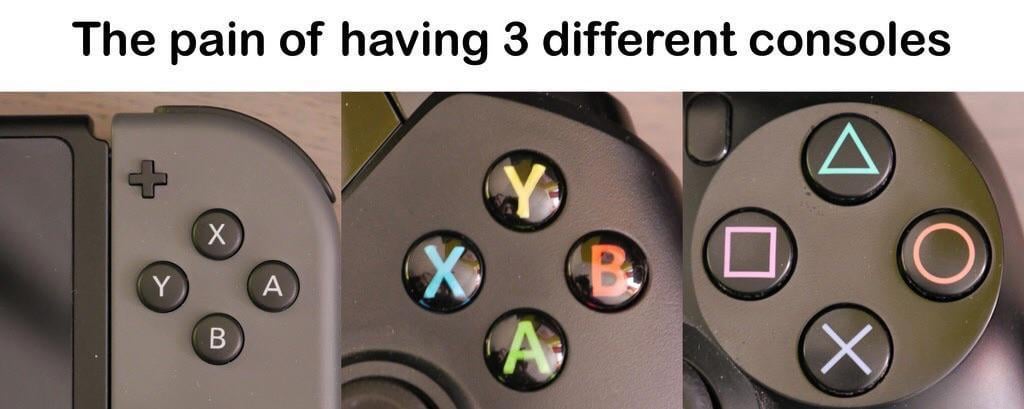
Its going from Xbox layout to Switch layout that gets me every time. More often than not both use A for select and B for cancel but are swapped so muscle memory goes out the window. Playstation uses different symbols but functionally they are the same as xbox these days so its not that much of an issue because of muscle memory. Can trip up on X occasionally but its rarely an issue.
Nago15
Quick time event when your life depends on it: “Press X”
Grave_Knight
Find the X button.
laker9903
At least PS and Xbox have the same command layout. Nintendo screws me up by switching the right and bottom button functions.
facelesswolf_
I think I played on so many different controllers I just translate these in my head. Unless it’s Nintendo, then my mind is fucked
PushDeep9980
My toddler son is used to the steam deck placement, but some times I hook up a PlayStation controller so when I tell him to press x, he presses square , then when we use the switch I tell him to press x and he presses b and then I get confused
otacon7000
We need a new contestant. And it shall have the X button on the right.
mr_birkenblatt
Just press X
Wattakay
Considering how long all pc games with controller support just had Xbox buttons for games i just default to that even if i have always used a PS controller
icon_2040
Telling my son to press A after months of Xbox not realizing he’s playing on a PS5 at the moment. “Mama there’s no letters you silly goose”
butwhythoeh
Wait till bro sees a megadrive and nes pads.
Malt129
And Steam Deck
Warpmind
…I want to make a game released for all these three consoles, and make X the default action button for *all* of them…
vgm-j
I used to play Fifa 99 and 2000 a lot on Playstation. Didn’t play anything until last year (because of my son) on the Switch. I keep telling him to press square , triangle etc.
somethingmoronic
We need a 4th console with an X on the right to maintain balance in the universe.
andtheotherguy
The real tragedy is they’re all arranged in the same way. I’ll never understand this. The Nintendo Gamecube got it right, the most important one in the middle and the other ones around it.
sodiufas
Like if u switch form 3ds max to Blender then to Photoshop then to Renoise then DaVinci all having different shortcuts – this is hard. 4 buttons mostly doing the same shit… it’s still hard for u to pass square hole test I suppose. This meme is stupid.
HalcyonHelvetica
Grew up on DS, Switch, and mostly Japanese PS1 games so it’s been painful playing stuff where confirm is swapped
joestaff
This has never been an issue for me. I guess I’m just too gamer.
… 🤢
CentralCypher
They all do the same thing though, so doesnt matter.
krakilla
The peasantry is strong in this one…
Monotonegent
Nintendo *invented* this layout with the Super Nintendo/Famicom. It’s everyone else causing problems
earlgreybubbletea
Imagine having a controller where the button would light up and display the button symbol based on the game you’re playing.
But instead of an obnoxious super bright led light, it’s made in the softest and dimmable light setup possible.
Something like e-ink maybe for the daytime with a backlight you could use at night? I just know a full on led display under the buttons wouldn’t work for me.
TheSkullKidman
I play lots of emulated games on PC with a wired Nintendo controller and whenever I’m playing some Playstation emulation it’s a whole game of figuring out which button is supposed to be which
rfow
Interestingly enough, Sony releases in Japan use O as confirm and X as back, similar to Nintendo’s A position for confirm and B position for back. At least, they did until the PS5 came out in 2020.
Prodigle
I remember in the PS2 era where circle was “usually” the confirm button, but sometimes it was X, and occasionally it was square
mdahms95
B and circle are both cancel/back.
A and (ps)X is confirm. Square and triangle, along with x and Y is no man’s land
Whystherumalwaysgone
Skill issue.
Also: Nintendo A/Circle confirmation button ultras rise up, Xbox and Sony NA are the weirdos here.
Vectorman1989
I had a playstation for years so I don’t really need to think about the buttons if I play one, it helps that their other symbols are distinct. Nintendo always fucks me up though and I always end up pressing the wrong button at some point
The bigger mystery is why Sony swapped O and X function outside of Japan, starting all the way at the original PlayStation.
Seems like a total random thing to do in hindsight.
CampingZ
It’s like saying the British spelling is wrong.
Jordan_the_Hutt
SEGA needs to make a comeback and put the X in the remaining position.
Combatical
This is probably what pushed me to pc 100%. I just cant with controllers.
Howitzeronfire
Unpopular opinion: Using B or Circle as confirm and A or X for back feels better than the opposite.
I say this not having played japanese games most of my life
Basic_Asshole
In my opinion none of the letter ones are right. Xbox has the A and B buttons the wrong way around, but Nintendo has de X and Y buttons the wrong way around. I do prefer Nintendo’s layout over Xbox though since at least then I don’t have to press back with the button that’s on the most logical place for pressing continue
Revanmann
Every time I see a post like this I feel like I’m the only one who has no issue with this lol. I’ve had them memorized forever. And Nintendo was first, so one could argue the others are wrong.
-Captain-
I feel like an absolute grandpa having to look at the controller to figure out which button I need to press 😂
DMightyHero
First World Problems
welestgw
The smaller switch buttons are more jarring for me, or the pro controller for switch being gigantic buttons. The xbox one is really the sweet spot of position and size.
Nuprakh
Just need a few minutes to adapt xbox to nintendo. But on PC I prefer using a dualsense, so the X/Cross always gets me unprepaired.
MetalSonic_69
I always prefer the bottom button to be “confirm” and/or “jump”

48 Comments
Its always start and select. The rest for me is called by the Playstation layout no matter which one I am playing
Playing with a PS controller on some games on steam will show ABXY prompts….that is killer.
The others are start and select, but those are the North, South, East, and West buttons.
I find that looking at them confuses me, but when I hold the controller muscle memory kicks in, and I know where all the buttons are.
It sucks that every controller conforms to this layout of four equally sized buttons now. The GameCube controller had it right: big confirmation button in the middle that you rest your thumb on; then you can easily rock your thumb onto all the other face buttons.
This is why i like steam input, i can just bind the buttons to whatever i like and ignore the icons.
Its going from Xbox layout to Switch layout that gets me every time. More often than not both use A for select and B for cancel but are swapped so muscle memory goes out the window. Playstation uses different symbols but functionally they are the same as xbox these days so its not that much of an issue because of muscle memory. Can trip up on X occasionally but its rarely an issue.
Quick time event when your life depends on it: “Press X”
Find the X button.
At least PS and Xbox have the same command layout. Nintendo screws me up by switching the right and bottom button functions.
I think I played on so many different controllers I just translate these in my head. Unless it’s Nintendo, then my mind is fucked
My toddler son is used to the steam deck placement, but some times I hook up a PlayStation controller so when I tell him to press x, he presses square , then when we use the switch I tell him to press x and he presses b and then I get confused
We need a new contestant. And it shall have the X button on the right.
Just press X
Considering how long all pc games with controller support just had Xbox buttons for games i just default to that even if i have always used a PS controller
Telling my son to press A after months of Xbox not realizing he’s playing on a PS5 at the moment. “Mama there’s no letters you silly goose”
Wait till bro sees a megadrive and nes pads.
And Steam Deck
…I want to make a game released for all these three consoles, and make X the default action button for *all* of them…
I used to play Fifa 99 and 2000 a lot on Playstation. Didn’t play anything until last year (because of my son) on the Switch. I keep telling him to press square , triangle etc.
We need a 4th console with an X on the right to maintain balance in the universe.
The real tragedy is they’re all arranged in the same way. I’ll never understand this. The Nintendo Gamecube got it right, the most important one in the middle and the other ones around it.
Like if u switch form 3ds max to Blender then to Photoshop then to Renoise then DaVinci all having different shortcuts – this is hard. 4 buttons mostly doing the same shit… it’s still hard for u to pass square hole test I suppose. This meme is stupid.
Grew up on DS, Switch, and mostly Japanese PS1 games so it’s been painful playing stuff where confirm is swapped
This has never been an issue for me. I guess I’m just too gamer.
… 🤢
They all do the same thing though, so doesnt matter.
The peasantry is strong in this one…
Nintendo *invented* this layout with the Super Nintendo/Famicom. It’s everyone else causing problems
Imagine having a controller where the button would light up and display the button symbol based on the game you’re playing.
But instead of an obnoxious super bright led light, it’s made in the softest and dimmable light setup possible.
Something like e-ink maybe for the daytime with a backlight you could use at night? I just know a full on led display under the buttons wouldn’t work for me.
I play lots of emulated games on PC with a wired Nintendo controller and whenever I’m playing some Playstation emulation it’s a whole game of figuring out which button is supposed to be which
Interestingly enough, Sony releases in Japan use O as confirm and X as back, similar to Nintendo’s A position for confirm and B position for back. At least, they did until the PS5 came out in 2020.
I remember in the PS2 era where circle was “usually” the confirm button, but sometimes it was X, and occasionally it was square
B and circle are both cancel/back.
A and (ps)X is confirm. Square and triangle, along with x and Y is no man’s land
Skill issue.
Also: Nintendo A/Circle confirmation button ultras rise up, Xbox and Sony NA are the weirdos here.
I had a playstation for years so I don’t really need to think about the buttons if I play one, it helps that their other symbols are distinct. Nintendo always fucks me up though and I always end up pressing the wrong button at some point
[https://www.shutterstock.com/shutterstock/photos/1030467595/display_1500/stock-photo-x-button-key-keyboard-close-up-macro-computer-laptop-1030467595.jpg](https://www.shutterstock.com/shutterstock/photos/1030467595/display_1500/stock-photo-x-button-key-keyboard-close-up-macro-computer-laptop-1030467595.jpg) I still remember games around 2010 with badly done PC ports had press x to continue, x does nothing.
The bigger mystery is why Sony swapped O and X function outside of Japan, starting all the way at the original PlayStation.
Seems like a total random thing to do in hindsight.
It’s like saying the British spelling is wrong.
SEGA needs to make a comeback and put the X in the remaining position.
This is probably what pushed me to pc 100%. I just cant with controllers.
Unpopular opinion: Using B or Circle as confirm and A or X for back feels better than the opposite.
I say this not having played japanese games most of my life
In my opinion none of the letter ones are right. Xbox has the A and B buttons the wrong way around, but Nintendo has de X and Y buttons the wrong way around. I do prefer Nintendo’s layout over Xbox though since at least then I don’t have to press back with the button that’s on the most logical place for pressing continue
Every time I see a post like this I feel like I’m the only one who has no issue with this lol. I’ve had them memorized forever. And Nintendo was first, so one could argue the others are wrong.
I feel like an absolute grandpa having to look at the controller to figure out which button I need to press 😂
First World Problems
The smaller switch buttons are more jarring for me, or the pro controller for switch being gigantic buttons. The xbox one is really the sweet spot of position and size.
Just need a few minutes to adapt xbox to nintendo. But on PC I prefer using a dualsense, so the X/Cross always gets me unprepaired.
I always prefer the bottom button to be “confirm” and/or “jump”