
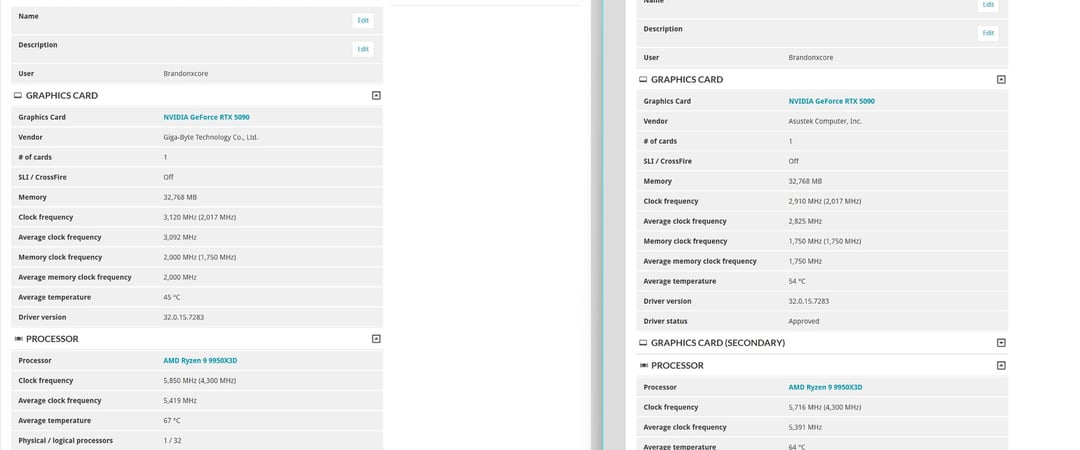
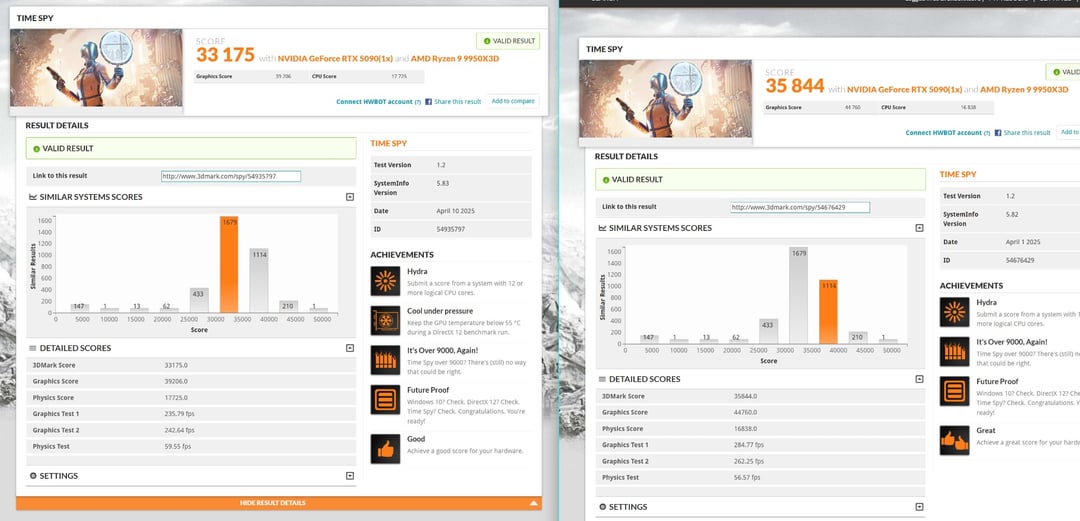
Frustrated at the difference benchmark performance between my astral 5090 and aorus master ice 5090, the fps is far lower regardless of what settings I change on the gigabyte card. Vsync off, gsync off, max performance set, clocks are clearly higher with overclocking on the ice, but the performance isn't there, lowering clocks doesn't help, voltages don't help. Both fresh installed windows 11, latest Nvidia driver. It feels like it's two different chips(yes both have 176 ROPs). The ice clocks higher but scores quite a bit lower, astral clocked lower scores higher. 😐 I know it's synthetic but I cant figure out what's going on. It feels like two different chips completely. Same system.
Any ideas?
(Left Aorus ICE, Right Asus Astral)
7 Comments
I can’t make up shit on the images.
I searched for the links and I see the Gigabyte memory is running at 32gbps as opossed to 28, maybe memory correction kicking in?
[deleted]
Its a bit interesting. There are huge differences. What test is it?
CPU temps: with GigaByte the CPU used much more, higher freqs as well. Maybe PCIE version did set itself lower? But there are also not that much difference in temps.
Really weird
The astral is maybe just that much better?
3DMark Score 38520.0
Graphics Score 49213.0
Physics Score 17264.0
Graphics Test 1 323.27 fps
Graphics Test 2 280.22 fps
Physics Test 58.0 fps
Your scores don’t look that great full stop. This is my Zotac on a 900mv limit with a 9800x3d that doesn’t boost well.
Have you checked to see if there is a vbios update for either of the cards? Otherwise my best guess would be overheating vrm on the worse performing card. I think they remove access to some if temperature sensors on the 5000 series so you may not even be able to find it via software. I’m not 100% sure about the sensor though it was just something I remember reading but didnt ever actually check.