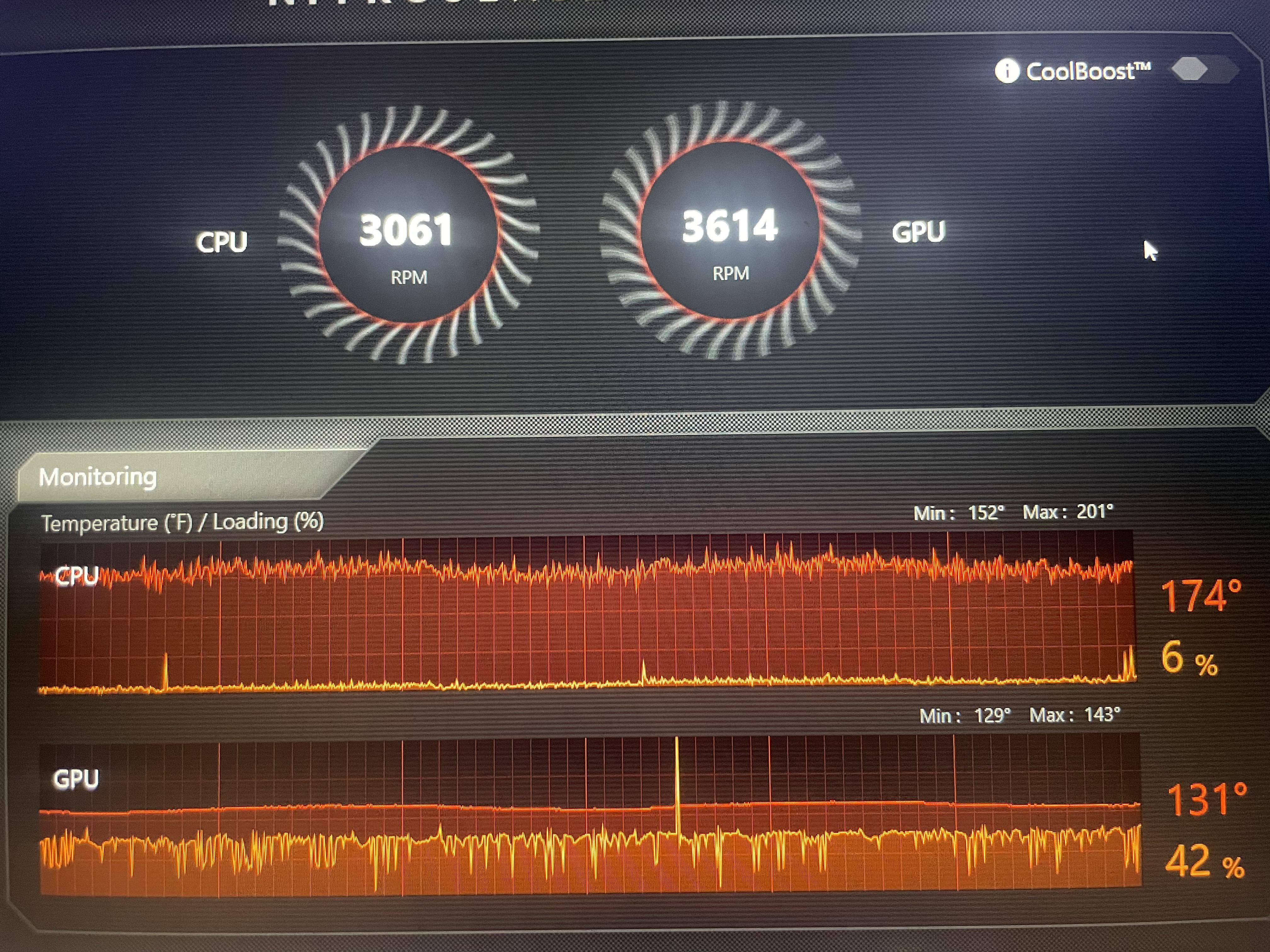
This is a genuine question. I usually make jokes about how hot my computer runs, then they look at me crazy. and ive seen a bunch of memes about it. just wanted to know if my pc is slowly being disintegrated from the inside at this temp.

This is a genuine question. I usually make jokes about how hot my computer runs, then they look at me crazy. and ive seen a bunch of memes about it. just wanted to know if my pc is slowly being disintegrated from the inside at this temp.
35 Comments

OP
I don’t know, I’m used to metric system.
What are the specs? That definitely seems high for an idle temp, but it’s also a laptop so it’s a ticking timebomb for overheating.
Have you tried cooking an egg on your mouse pad?
Yes. Using Fahrenheit is very bad.
Looks like it’s an Acer laptop. Do turn on Coolboost. It keeps fan at higher RPMs. Louder, but during gaming it’s fine. At very least, blow dust out of the fans if you haven’t already.
Re-paste the laptop if you are comfortable with that. My predator helios 300 used to reach 95deg C.. after reapplying the thermal paste, it dropped to around 88deg C. It was annoying as both CPU and GPU shared the same heat pipe for my model.
It’s completely normal for a laptop.
Not good, not terrible. During gaming, that’s normal. But on idle? Definitely an issue.
My CPU goes to 210˚ under semi-high load, it’s been fine
This looks like decepticons tryna hack your computer
i thought it was celisius🤨
Gross!!!! Who uses Fahrenheit for PC component temperatures?
It’s fine. If you’re worried about it turn on Cool Boost which you don’t even have on. But this is just a trolling post anyway. Most people view temps in Celsius and that’s 74 degrees which is not high for a gaming laptop at all.
Yeah, and so is using Fahrenheit for PC temps, a travesty
80°c is ok
174°F is about 74°C, depending on the load of your laptop that’s quite normal. Cleaning the laptop fans can make it run cooler.
80°C is absolutely fine, but it should not go much higher than that.
“It’s portable tho”
Oh it’s reporting in freedom units, for a second I thought it was metric and then was a problem
Prolly could broil a chuck roast on that thang hawk tuah
175 degrees! That’s about 100 to many! Your trying to create a new sun or something?
On an unrelated note: I’m European
Good lord it took me a second to see that it was not in Celsius and I thought OP had burned to ashes.
You probably need a visit from the gouch collector and fresh thermal paste.
I am impressed your PC didn’t shut down when your CPU is almost twice the temp of boiling water, never seen a CPU be 174°, they usually throttle or straight up shut down at 100C
It’s good temp, but using fahrenheit is a abomination that should not exist.
74°c is with in most manufacturing limits. But that’s kinda toasty. That is when I myself would go about taking it to a shop to get new thermal goodies and a good cleaning.
I do my own cleaning, but taking things apart to re paste scares the shit out of me.
I repasted my gpu and cpu on my laptop and it improved thermals.
Laptops always run hot especially at max load it’s best to keep it elevated and if you can get one of those cheap cooling stands u can set it on with fans inside it, it doesn’t help a ton but definitely keeps it cooler.
Is this when gaming? I do hope so… but trust me, laptops can run hot for a long time. My first laptop had integrated graphics and I used it to run world of warcraft at about 3 fps in the city and the thing would shut down from thermal throttling unless I’d sit in the windowsill on top of my desk. It could reach 100C within 5 minutes at one point and go black, I burned my hand trying to lift it at that point… When we finally opened it to repaste, some plastic parts were actually melted lol. It still ran after that but was replaced as a gaming machine and donated to my dad who used it for web browsing only 😂
That being said, your laptop is likely to throttle and underperform and delicate parts can end up damaged and die prematurely after just few short years. Not even speaking of the fans working very hard and potentially failing at some point. I’d highly recommend repasting it with a good paste and making sure it has a lot of space to breathe when you game (all vents need to be clear, intake at least 0.5 to 1 cm space, exhaust vents need a ton of space so the intakes don’t suck the hot air back in).
Name me 3 countries
Yeah using Fahrenheit is really really bad for pc’s my boy
btw those are perfectly fine temps
My laptop just turns off at 100⁰C
if that 6% indicates the current load then 80C is way way too hot for a CPU temp. If it was under full load then it’d be probably normal but 80C in idle indicates some serious cooling issues.
No one fucking uses Fahrenheit to measure the temperature of a CPU/GPU
I measure my temps in scoville units.