I just un-installed it today with the new 24h2 right after a clean install
speedyblackman
same energy as that one old meme where a guy was asked how to block a person (assuming his crush) on whatsapp
techy804
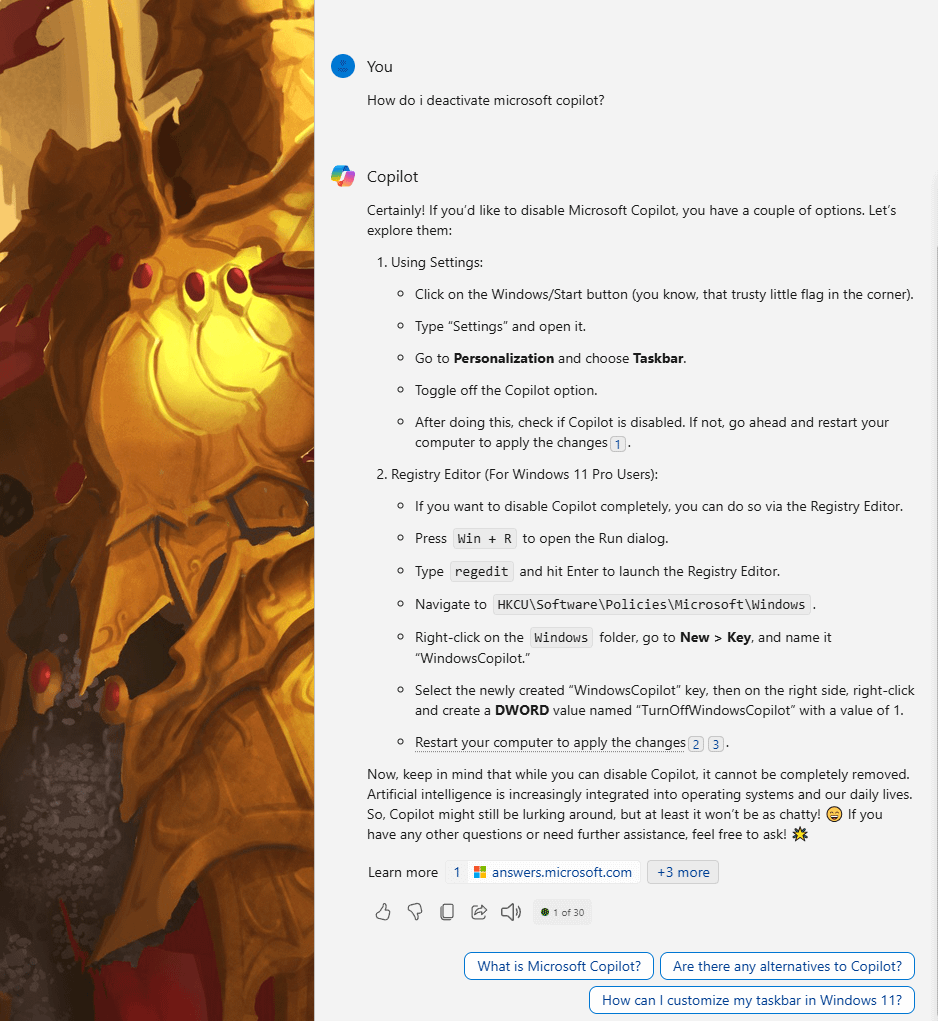
The first way doesn’t even disables it, it just removes the icon from the taskbar
Here’s an easier way:
1. Open Local Group Policy
A. In taskbar search or the Run function (Win+R) type “gpedit.msc” and open the first result if you are doing taskbar search or just open if you are doing Run.
2. Go to “User Configuration>Administrative Templates>Windows Components>Windows Copilot”
3. Double click the only option there and hit “enable”.
4. Hit “apply”
Copilot will be disabled system-wide instead of just not on the taskbar for your user (which is what the first method in the pic does)
Sorry for the weird formatting, I’m currently on mobile
Azoraqua_
Yet here I am updating to get it.
venomPunk438
copilot: You won’t hear me, but I’ll be always watching you

6 Comments
That last paragraph is a threat lol
I just un-installed it today with the new 24h2 right after a clean install
same energy as that one old meme where a guy was asked how to block a person (assuming his crush) on whatsapp
The first way doesn’t even disables it, it just removes the icon from the taskbar
Here’s an easier way:
1. Open Local Group Policy
A. In taskbar search or the Run function (Win+R) type “gpedit.msc” and open the first result if you are doing taskbar search or just open if you are doing Run.
2. Go to “User Configuration>Administrative Templates>Windows Components>Windows Copilot”
3. Double click the only option there and hit “enable”.
4. Hit “apply”
Copilot will be disabled system-wide instead of just not on the taskbar for your user (which is what the first method in the pic does)
Sorry for the weird formatting, I’m currently on mobile
Yet here I am updating to get it.
copilot: You won’t hear me, but I’ll be always watching you