
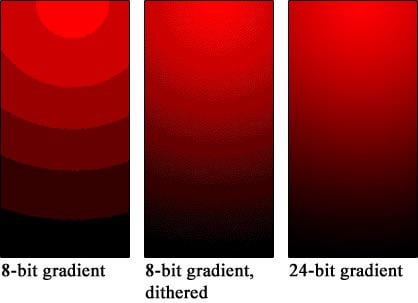
If I turn my PC on and I get banding across the screen, I restart the PC in safe mode and it goes away. It only happens sometimes but it’s annoying as hell. What is going on?
P.S. Not my picture, but it’s a good example of what banding is. In the last post I made, it was misunderstood what I meant. I’m hoping the visual example clears up a bit of confusion
8 Comments
I mean, my first thought would be your graphics driver. Have you tried completely uninstalling it and reinstalling it?
Make sure your GPU drivers are up to date.
Post your monitor and gpu
It sounds like an HDR issue. Try to turn HDR off in Windows display settings.
Windows Auto HDR can lead to banding in my experience. Not sure if you have this enabled or not
Sounds like a HDR issue download the HDR calibration tool from the windows store.
In Nvidia control panel, under Display -> Change resolution, make sure your color depth (8bpc) and format (RGB or YCbCr444) are set correctly… note that 8bpc is per channel, ie. 8×3 (RGB) is 24-bit color. Now depending on your refresh rate and if HDR is enabled you might not be able to select those options – that depends on your display port or HDMI signal. Also check if a color profile is available for your monitor. Also also don’t forget to thank Nvidia for only supporting DP1.4.
I have a weird issue similar, where I’ll get lines across the bottom of my screen that sorta animate downwards. They go away after a minute and usually appear stronger when it’s cold out.
I attribute it to a weak solder connection, but don’t want to rip the panel open.