oof, I have a GTX 1060 from 2016. I guess our end is near
MeelyMee
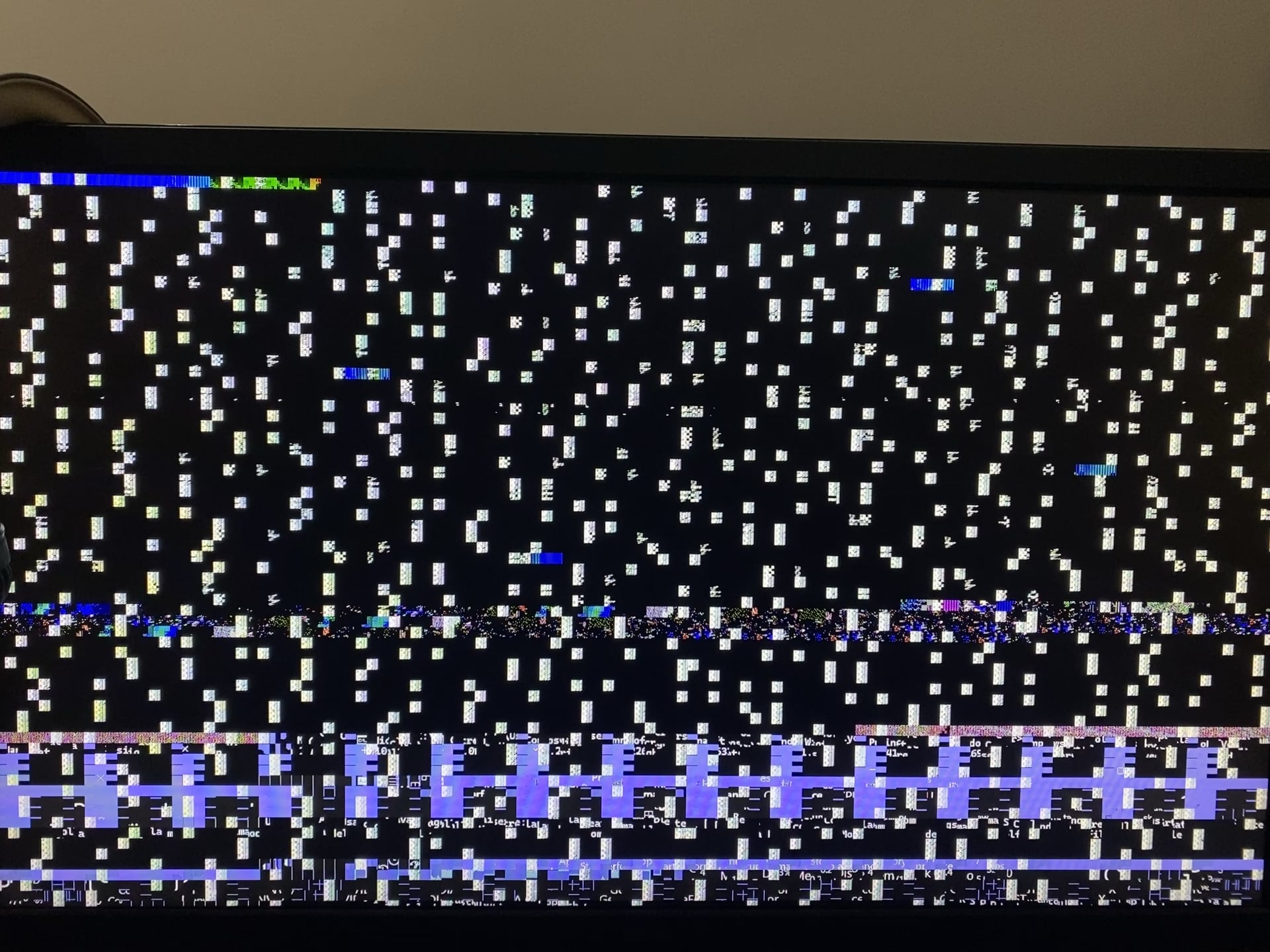
VRAM issue most likely.
Yes, it can be revived. No, it’s not going to be worth it.
If you want to know which chip(s) went bad you can run MODS/MATS, it’ll find it. Unless you’re experienced in replacing BGA chips and potentially doing tiny pad repair it’s not going to be something you can fix yourself however. Anyone who can do these things will likely charge more than a used card to replace it would cost.
NEGMatiCO
I have a question, or rather, an experimental solution (since haven’t faced such situation myself), If you can get to windows, and this happens only when you play games (this is an assumption), does doing something like undervolt, underclock or something like that at least help to somewhat mitigate the issue?
If this happens as soon as you turn on the PC, however, then ig it’s done. RIP
boratburg

you about to get contact from trinity
PRSMesa182
Reviving a 1070 probably isn’t worth it if you don’t have the ability to do it yourself for zero cost
IntricateOnionStatue
You’re gonna get people telling you to throw it in the oven. And while it may work, it’ll 100% render your oven unusable since the card will release toxins and will contaminate your oven forever. Honestly it’s just a really stupid idea.
If you have a hot air station, you can reflow everything yourself or ask a repair shop to do it for you.
Keep in mind, it’s only a temporary fix if it even fixes it at all.
Best solution is to throw it out and buy a new card.
Impressive-Box-2911
Send it to [https://www.youtube.com/@northwestrepair](https://www.youtube.com/@northwestrepair) for repair…now of course with shipping and the service fee you are probably better off just buying a new GPU.
CurrentlyLucid
I had a flaky screen not exactly like this, but still a full screen issue, I turned off the PC and jammed my vid card into the socket and rebooted, been fine since.
Crafted_Mecke
have you checked another monitor, maybe the monitor is dying, just to make sure its the gpu.
Or try plugging your Monitor to the mainboard, atleast you know 100% its the GPU
LowBus4853
Hes dead, Jim.
On a more serious note this is VRAM artifacting. You can try and downclock the vram in msi afterburner but seeing as you cant even get a proper video output it might be hard.
As for your options, you could reflow the ram chips (specialist repair) but that only gets it working for a bit until it breaks again. You could replace the ram chips (also specialist repair) and it may fix it completely. But the most practical option is to buy another GPU or buy a cheap used one if you are tight on money.
Now is the time to buy a little stand, dismantle it, clean in and mount again and put on a shelf, buy a 300 euros card and once in a while remember with a smile what a great GPU it was
MatiasArg09
Letting go is also a way of loving
Surrandon
Best advice I got here is make sure it isn’t cables, monitor, or the physical connection of the card. Otherwise it looks quite dead.
KKPPEA
It’ll buff out (Also RIP 1070)
Dorfl-the-Golem
Take it out. Blow on it. Put it back in.
Consistent_Research6
If you do not have the knowledge or tools to fix it, replace it, is easier for you.
HanCurunyr
Let the champion rest, it served you faithfully, it deserves it
mcmalloy

F give her a proper send off
Wiikneeboy
It’s a sign that you need to upgrade to a modern graphics card. You did your best to try and fix it.
Rrat_Dead_Beat
If you have a spare oven, one you know you’ll never use for food, you can try throwing it in there and heating it up to reflow the solders. If it works, you’ll have a temporary fix that’ll be just enough to buy and wait for a new card.
**Do not heat it in an oven you cook food in, the card will be covering said oven with toxic materials which can get in what you eat.**
n64bomb
It is beyond its useful life anyone. Replace and move on. I would see it as a blessing to upgrade.
jurkajurka
Season it with sugar, spice, and everything nice.
Saaam-chan
Pee on it
LuckyOwl1
Downclock?
Stig783
Yup it’s done, not worth repairing either.
DoNotDisturb____

bert_the_one
The RTX3060 would be a good replacement and reasonably priced
ZenZennia
Don’t try to fix it yourself. it’s dead. it can be fixed by a specialist at a very low success rate with temporary results of random duration.
Try and buy a new one as people already said.
a used 4060 will be even stronger than this one for example.
Best of luck.
ShadyNefarius12
Oh noes. My Gainward Geforce 1060 6GB VRAM is still fine for me, even it passed 6 years since I’ve bough it. It might be the next one who gets killed, but it’s yet to know when. I know the answer would be to replace it but sometimes there’s no other choice.
Mevanski77
Fellow gtx1070 owner here praying the inevitable is delayed ever longer.
If its the VRAM soldering you could do a reflow to see if it helps. If your lucky it will solve it, it may or may not work but I would do it nonetheless.

39 Comments
oof, I have a GTX 1060 from 2016. I guess our end is near
VRAM issue most likely.
Yes, it can be revived. No, it’s not going to be worth it.
If you want to know which chip(s) went bad you can run MODS/MATS, it’ll find it. Unless you’re experienced in replacing BGA chips and potentially doing tiny pad repair it’s not going to be something you can fix yourself however. Anyone who can do these things will likely charge more than a used card to replace it would cost.
I have a question, or rather, an experimental solution (since haven’t faced such situation myself), If you can get to windows, and this happens only when you play games (this is an assumption), does doing something like undervolt, underclock or something like that at least help to somewhat mitigate the issue?
If this happens as soon as you turn on the PC, however, then ig it’s done. RIP

you about to get contact from trinity
Reviving a 1070 probably isn’t worth it if you don’t have the ability to do it yourself for zero cost
You’re gonna get people telling you to throw it in the oven. And while it may work, it’ll 100% render your oven unusable since the card will release toxins and will contaminate your oven forever. Honestly it’s just a really stupid idea.
If you have a hot air station, you can reflow everything yourself or ask a repair shop to do it for you.
Keep in mind, it’s only a temporary fix if it even fixes it at all.
Best solution is to throw it out and buy a new card.
Send it to [https://www.youtube.com/@northwestrepair](https://www.youtube.com/@northwestrepair) for repair…now of course with shipping and the service fee you are probably better off just buying a new GPU.
I had a flaky screen not exactly like this, but still a full screen issue, I turned off the PC and jammed my vid card into the socket and rebooted, been fine since.
have you checked another monitor, maybe the monitor is dying, just to make sure its the gpu.
Or try plugging your Monitor to the mainboard, atleast you know 100% its the GPU
Hes dead, Jim.
On a more serious note this is VRAM artifacting. You can try and downclock the vram in msi afterburner but seeing as you cant even get a proper video output it might be hard.
As for your options, you could reflow the ram chips (specialist repair) but that only gets it working for a bit until it breaks again. You could replace the ram chips (also specialist repair) and it may fix it completely. But the most practical option is to buy another GPU or buy a cheap used one if you are tight on money.
Good luck.
https://preview.redd.it/irf22fjggcsd1.jpeg?width=295&format=pjpg&auto=webp&s=e00bb865d7c2225099f7efb85d1c7a565afecb1b
ALL GLORY TO THE HYPNOTOAD
Replace it… best solution
Now is the time to buy a little stand, dismantle it, clean in and mount again and put on a shelf, buy a 300 euros card and once in a while remember with a smile what a great GPU it was
Letting go is also a way of loving
Best advice I got here is make sure it isn’t cables, monitor, or the physical connection of the card. Otherwise it looks quite dead.
It’ll buff out (Also RIP 1070)
Take it out. Blow on it. Put it back in.
If you do not have the knowledge or tools to fix it, replace it, is easier for you.
Let the champion rest, it served you faithfully, it deserves it

F give her a proper send off
It’s a sign that you need to upgrade to a modern graphics card. You did your best to try and fix it.
If you have a spare oven, one you know you’ll never use for food, you can try throwing it in there and heating it up to reflow the solders. If it works, you’ll have a temporary fix that’ll be just enough to buy and wait for a new card.
**Do not heat it in an oven you cook food in, the card will be covering said oven with toxic materials which can get in what you eat.**
It is beyond its useful life anyone. Replace and move on. I would see it as a blessing to upgrade.
Season it with sugar, spice, and everything nice.
Pee on it
Downclock?
Yup it’s done, not worth repairing either.

The RTX3060 would be a good replacement and reasonably priced
Don’t try to fix it yourself. it’s dead. it can be fixed by a specialist at a very low success rate with temporary results of random duration.
Try and buy a new one as people already said.
a used 4060 will be even stronger than this one for example.
Best of luck.
Oh noes. My Gainward Geforce 1060 6GB VRAM is still fine for me, even it passed 6 years since I’ve bough it. It might be the next one who gets killed, but it’s yet to know when. I know the answer would be to replace it but sometimes there’s no other choice.
Fellow gtx1070 owner here praying the inevitable is delayed ever longer.
https://i.redd.it/dmf8bizlqcsd1.gif
Bro.. Just let him die at this point.. He’s been through a lot. Reviving this would be like squeezing the very bottom of a toothpaste
Damn. An amazing card. Rip soldier o7
https://preview.redd.it/g36zs3b5tcsd1.jpeg?width=800&format=pjpg&auto=webp&s=3b1dd6f92695506a204056c928701d1a7ea463c3
If its the VRAM soldering you could do a reflow to see if it helps. If your lucky it will solve it, it may or may not work but I would do it nonetheless.
https://i.redd.it/jc09e0ettcsd1.gif
Dismantle it and frame the pcb.
Oven that bad boy
Well, learned a new thing today. People baking their cards what a time to be alive