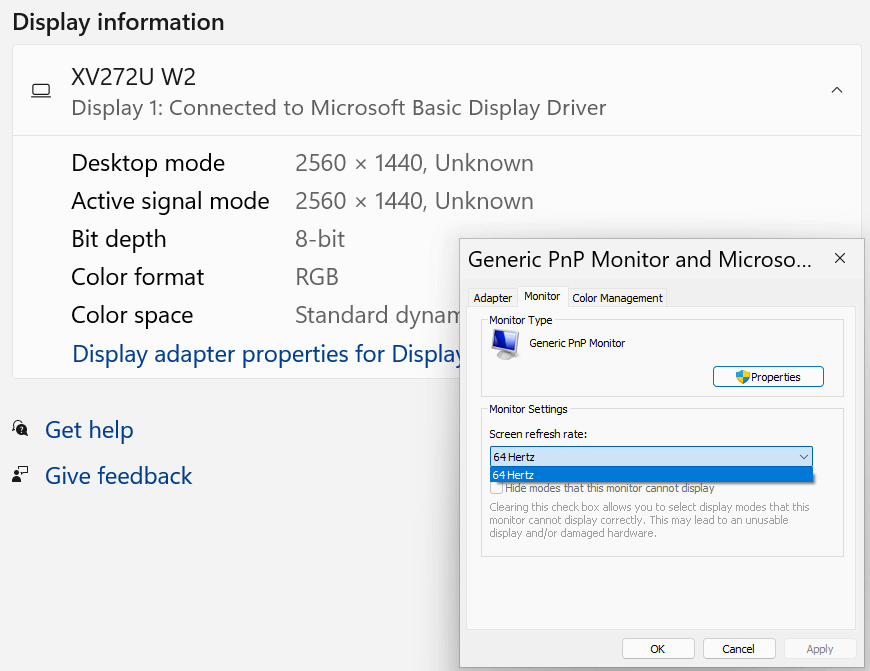
My monitor turned off unexpectedly last night/early this morning and the display has been pretty choppy even after restarting. I suspected that it might have reset me at a lower refresh rate, and I was right. Why is it only allowing me to go up to 64 Hz in my display setting though? This monitor was running at 144 Hz with an HDMI, and it’s capable of running at 240 Hz with a DisplayPort.
Nidhoggr84
Microsoft Basic Display Driver means the GPU device driver isn’t loaded, or the GPU has a hardware problem.
Try to install the graphics driver.
What GPU do you have?
Hattix
You don’t have your video drivers installed or they’re disabled.
That’s why it says “Microsoft Basic Display Driver”.
Initial_Suspect7824
Just AMD drivers doing its things.
Mine does the same when I run an overclock.
himeluwu
try updating gpu drivers
2_Ckains
UPDATE: I’ve updated the driver(s) for my GPU and the system is restarting. Will let you guys know in a few minutes if that solved the problem.
R4forFour
It can be the cable limiting the refresh rate. If you’re running HDMI, make sure it’s capable of higher refresh rate.
Use DDU and install a fresh copy of the drivers. As much as AMD improved their driver game they are still unstable under circumstances.
Curious-Pudding-7363
Wild guess but are you using a dvi cable?
michelas2
Gpu drivers or more accurately, lack thereof.
Unusual-East4126
You need to install the proper display drivers first.
2_Ckains
FINAL UPDATE: It was, in fact, a GPU drivers issue. Thank you to everyone for commenting and helping me get this fixed. I’ll update the post’s flair. But we’re back, boys!
is the monitor plugged into motherboard or graphics card? should be in graphics cards
the only other issue IF NOT THAT, would be bad cable…. the cable has data issues so its limiting you. i happen to have a bad HDMI cable that i recently found out. wouldn’t let me do more than 60hz on any resolution. didn’t matter if it was 1080p or 1440p, i was locked 60hz…. bought a new cable, problem solved. sometimes cables are just shit, especially if its old or chinesium.
In the cable regards, cable matters and club3d are the two best brands you can buy. Club3d passes every cable tester you can find online (level1techs did a test for the KVM switches and found club3d was the only brand to pass with flying colors every time).
LinuxRevolution
1. You don’t have a video driver installed.
2. If you’re using HDMI you may need to swap it out for a display port cable. Some monitors only let you use the full refresh rate on the display port.
XD7006
usually that’s a physical limit
lazarqa
I had the same issue with my monitor, switched the HDMI port on my monitor and it worked.

16 Comments
My monitor turned off unexpectedly last night/early this morning and the display has been pretty choppy even after restarting. I suspected that it might have reset me at a lower refresh rate, and I was right. Why is it only allowing me to go up to 64 Hz in my display setting though? This monitor was running at 144 Hz with an HDMI, and it’s capable of running at 240 Hz with a DisplayPort.
Microsoft Basic Display Driver means the GPU device driver isn’t loaded, or the GPU has a hardware problem.
Try to install the graphics driver.
What GPU do you have?
You don’t have your video drivers installed or they’re disabled.
That’s why it says “Microsoft Basic Display Driver”.
Just AMD drivers doing its things.
Mine does the same when I run an overclock.
try updating gpu drivers
UPDATE: I’ve updated the driver(s) for my GPU and the system is restarting. Will let you guys know in a few minutes if that solved the problem.
It can be the cable limiting the refresh rate. If you’re running HDMI, make sure it’s capable of higher refresh rate.
https://www.simplymac.com/tech/hertz-limit-for-each-hdmi-version-maximum-refresh-rates
Use DDU and install a fresh copy of the drivers. As much as AMD improved their driver game they are still unstable under circumstances.
Wild guess but are you using a dvi cable?
Gpu drivers or more accurately, lack thereof.
You need to install the proper display drivers first.
FINAL UPDATE: It was, in fact, a GPU drivers issue. Thank you to everyone for commenting and helping me get this fixed. I’ll update the post’s flair. But we’re back, boys!
https://preview.redd.it/dv3a24x2w7qd1.png?width=831&format=png&auto=webp&s=e6387041bcab0b7181db7145d7f319608c0cde77
is the monitor plugged into motherboard or graphics card? should be in graphics cards
the only other issue IF NOT THAT, would be bad cable…. the cable has data issues so its limiting you. i happen to have a bad HDMI cable that i recently found out. wouldn’t let me do more than 60hz on any resolution. didn’t matter if it was 1080p or 1440p, i was locked 60hz…. bought a new cable, problem solved. sometimes cables are just shit, especially if its old or chinesium.
In the cable regards, cable matters and club3d are the two best brands you can buy. Club3d passes every cable tester you can find online (level1techs did a test for the KVM switches and found club3d was the only brand to pass with flying colors every time).
1. You don’t have a video driver installed.
2. If you’re using HDMI you may need to swap it out for a display port cable. Some monitors only let you use the full refresh rate on the display port.
usually that’s a physical limit
I had the same issue with my monitor, switched the HDMI port on my monitor and it worked.