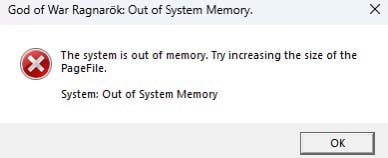
I keep having this issue while my memory never goes above 25% and since i have no idea how to operate a pc outside a user level i need some help

I keep having this issue while my memory never goes above 25% and since i have no idea how to operate a pc outside a user level i need some help
17 Comments
[deleted]
What CPU do you have?
Did people lose the ability to google stuff nowadays? It says what to do in the error message.
https://preview.redd.it/dqjyved9atpd1.jpeg?width=474&format=pjpg&auto=webp&s=1e5520e3b430be0c0e1e4b5cde9403a8e1a61941
Have you updated bios? There was a micro code update for 13th and 14th gen, haven’t had this error since the update.
If you want a temp fix, drop the clocks down to 5.5ghz and it’ll work without issue.
first update the bios secondly locked the cpu turbo to 5.8 it will solve your issue!
Wow just like the last of us part 1
Out Of System memory is NOT the 13th and 14th gen Intel CPU problem. That’s “Not enough video memory to allocate a rendering resource” or similar and appears when loading up DX12 games that need to compile shaders.
This appears to be the result of a game memory leak or a local RAM availability problem, perhaps a problem with the Page File size (set size over system mananged) or the disk it lives on not having enough space for it to grow.
what are the full system spec ?
Whats ur setup to begin with
[deleted]
How much space left on your C: drive?
If you already having this, then it is might be too late. Time for RMA
Wasn’t the issue a “Video Memory” issue and not a “System Memory” issue?
Have you tried to download more ram? /s
You don’t have enough memory try downloading some off the internet
U can increase the pagefile like it says to ? Idk if thts the issue because you didnt gibe ur system specs but:
1 right click windows icon
2 system
3 look for advance system setting
4 advamce tab
5 perfarmance setting button
6 custom setting check box
7 input min max pagefile size (in mb)
8apply save reboot after hittimg ok in all windows
I wrote those instruction off memory so if u get lost juat use copilot or chat gpt
Nvme finally made a page file worth having