
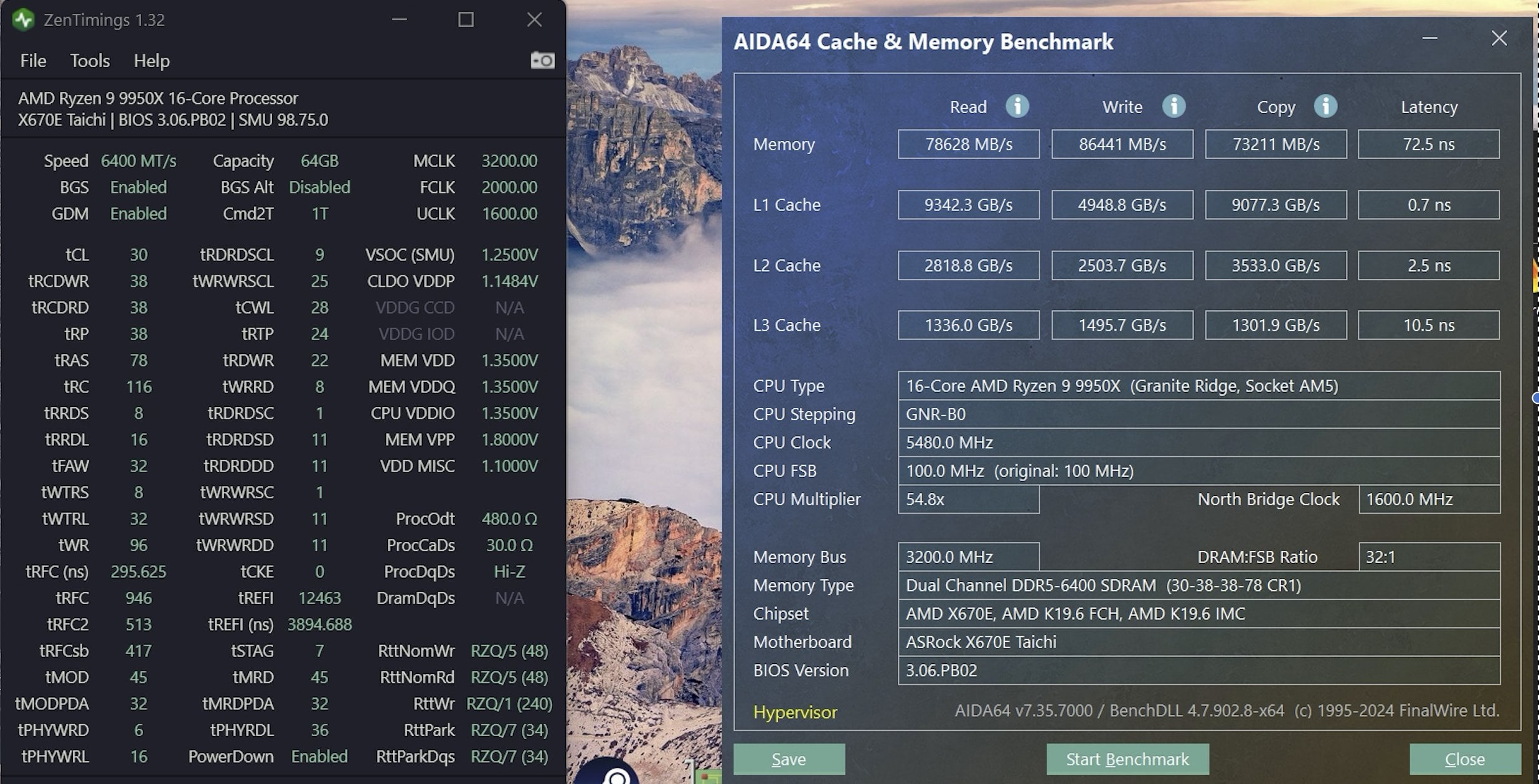
I've been building computers for probably 20 years, but I don't know anything about the overclocking world. I just built a new rig for productivity and gaming and wanted to try my hand at some basic OC'ing. I've been tinkering with my RAM speeds, but I hit a wall pretty quickly. Not sure if it's my RAM, my memory controller, or me (it's probably me). As I’ve come to learn, there isn’t a ton of info about DDR5 overclocking. So I’ve been watching Buildzoid and trying to decipher conversations in forums.
Am I doing something wrong or is there just not a lot of OC headroom with this kit? Is there a way I can tell if it’s the kit vs. my memory controller (other than testing lots of other kits)? Will happily take any advice.
Specs:
- AMD 9950x w/ Phantom Spirit 120 EVO
- Asrock x670e Taichi
- 4080 Super 16GB
- NZXT C1200 ATX 3.1
I purchased 3 kits of RAM to test:
- Kingston Fury 2x32GB 6400 cl32 – A DIE (per QVL) – I couldn't even boot with these even though they were on the QVL rip and are supposedly A-die. Returning them w/replacement coming tomorrow.
- KLEVV CRAS V 2x32GB 6400 CL32 1.35V A DIE – I bought these as they were 6400/32 A-die, $50 cheaper than the Kingston kit, and had EXPO.
- TEAMGROUP XTREEM (2x24GB) 8000 CL38 M-DIE – This was on the QVL and I was curious to see how 48GB @ 8000 would fare vs 64GB @ 6400.
After testing all the kits to see if they worked, (the Kingston didn’t), I started with the KLEVV 64gb kit.
This was my plan:
- Start with stable EXPO profile. Here is the EXPO profile for the KLEVV kit 6400-32-38-38-38-78.
- From the EXPO as a starting point, change the speed or CL one step at a time to see to see what would work.
- Tighten secondary and tertiary timings
Unfortunately, I didn’t get far from there. Here’s what worked. Keep in mind I didn’t change any of the voltages from the EXPO profile.
- 6400/32 (EXPO)
- 6400/32 w/ FCLK=2133
- 6400/30
- 6400/30 w/ FCLK=2133
- 6000/30 – worked
- 6000/28 – worked
- 6600/32
Here’s what didn’t work. I did increase the voltages up to 1.38/1.39v for 6400/28, but still couldn’t post.
- 6000/26 – didn’t POST
- 6400/28 – didn’t POST
- 6400/32 w/MCLK=UCLK – got to desktop, but BSOD’d during AIDA64 memtest
- 6600/30 – didn’t POST
- 6800/32 – BSOD on desktop
- 6800/34 – BSOD during AIDA64 memtest
- 6800/36 – BSOD during AIDA64 memtest
- 6800/38 – didn’t POST (or maybe BSOD on desktop)
Am I doing something wrong or is there just not a lot of OC headroom with this kit? Given the EXPO profile of 6400/32-38-38-38-78, I was hoping I could get to 6400/28, but that hasn’t panned out. On the speed front, I got 6600/32 to work, but I couldn’t get 6800 to work even up to CL 38. Any help at all would be appreciated. Thanks in advance everyone.
3 Comments
Dual-rank sticks put more stress on the memory controller than single-rank sticks, so that’s already a big limitation. Even single-rank sticks at 6400 MT/s can be difficult with an average Zen 4 memory controller. In this case, you might have better results at 6000 MT/s and tightening from there.
Also, if your goal is to tighten tCL, you will need to significantly increase RAM VDD/VDDQ as tCL scales very well with voltage. Running 6400 MT/s at tCL 28 generally requires 1.5v+ for Hynix.
set in bios (for 6400MTs)
MCLK=UCLK
BCLK=2133
tRefi=50000
Vdd/vddq= 1.435 (see if this gets 6400c30 stable)
Disable hypervisor
This should improve latency to below 60ns
Also mem transfers will get a bit better scores
6400 CL28 will require a lot of memory VDD voltage. Like 1.45-1.65V depending on the sticks