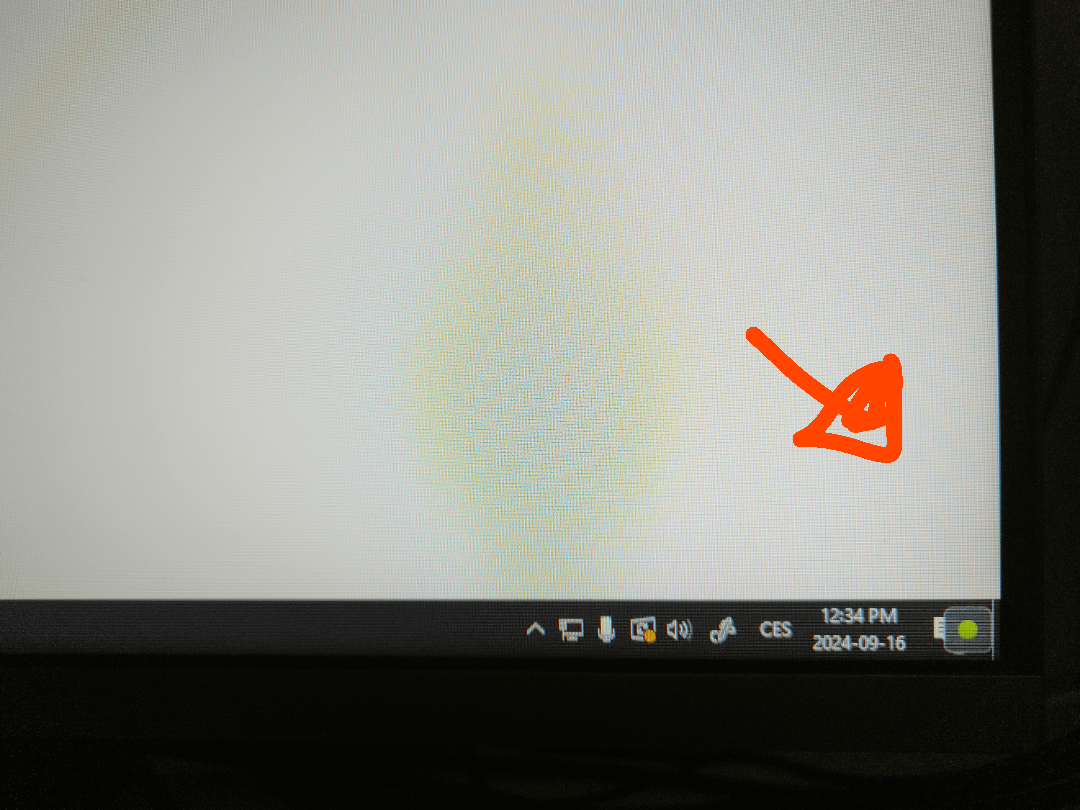
This symbol icon thingy appeared randomly and I can't do anything about it.
I tried to directly screenshot it but it doesn't appear on it, so I had to photo, I tried my best guys
It persists over all programs.

This symbol icon thingy appeared randomly and I can't do anything about it.
I tried to directly screenshot it but it doesn't appear on it, so I had to photo, I tried my best guys
It persists over all programs.
11 Comments
Is it by any chance an nvidia overlay status indicator?
Close apps in task manager until it goes away and you will know what program puts the dot there.
`alt`+`F9` to stop recording with Nvidia Share.
`alt`+`z` to open the Nvidia overlay if needed.
Yeah, that’s the overlay for the ‘Lethal company’ cheat software.
(ah I see you solved it, there is always a non-zero chance someone freaks out and deletes his whole profile if called out)
Either Nvidia share or Nvidia shadowplay
That’s your wife, that hired an IT-guy, to record your porn browsing.

You‘re rexording with shadowplay
You’re recording
I hate GeForce yet I can’t replace it
Its a geolocation application. When you use a corporate windows, can you see this icon appear and disappear in 1 seconds.