Yes you might need to repaste and remount. Or you could use this as an excuse to do an open loop water cooled build.
AngryAndCrestfallen
My xfx qick 6750xt has a 35c difference between Hotspot and gpu temp, last time I checked it was 59/93 with fans at 100% and slightly undervolted, from my research rx 6000 gpus run hot as long as it doesn’t reach 110c hotspot then it’s fine
freemanfields
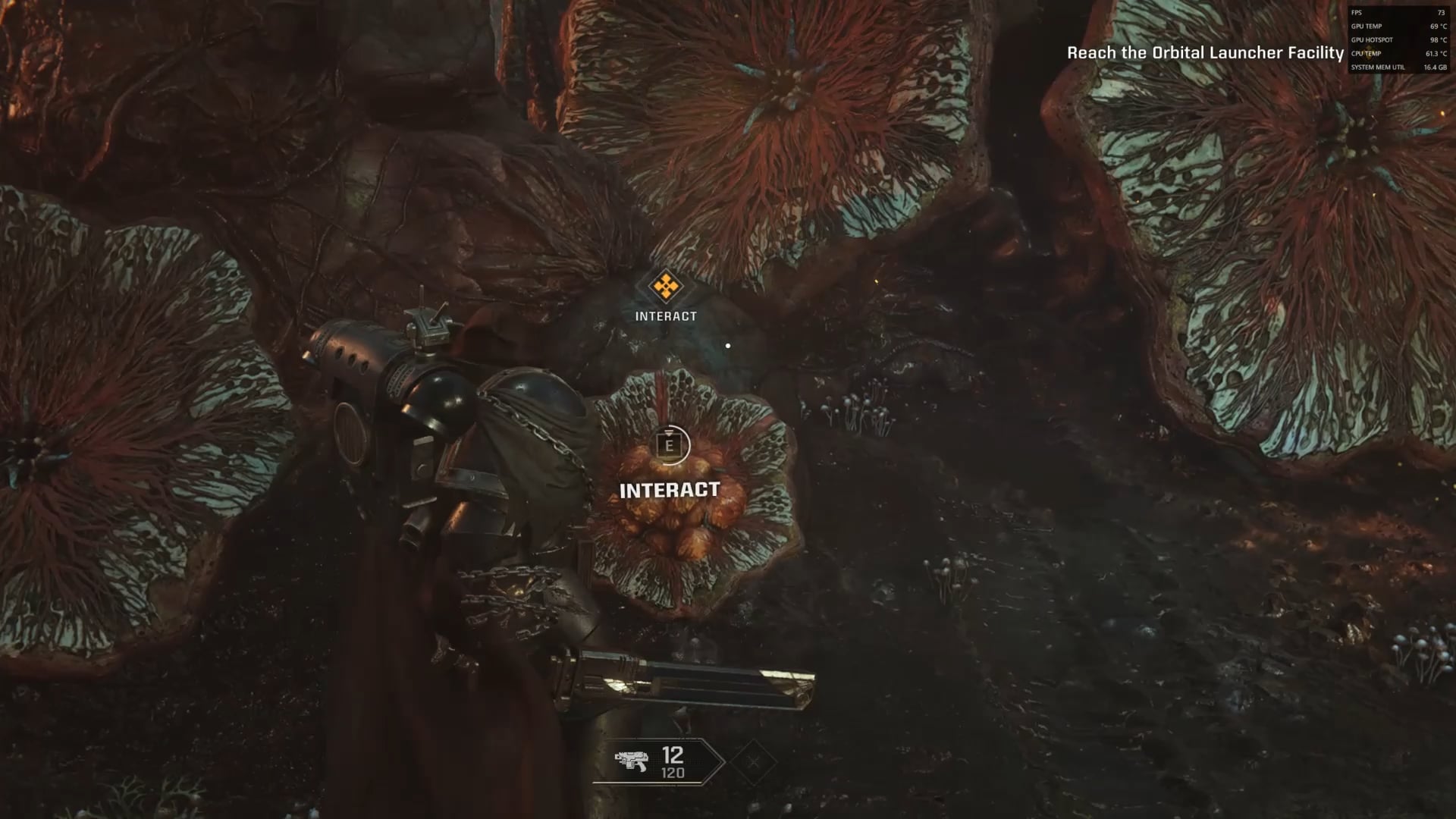
I’ve had problems with a +30 degree temperature differential on GPU Edge and Hotspot temps on two graphics cards – a 6750XT and a 6900XT. In both cases, this resulted in the Hotspot temps reaching +100C very quickly. Similarly, the problem was fixed in each case by repasting the GPU die with good paste and making sure there was full paste coverage on the whole die. Once the cards were repasted properly, the GPU Edge temps would go up a bit, but the Hotspot temps would come down, such that the differential between the two became a more regular 15-20C, and Hotspot rarely going above mid-90s, even with an Overclock applied.
Based on my, admittedly anecdotal, experience, it looks like you’re having a similar problem. I’d recommend trying to repaste your GPU die, if you feel comfortable doing so, and make sure you use a high quality paste (and enough of it) when you do. Full coverage on the GPU die is the most important thing for fixing this problem – one time when I tried to repaste one of the above GPUs there was no temp improvement because I didn’t use enough paste and, as a result, there wasn’t full coverage on the die after I put the GPU back together.
SadTurtleSoup
Couldn’t tell ya. I can’t even get past the second mission’s cutscene without it crashing my drivers.
PrintInformal785
As long as you have a fire extinguisher nearby, you can go nuts buddy !
SwagsteinMcYolo
Crank the gpu fan speed at 100%
I--Hate--Ads

Unable_Resolve7338
Raise those fan speeds man.
You can replace a fan but you cant replace a burnt chip as easily.
matrixzone5
I had a 6900xt that had a hotspot that would hit like 103-105 sometimes. I repasted with thermal grizzly and the hotspot never went above 95 ever again. I think the paste just went bad it was quite dry and thin when I cleaned it. Give it a try if your feeling brave, card is about old enough for it.
take17easy
I’m still running the stock graphite pad on an overclocked reference 6800xt at 105C hotspot. I’m like that dog in the “this is fine meme” 🤣
Hattix
A 6950XT runs hot. A hotspot above 100C is not normally a cause for concern.
Mr-Satan157
seems pretty hot
im running 14900k / 4090 on 4K and both GPU and CPU are at around 70deg with dlss max settings
maziwamimi
No. If thats a peak hotspot no. What about your average temp
AmenTensen
I begin to look for a problem if my GPU is at 80 nevermind 101 goddamn.
Soccera1
Are your fans at 100%?
Xenom0rph86
RX6900XT user here.
I totally recommend you using PTM7950 on the GPU. It really works wonders. Also spending some time finding the sweet spot for your GPU in terms of undervolting.
My RX6900XT GPU temp went down by 20ºC and hotspot by 35ºC since I bought it second hand to this day.
MrCawkinurazz
More likely you have bad airflow and maybe a weak CPU cooler, in that case, the temperature inside the case rises and everything cooks nicely, if so, invest in a good PC case with good airflow.
ElecFoxCo
I know nothing about war hammer lore although some friends of mine love them, is this game a good way to learn more about war hammer or it is more like a fan service game?
9999_lifes
100 is temperature i boil my eggs! Thats hot!
CorianderIsBad
If your GPU fans are going crazy and very noisy I guarantee the GPU paste is dry & flaky. It’s probably barely even there. It’s not cooling properly. Even with 99% utilisation it should be in the mid 70s or 80s tops. Most of the time it’s simple to unscrew the back plate and clean then reapply the paste. Check youtube for your model. Someone will have a tutorial on there. Don’t screw the backplate on tight. There’s probably springs on the screws which will do the work for you. Just screw until it stops naturally.
hitmanharding
It’s just this game. I re pad and paste cards for fun. My 4090 stress testing was fine, but this game hits hotspot at 106 in some menu’s not even in game. Before the patch my CPU was going crazy
EastLimp1693
It’s oced amd, that’s usual. Is it good? Not so. Give it more airflow of COLD air and probably some underwolt.
footnote32
I have the red devil 6950xt.
If you’re able to swap the paste with ptm7950, it will help quite a lot. You can still just increase the fan curve ever sooo slightly. I found the fan curve was too low for the GPU.
fogoticus
It’s definitely not ideal and I would repaste that GPU asap. I personally used Kryonaut Extreme both on my CPU & GPU and it’s performing really well for heat transfer and I highly recommend it. Over a year later had to detach my AIO cooler from the CPU and the thermal paste was just as liquidy as day 1 even through it went through a year of hell.
Another paste I heard of that performs really well is the kooling monster kold-01 allegedly being better than kryonaut extreme and closer to phase changing thermal pads. But I heard phase changing thermal pads have some quirks that make them less than desirable so I’d rather go for very high quality thermal paste instead.
Kind-Foundation-3066
It aint GPU anymore, its Supernova.
totally_not_a_boat
What game is this it looks good
jtblue91
It’s a waterproofing feature that boils any water that has entered your computer and evaporates it from the system.
moxzot
Hotspots should usually be within 10c of the reported gpu temp, you have an issue and need new paste asap.
saltsackshaker-cry
This comment section is full of misinformation lol actually funny. Yes that **HOTSPOT** is normal temperatures for most high-end GPUs.
masterkeaton1000
EDIT: sorry this comment isn’t related to the title
What game is this? Is it the new Warhammer space marine one?
Phoenix800478944
Repaste your gpu
wazzapgta
If you have extra money, you don’t have to be concerned.

33 Comments
Yes!
Check your GPU thermals or Cabinet AirFlow.
Check GPU thermal paste aswell.
Yes you might need to repaste and remount. Or you could use this as an excuse to do an open loop water cooled build.
My xfx qick 6750xt has a 35c difference between Hotspot and gpu temp, last time I checked it was 59/93 with fans at 100% and slightly undervolted, from my research rx 6000 gpus run hot as long as it doesn’t reach 110c hotspot then it’s fine
I’ve had problems with a +30 degree temperature differential on GPU Edge and Hotspot temps on two graphics cards – a 6750XT and a 6900XT. In both cases, this resulted in the Hotspot temps reaching +100C very quickly. Similarly, the problem was fixed in each case by repasting the GPU die with good paste and making sure there was full paste coverage on the whole die. Once the cards were repasted properly, the GPU Edge temps would go up a bit, but the Hotspot temps would come down, such that the differential between the two became a more regular 15-20C, and Hotspot rarely going above mid-90s, even with an Overclock applied.
Based on my, admittedly anecdotal, experience, it looks like you’re having a similar problem. I’d recommend trying to repaste your GPU die, if you feel comfortable doing so, and make sure you use a high quality paste (and enough of it) when you do. Full coverage on the GPU die is the most important thing for fixing this problem – one time when I tried to repaste one of the above GPUs there was no temp improvement because I didn’t use enough paste and, as a result, there wasn’t full coverage on the die after I put the GPU back together.
Couldn’t tell ya. I can’t even get past the second mission’s cutscene without it crashing my drivers.
As long as you have a fire extinguisher nearby, you can go nuts buddy !
Crank the gpu fan speed at 100%

Raise those fan speeds man.
You can replace a fan but you cant replace a burnt chip as easily.
I had a 6900xt that had a hotspot that would hit like 103-105 sometimes. I repasted with thermal grizzly and the hotspot never went above 95 ever again. I think the paste just went bad it was quite dry and thin when I cleaned it. Give it a try if your feeling brave, card is about old enough for it.
I’m still running the stock graphite pad on an overclocked reference 6800xt at 105C hotspot. I’m like that dog in the “this is fine meme” 🤣
A 6950XT runs hot. A hotspot above 100C is not normally a cause for concern.
seems pretty hot
im running 14900k / 4090 on 4K and both GPU and CPU are at around 70deg with dlss max settings
No. If thats a peak hotspot no. What about your average temp
I begin to look for a problem if my GPU is at 80 nevermind 101 goddamn.
Are your fans at 100%?
RX6900XT user here.
I totally recommend you using PTM7950 on the GPU. It really works wonders. Also spending some time finding the sweet spot for your GPU in terms of undervolting.
My RX6900XT GPU temp went down by 20ºC and hotspot by 35ºC since I bought it second hand to this day.
More likely you have bad airflow and maybe a weak CPU cooler, in that case, the temperature inside the case rises and everything cooks nicely, if so, invest in a good PC case with good airflow.
I know nothing about war hammer lore although some friends of mine love them, is this game a good way to learn more about war hammer or it is more like a fan service game?
100 is temperature i boil my eggs! Thats hot!
If your GPU fans are going crazy and very noisy I guarantee the GPU paste is dry & flaky. It’s probably barely even there. It’s not cooling properly. Even with 99% utilisation it should be in the mid 70s or 80s tops. Most of the time it’s simple to unscrew the back plate and clean then reapply the paste. Check youtube for your model. Someone will have a tutorial on there. Don’t screw the backplate on tight. There’s probably springs on the screws which will do the work for you. Just screw until it stops naturally.
It’s just this game. I re pad and paste cards for fun. My 4090 stress testing was fine, but this game hits hotspot at 106 in some menu’s not even in game. Before the patch my CPU was going crazy
It’s oced amd, that’s usual. Is it good? Not so. Give it more airflow of COLD air and probably some underwolt.
I have the red devil 6950xt.
If you’re able to swap the paste with ptm7950, it will help quite a lot. You can still just increase the fan curve ever sooo slightly. I found the fan curve was too low for the GPU.
It’s definitely not ideal and I would repaste that GPU asap. I personally used Kryonaut Extreme both on my CPU & GPU and it’s performing really well for heat transfer and I highly recommend it. Over a year later had to detach my AIO cooler from the CPU and the thermal paste was just as liquidy as day 1 even through it went through a year of hell.
Another paste I heard of that performs really well is the kooling monster kold-01 allegedly being better than kryonaut extreme and closer to phase changing thermal pads. But I heard phase changing thermal pads have some quirks that make them less than desirable so I’d rather go for very high quality thermal paste instead.
It aint GPU anymore, its Supernova.
What game is this it looks good
It’s a waterproofing feature that boils any water that has entered your computer and evaporates it from the system.
Hotspots should usually be within 10c of the reported gpu temp, you have an issue and need new paste asap.
This comment section is full of misinformation lol actually funny. Yes that **HOTSPOT** is normal temperatures for most high-end GPUs.
EDIT: sorry this comment isn’t related to the title
What game is this? Is it the new Warhammer space marine one?
Repaste your gpu
If you have extra money, you don’t have to be concerned.