
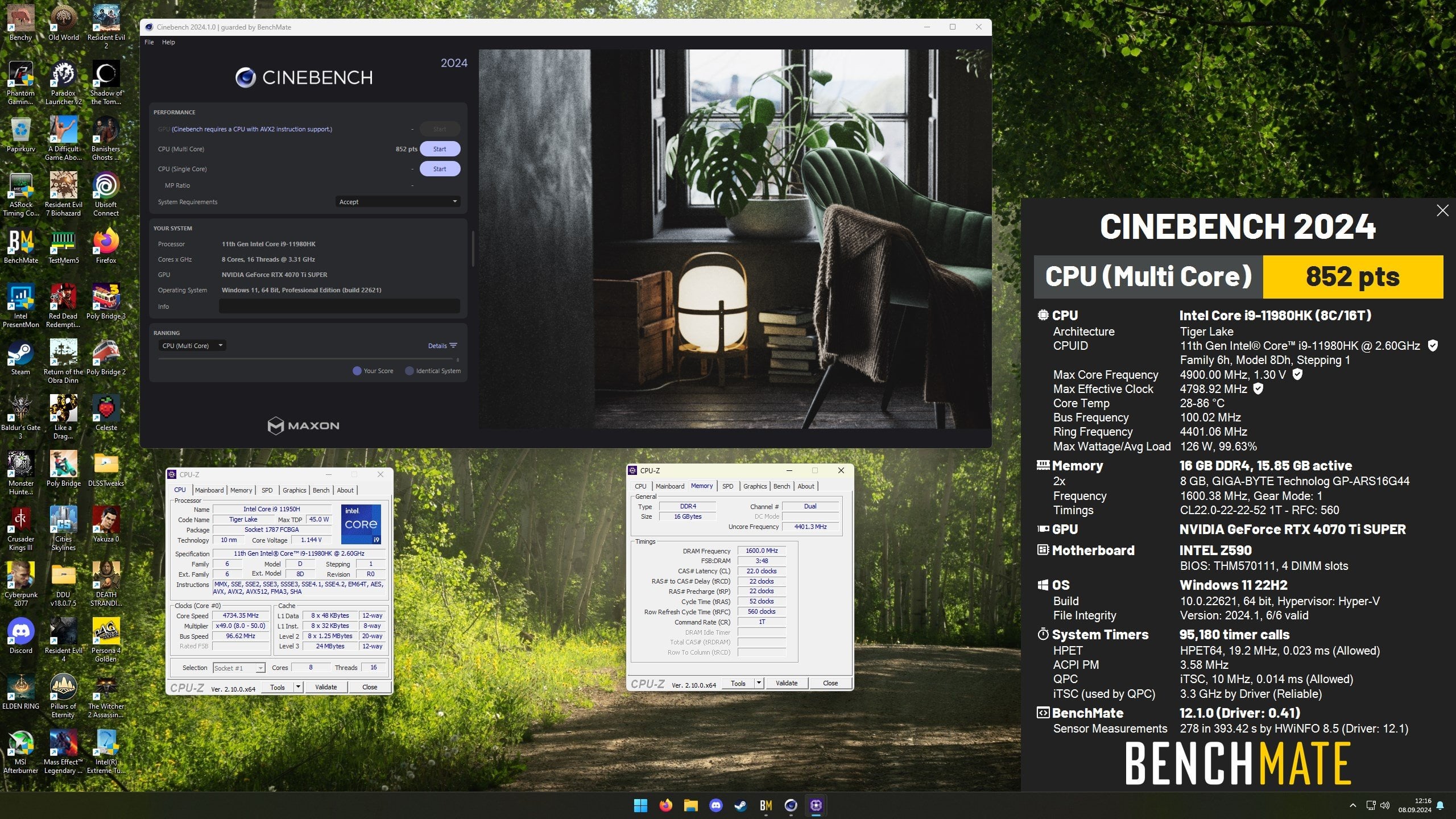
Introduction and overclocking notes
Inspired by Skatterbencher and other people testing these ERYING boards, I decided to get one myself to test and see how it actually performs, as well as get a sense on how it stacks up against Rocket Lake. At the time of writing this, I've gotten the first place on all HWBot scores for the 11980HK except for frequency and XTU scores.
To start off, this CPU gets extremely hot. Even after applying liquid metal, and then using an external radiator with a custom loop, the most power I can dissipate from the CPU is ~135W before hitting thermal limits. The positive aspect of this is that the power efficiency of this CPU is actually comparable to Zen 3, the negative aspect is that the overclocking potential is somewhat limited. The power draw when AVX512 is in use is also very high, especially in y-cruncher BBP.
As for the clock speeds, the max day-to-day overclock I could get running was 4.8 GHz all-core with a -80 mV undervolt applied for roughly 1.30V VID. This is nearly 10% slower than the 5.3 GHz I managed to my 11900K running day-to-day, which might be an indication of why Intel decided to release Rocket Lake for desktops.
The ring clock was by far the most annoying part to tune. Even though Tiger Lake moved to a dual ring-bus, which should easily be able to provide sufficient bandwidth, there are significant performance penalties if the ring clock throttles. Unfortunately, the first part to throttle on Tiger Lake is the ring, and the ring will throttle down to 3.0 GHz if any throttling has to occur. The default behavior of the ring is 4.0 GHz for single-core loads and 3.5 GHz for all-core loads, which is a good deal slower than the 4.4 GHz I was able to get working.
Memory overclocking
I also managed to do some memory overclocking. My first try was with Samsung 8Gb B-die, which is considered to be the "go-to" memory IC for DDR4. The motherboard is probably the main limitation here, as Tiger Lake officially supports 5600 MT/s with LPDDR5. Unfortunately, the most I could boot with B-die was 3466 and quite loose timings. On a hunch, I then tried 8Gb DJR, and those sticks could at least manage 3866 18-22-22-22-1T in gear 1 with a slight bump of +0.400V to the SA. The subtiming controls are quite lacking unfortunately, adjusting tREFI and tRFC seemed to work, as did tRP and tWR, but tWTR and tRRD would not change according to HWiNFO. The sticks I used are still capable of benching 5333 on LGA1700, so I know they are good for more.
Still, I could disable Power Down Mode, and force Gear 1, which likely improved performance a great deal compared to most other tests I could find. Enabling Round Trip Latency in training algorithms also seems to improve memory latency a bit.
The motherboard
The motherboard lacks some quality of life features I've gotten used to, most notably auto recovery from failed memory overclocks, user profiles, and a dedicated page to all the performance options. Whenever I went a bit too far with memory overclocking or CPU overclocking, I had to perform a clear CMOS and type in all the values. Voltage control, base clock, and max core ratios are on a different tab compared to the turbo ratios and power limits for the CPU, however ring clock is in the same tab as the voltage control. Memory overclocking is located on the system agent tab, but SA voltage is in the overclocking options. Writing down the settings which are adjusted where is definitely a good idea while tuning.
The VRM needs all the cooling you can throw at it; I ended up replacing the default thermal pads with thermal putty, and then placing a fan over the area to improve the heatsink temperatures further. Even then I had to give the heatsink time to cool down in-between y-cruncher 100B BBP runs.
Curiously, AVX512, or "AVX3" as the BIOS calls it, is disabled out of the box. People buying this motherboard/CPU combo will want to check if AVX3 is enabled if they intend to run RPCS3 or other AVX512 software.
Benchmarks
My performance comparisons are somewhat limited due to me no longer having a Zen 3 or Rocket Lake to test against, but I do have a 7800X3D to compare against to provide a contrast. All of these results are done with a "stable" setup I could comfortably run 24/7, the CPU will simply thermal throttle in power virus loads.
| Test Setup | 11980HK | 11980HK memory tuned | 7800X3D |
|---|---|---|---|
| CPU clock | 4.8 GHz all-core / 5.0 GHz dual-core | 4.8 GHz all-core / 5.0 GHz dual-core | Stock Precision Boost |
| Interconnect clock | 4.4 GHz | 4.4 GHz | 2.10 GHz |
| Memory clock | 3200 MT/s 22-22-22-52-1T JEDEC | 3866 MT/s 18-22-22-22-1T "tuned" | 6200 MT/s (Buildzoid easy subtimings) |
| GPU | 4070 Ti Super | 4070 Ti Super | 4070 Ti Super |
| CPU tests | 11980HK | 11980HK tuned | 7800X3D |
|---|---|---|---|
| Geekbench 6 Single-Core | 2317 | 2367 | 2689 |
| Geekbench 6 Multi-Core | 10747 | 12155 | 15493 |
| Cinebench 2024 Multi-Core | 852 | 906 | 1131 |
| Cinebench R23 | 16173 | 16185 | 18176 |
The Cinebench R23 result is mostly there to point out that I haven't pushed my 7800X3D in any significant fashion outside of a basic memory overclock using Buildzoid's memory timings.
| Gaming tests | 11980HK | 11980HK tuned | 7800X3D |
|---|---|---|---|
| Final Fantasy 14 Dawntrail benchmark | 24728 | 27678 | 42158 |
| Shadow Of The Tomb Raider benchmark (fps) | 174 | 204 | 271 |
| Baldur's Gate 3 patch 7 (fps / 99th percentile fps) | 78.9 / 52.7 | 92.9 / 65.0 | 134.2 / 94.1 |
Link to screenshots of the benchmarks. Baldur's Gate 3 was benchmarked while walking from Sharess' Caress to Wyrms Rock in early Act 3 using Intel Presentmon. SOTTR and FF14 Dawntrail was benched at max settings with 1280×720 resolution to minimize GPU bottlenecks, however my 4070 Ti Super is unfortunately not fast enough to prevent GPU bottlenecking in SOTTR with RT enabled.
I understand that this is a limited set of benchmarks, but I think they convey some idea of how this CPU performs. I'm fairly confident my old 11900K would have beaten the 11980HK in gaming, I know it was faster for Geekbench 3/4 and Cinebench. The lack of clock speed is certainly part of why it's not all that competitive, but in more memory-sensitive benchmarks on HWBot like SuperPI and Geekbench the 11900K actually achieved higher performance per clock. As for how it would have stacked up in the landscape of early 2021, I suspect most reviewers would have praised the power efficiency, but lamented it's lackluster performance.