
Intel Core i9-14900HX
RTX 4070
16 DDR5 5200
Windows 11
Hey, tech idiot here that finally was able to buy a gaming laptop!
I just started undervolting my new Laptop and wanted to ask, if the settings I have in throttlestop make any sense.
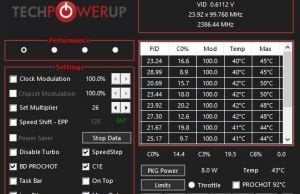
I have 4 profiles in throttlestop. The first one is my performance profile, second is my battery profile (I dont use this one, I only play connected to a power output), third is a failsafe for my CPU which my alarm is setting to when it reaches 80 degress celsius and the fourth is my failsafe for the GPU when it reaches 90 degress Celsius.
Those are my settings for the performance profile
These are the settings for my failsafe CPU
and here are the settings of my failsafe for the gpu
Intel GPU and iGPU are undervolted to -35.2 mV here
CPU Core and CPU Cache have always the same undervolting.
Razer Synapse is on turbo and fan speed on automatic
GPU
Are those settings and profiles making any sense? I used a tutorial ive read online on how to use throttlestop ( https://www.ultrabookreview.com/31385-the-throttlestop-guide/ )but somehow even browsing my cpu reaches 89 degress which is weird since I already undervolt my CPU.
Can someone help me on how to make it more efficient?
Thanks in advance 🙂
Edit: typo and forgot some informations that you might need. As I already mentioned, tech idiot here.