maybe a WAG but does your display have adaptive lighting?
Pankosmanko
Does it happen with ray tracing turned off? I’m currently playing Elden Ring and had the same thing happening with RT on
socokid
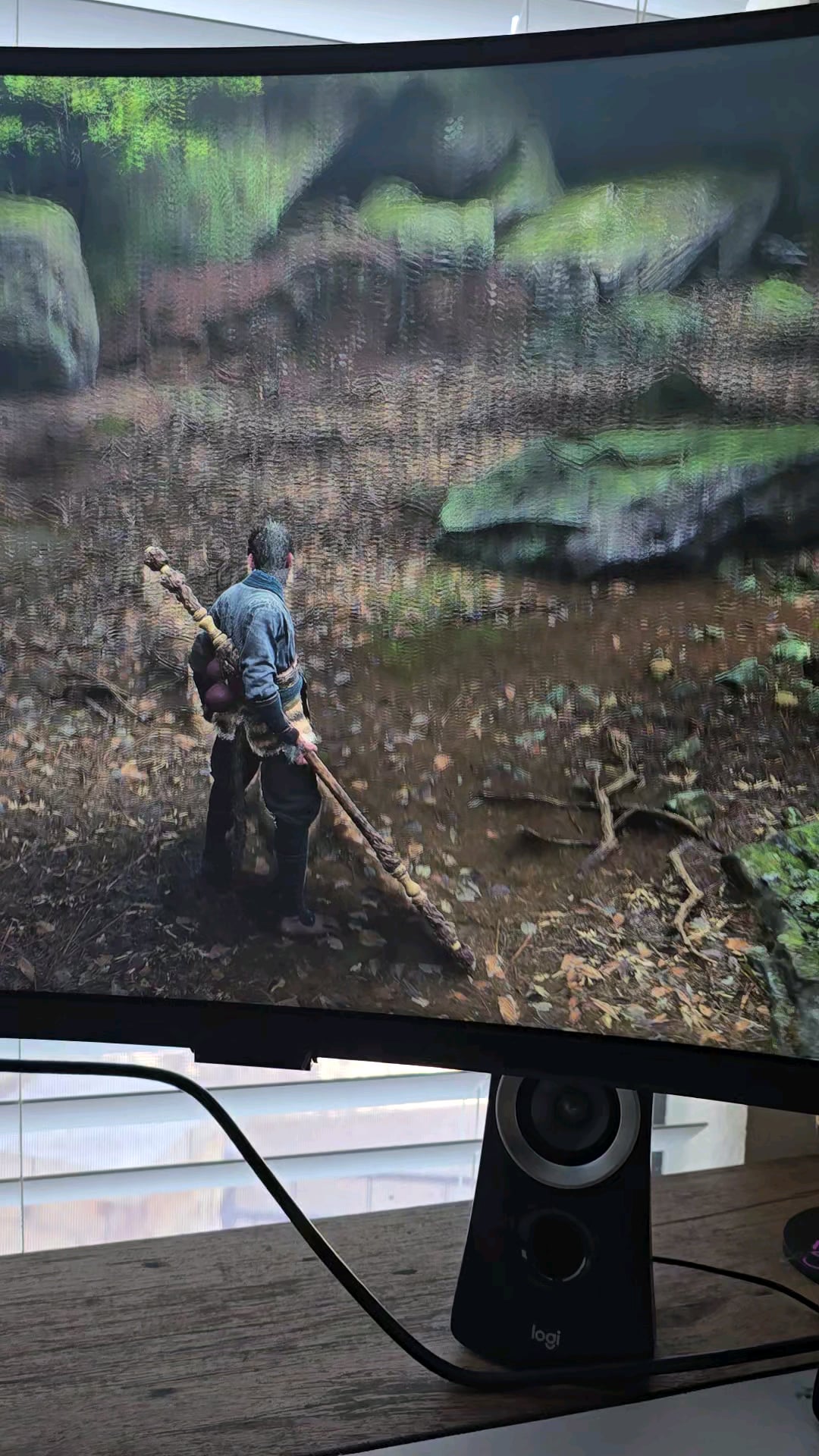
Vertical video of a horizontal screen will never look ridiculous as hell.
1. What game is this?!!
…
FFS
DiscoDav3
If Its only doing this in one game, then it’s the game. Make sure drivers are up to date. Then play around with the display settings in game. Set stuff to low quality then start ramping up, changing some settings. You’ll get there and get it sorted. It will probably be fixed in a patch, but till then …
PiztleWhipperSnapper
This is what I did. Originally, I reinstalled game, updated drivers for my RTX. Went through all settings. Keep in mind, My PC is stacked so there should be no issues. Met failure to fix. Then I decided to go into the game config save setting after uninstall after another person on a thread suggested this…and I Deleted those. Reinstalled game and it was fixed.
I also had this happen on Elden Ring.
So I did same thing and fixed. Also, make sure your running only one graphics software for games like NVIDIA etc… Sometimes those can conflict and cause random issues along with windows settings.
AWellDressedChicken
Shot in the dark here, but is it possible that you have a “Night Vision” setting on your monitor with an “AI” or “Adaptive” option?
My monitor has this, and when it’s enabled it will adjust in real time depending on whether or not the in-game scene is bright or dark. It seems yours seems to get darker when looking at a dark area, and brighter when looking at a bright area, which is the opposite effect of the night vision mode though.
DkoyOctopus
send it to gamers nexus so he can make another intel vid i guess.
relax nerds, no company owns me.
GrizzlyMofoOG
Anytime I’ve run into a similar problem it’s always been fixed by a driver update or turning off GPU software stuff like frame smoothing or upscaling (on the GPU settings not the game).
bugi_
You can complain about in a way the developers notice. It’s the game/engine.
TH3RM4L33
It looks like it’s a game bug, but just in case, there’s a monitor setting that can cause this.
kyzer-ix
this is looking like a monitor setting? need more info tho
No_Imagination_3233
If you go towards the darkness you’ll unlock a secret bonus if you go to the towards light you’ll unlock a secret bonus
MoistStub
If you have an HDR display try toggling HDR mode if that’s an option for you. HDR is a newer display tech and has unexpected issues sometimes.
3DimensionalPixel
Auto exposure bug in UE most likely
roadtrippinTryHard
not helpful at all, but those graphics look so freaking good
hotmiamiboy
My guess is that this is happening because of screen space reflections. I’m not sure Wukong has such a setting, but if yes try to change the reflections settings. Also, I think if you turn on RT this effect should disappear.
Mysteoa
What gpu and driver version?
eragon03
I had something similar in calisto and re4 at day 1 and was just an fsr bug that was fixed later.
BMWtooner
If you’re using hdr, try turning it off. As much as I love hdr, in games and on pc it kinda ruins things. If not that, I dunno.

23 Comments
Lumen fuck up, I guess it’s just an engine bug
Looks like an auto exposure bug in Unreal
maybe a WAG but does your display have adaptive lighting?
Does it happen with ray tracing turned off? I’m currently playing Elden Ring and had the same thing happening with RT on
Vertical video of a horizontal screen will never look ridiculous as hell.
1. What game is this?!!
…
FFS
If Its only doing this in one game, then it’s the game. Make sure drivers are up to date. Then play around with the display settings in game. Set stuff to low quality then start ramping up, changing some settings. You’ll get there and get it sorted. It will probably be fixed in a patch, but till then …
This is what I did. Originally, I reinstalled game, updated drivers for my RTX. Went through all settings. Keep in mind, My PC is stacked so there should be no issues. Met failure to fix. Then I decided to go into the game config save setting after uninstall after another person on a thread suggested this…and I Deleted those. Reinstalled game and it was fixed.
I also had this happen on Elden Ring.
So I did same thing and fixed. Also, make sure your running only one graphics software for games like NVIDIA etc… Sometimes those can conflict and cause random issues along with windows settings.
Shot in the dark here, but is it possible that you have a “Night Vision” setting on your monitor with an “AI” or “Adaptive” option?
My monitor has this, and when it’s enabled it will adjust in real time depending on whether or not the in-game scene is bright or dark. It seems yours seems to get darker when looking at a dark area, and brighter when looking at a bright area, which is the opposite effect of the night vision mode though.
send it to gamers nexus so he can make another intel vid i guess.
relax nerds, no company owns me.
Anytime I’ve run into a similar problem it’s always been fixed by a driver update or turning off GPU software stuff like frame smoothing or upscaling (on the GPU settings not the game).
You can complain about in a way the developers notice. It’s the game/engine.
It looks like it’s a game bug, but just in case, there’s a monitor setting that can cause this.
this is looking like a monitor setting? need more info tho
If you go towards the darkness you’ll unlock a secret bonus if you go to the towards light you’ll unlock a secret bonus
If you have an HDR display try toggling HDR mode if that’s an option for you. HDR is a newer display tech and has unexpected issues sometimes.
Auto exposure bug in UE most likely
not helpful at all, but those graphics look so freaking good
My guess is that this is happening because of screen space reflections. I’m not sure Wukong has such a setting, but if yes try to change the reflections settings. Also, I think if you turn on RT this effect should disappear.
What gpu and driver version?
I had something similar in calisto and re4 at day 1 and was just an fsr bug that was fixed later.
If you’re using hdr, try turning it off. As much as I love hdr, in games and on pc it kinda ruins things. If not that, I dunno.
Adaptive contrast or backlight.
Bad hdr implementation