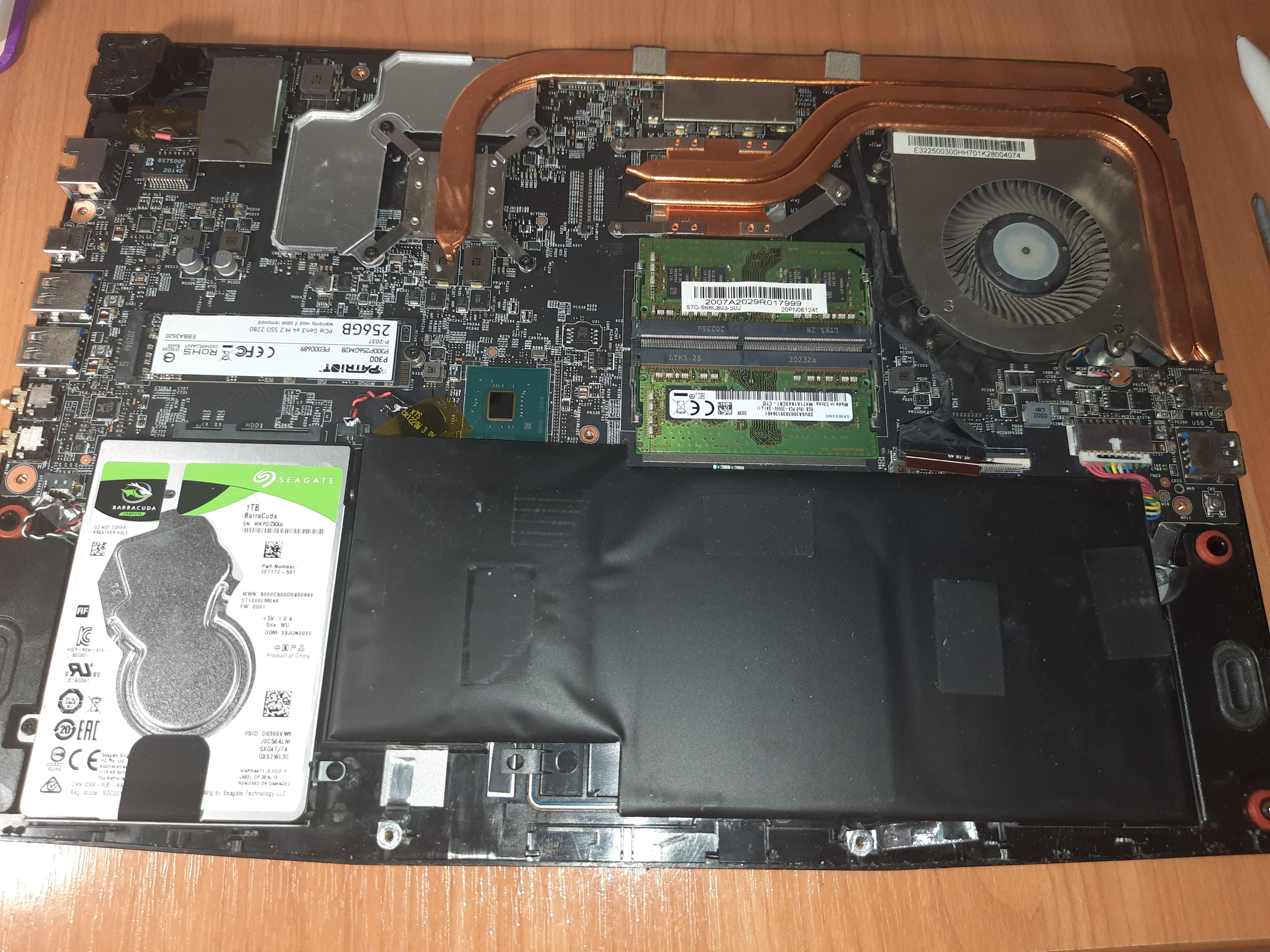
The bigger issue you have is this swelling battery cell. You need to replace it ASAP.
apachelives
Actual workshop here. Unless its proven bad or your changing a CPU/motherboard/HSF leave the thermal paste alone. The more you muck with it the more chances you will damage something. We have units 10+ years old original thermal paste no issues.
Changing thermal paste is the 2024 edition of snake oil. Makes people feel better for whatever reason, in reality its the dust removed at the same time that makes the real difference.
HunterRenegade09
Your laptop is going to demand child support soon.
cszolee79
With Arctic MX-4 paste I do it every 6-8 years.
With MX-6, not sure yet, probably the same.
NotJustBibbit
Why is the laptop pregnant? Replace the battery
PorkyPig_7
I switched to honeywell ptm7950 so I don’t have to repaste the laptop never again, and also benefit from a temperature drop under load.
Martin_NL
r/spicypillows
Local-moss-eater
You dont need more paste right now, the battery is already pregnant (replace that battery now)
Last_Music413
Run furmark and check the temps, if they go above 83 degrees then replace them
blazingwine
Changing the thermal paste doesn’t make much sense unless you’re having issues with temperature even after thoroughly and carefully cleaning the fans and vents.
Also, you’re going to need a new battery because your current battery has had a little too much of the mexican food and will let out a hell of a spicy diarrhea if punctured.
Also, if you check in your BIOS/UEFI, I’m 90% sure there will be a setting that’ll allow you to set a charging range. So, for example, if you set 50 and 80 as the limits, the battery will charge only when it is below 50 and stop when it is at 80 percent. This might be able to extend your battery life, and you can keep the charger plugged in. After charging to 80, your laptop will take power from the wall without putting a load on your battery.
My 6 year old Dell has this, so yours most likely should too
AshesTheCrow
Change the battery it’s very dangerous
Tough-Collection5998
My brother in Christ please change that battery. You have a fire hazard bro.
Onion_Cutter_ninja
– Change battery asap, thats a fire hazard.
– Change hard drive to a SSD one, your laptop will feel like a new one
shredmasterJ
U change thermal paste when u start noticing temp issues. If ur not having temps issues no need to reapply
Xcissors280
r/spicypillows
Predomorph111
Your battery is at risk of exploding, causing a lithium fire. Do focus on this fact cause inflated batteries are incredibly dangerous
R34PER_D7BE
are you sure that having ready to explode lithium battery is not an issue?
peter_the_bread_man
Throw that battery out at a battery disposal store or site, those things will burn so aggressively….literally a bomb in your house dude….
SpaceSolid8571
You do not change thermal paste like you do oil in your car. You go by your temperatures. If they are increasing for no explainable reason and not “just starting”, but have been for a while, that is when you start investigating and thinking about the paste being the cause.
therealRustyZA
Better replace that spicy pillow before anything.
Klutzy-Cycle8681
Brother get rid of that thing before someone gets hurt
DetectiveVinc
To actually answer the original question: Typically only once, since the stock paste is often dogshit. Use any half decent thermalpaste and you wont have to do it again.
ForThePantz
Do not mess with paste unless you’ve cleaned it out already and you have verified thermal issues. Second, everyone already screamed spicy pillow. Jayzuz. Throw in a 500GB NVMe and lose the spinning platter. Replace that HDD with a SATA drive for almost nothing. You can get a nice 3.5 to 2.5 adapter that will slip right in there. I’m not going to look at the RAM and I’ll just assume you’re rocking 16GB.
likeonions
When you notice an issue. 3 years is very soon.
Endle55torture
That pillow battery is a potential house fire. Then worry about cleaning the fans and possibly the thermal paste.
PowerPie5000
Spicy pillow alert! Get that battery changed as soon as you can.
JaValin0
Change the batt asap
Goldwyn1995
Based on paste. If paste is good, 3 years once.
razingstorm
That battery gotta go.
You change thermal paste when you have thermal issues. No issues? No need.
absurd_nerd_repair
Never unless core temps can’t be explained otherwise.
msanangelo
I never do unless heat becomes a issue or I’m replacing the cpu. it’s not that important imo. some of my computers have factory paste and are nearing a decade old. lol
Jackedman123
That left battery cell tho.
lievresauteur
You really don’t have to. Many computers can run for decades without you having to play inside
Write_A
It depends on how dusty it is at home and whether the laptop starts to overheat. Personally, I clean my Victus (a piece of crap) every 4-5 months
papaDaddy0108
Here i am with my 10 y/o laptop who never experienced repasting
xTeamRwbyx
That battery about to go boom
DenseUpstairs8916
Bro why is battery huge?
r/spicypillows
Destroyermaqa
Bro your batter has a baby. Take actions before it’s too late
lunat1c_
Never change your thermal paste. Be man! Complain about lower performance and high temps!
FlimsyPlankton1710
Never
pastepropblems
Forget the thermal paste, that battery belongs on r/spicypillows

41 Comments
The bigger issue you have is this swelling battery cell. You need to replace it ASAP.
Actual workshop here. Unless its proven bad or your changing a CPU/motherboard/HSF leave the thermal paste alone. The more you muck with it the more chances you will damage something. We have units 10+ years old original thermal paste no issues.
Changing thermal paste is the 2024 edition of snake oil. Makes people feel better for whatever reason, in reality its the dust removed at the same time that makes the real difference.
Your laptop is going to demand child support soon.
With Arctic MX-4 paste I do it every 6-8 years.
With MX-6, not sure yet, probably the same.
Why is the laptop pregnant? Replace the battery
I switched to honeywell ptm7950 so I don’t have to repaste the laptop never again, and also benefit from a temperature drop under load.
r/spicypillows
You dont need more paste right now, the battery is already pregnant (replace that battery now)
Run furmark and check the temps, if they go above 83 degrees then replace them
Changing the thermal paste doesn’t make much sense unless you’re having issues with temperature even after thoroughly and carefully cleaning the fans and vents.
Also, you’re going to need a new battery because your current battery has had a little too much of the mexican food and will let out a hell of a spicy diarrhea if punctured.
Also, if you check in your BIOS/UEFI, I’m 90% sure there will be a setting that’ll allow you to set a charging range. So, for example, if you set 50 and 80 as the limits, the battery will charge only when it is below 50 and stop when it is at 80 percent. This might be able to extend your battery life, and you can keep the charger plugged in. After charging to 80, your laptop will take power from the wall without putting a load on your battery.
My 6 year old Dell has this, so yours most likely should too
Change the battery it’s very dangerous
My brother in Christ please change that battery. You have a fire hazard bro.
– Change battery asap, thats a fire hazard.
– Change hard drive to a SSD one, your laptop will feel like a new one
U change thermal paste when u start noticing temp issues. If ur not having temps issues no need to reapply
r/spicypillows
Your battery is at risk of exploding, causing a lithium fire. Do focus on this fact cause inflated batteries are incredibly dangerous
are you sure that having ready to explode lithium battery is not an issue?
Throw that battery out at a battery disposal store or site, those things will burn so aggressively….literally a bomb in your house dude….
You do not change thermal paste like you do oil in your car. You go by your temperatures. If they are increasing for no explainable reason and not “just starting”, but have been for a while, that is when you start investigating and thinking about the paste being the cause.
Better replace that spicy pillow before anything.
Brother get rid of that thing before someone gets hurt
To actually answer the original question: Typically only once, since the stock paste is often dogshit. Use any half decent thermalpaste and you wont have to do it again.
Do not mess with paste unless you’ve cleaned it out already and you have verified thermal issues. Second, everyone already screamed spicy pillow. Jayzuz. Throw in a 500GB NVMe and lose the spinning platter. Replace that HDD with a SATA drive for almost nothing. You can get a nice 3.5 to 2.5 adapter that will slip right in there. I’m not going to look at the RAM and I’ll just assume you’re rocking 16GB.
When you notice an issue. 3 years is very soon.
That pillow battery is a potential house fire. Then worry about cleaning the fans and possibly the thermal paste.
Spicy pillow alert! Get that battery changed as soon as you can.
Change the batt asap
Based on paste. If paste is good, 3 years once.
That battery gotta go.
You change thermal paste when you have thermal issues. No issues? No need.
Never unless core temps can’t be explained otherwise.
I never do unless heat becomes a issue or I’m replacing the cpu. it’s not that important imo. some of my computers have factory paste and are nearing a decade old. lol
That left battery cell tho.
You really don’t have to. Many computers can run for decades without you having to play inside
It depends on how dusty it is at home and whether the laptop starts to overheat. Personally, I clean my Victus (a piece of crap) every 4-5 months
Here i am with my 10 y/o laptop who never experienced repasting
That battery about to go boom
Bro why is battery huge?
r/spicypillows
Bro your batter has a baby. Take actions before it’s too late
Never change your thermal paste. Be man! Complain about lower performance and high temps!
Never
Forget the thermal paste, that battery belongs on r/spicypillows