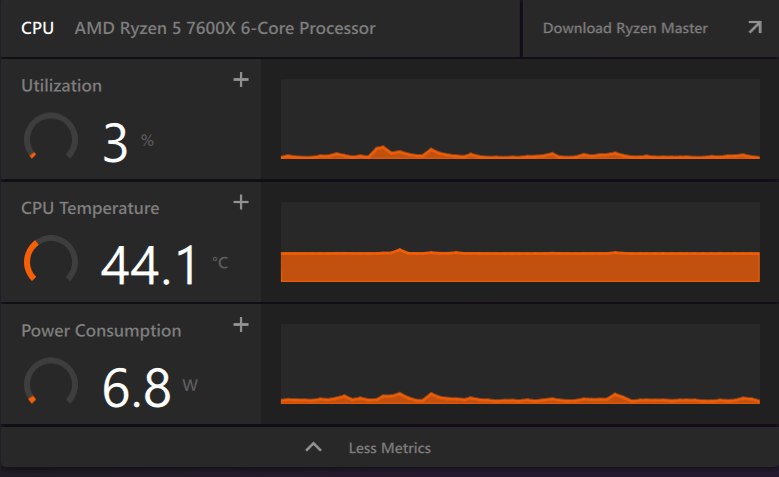
could be, your cpu is in idle (only 3% utilization) which is set to consume as low power as possible. you need to run a game or a benchmark test to see the power consumption under load.
GLynx
That only measure the CPU package power at idle.
deefop
It’s idling, cpus don’t use much power when they’re idling.
__ToneBone__
You’re idling, buddy. It’s a power saving measure. You wouldn’t want your CPU consuming so much power all the time
ItsMeMora
Unless you set it to high performance energy mode, balanced reduces your power draw when idling.
DerpMaster2
That is expected behavior for idle. Even my i9-10900K is currently only consuming about 13W at 3% utilization, and it’s running 2 Minecraft servers at once at the moment.
My i9 is very inefficient at high load, though, so once I launch an intensive game/application, power will skyrocket to 180-250W.
Gytole
Must have only used intel until now.
Wattage alone was my decision to go from the 8700 non K Variant to the 7950x3D and i’m glad I did, it runs less wattage than THAT thing ⚰️⚰️
erdna1986
Compared to what I see online this is isanely low. Average idle i’m seeing is 20 watts. Don’t know how to explain this low of a number, maybe you have the power saver profile enabled or some over power saving feature?
PAcMAcDO99
It’s definitely wrong
Amd cpus idle much higher than that
Triple of this pic at minimum
My 5700x3d idles at around 25-30w and the 7600x should roughly be there as well
lLoveTech
I think it shows only the CPU core power draw and not the complete package power draw which includes the soc. The soc itself draws much more power than that. The same software reports that my CPU draws only 15W while gaming so it’s certainly not taking into account the power drawn by other components in the package
Omletgod
amd adrenaline overlay does not show the full cpu package power, it only shows some or one of the cores power or something weird like that, if you use hwinfo, and check the cpu ppt, it will be much higher most likely, and that is your actual idle power
Adventurous_Fly6310
At 3% utilization yes lol
UncleRuckus_thewhite
Not rly . . . Use HWinfo turn on sensor’s and look at cpu package power .

15 Comments
[deleted]
could be, your cpu is in idle (only 3% utilization) which is set to consume as low power as possible. you need to run a game or a benchmark test to see the power consumption under load.
That only measure the CPU package power at idle.
It’s idling, cpus don’t use much power when they’re idling.
You’re idling, buddy. It’s a power saving measure. You wouldn’t want your CPU consuming so much power all the time
Unless you set it to high performance energy mode, balanced reduces your power draw when idling.
That is expected behavior for idle. Even my i9-10900K is currently only consuming about 13W at 3% utilization, and it’s running 2 Minecraft servers at once at the moment.
My i9 is very inefficient at high load, though, so once I launch an intensive game/application, power will skyrocket to 180-250W.
Must have only used intel until now.
Wattage alone was my decision to go from the 8700 non K Variant to the 7950x3D and i’m glad I did, it runs less wattage than THAT thing ⚰️⚰️
Compared to what I see online this is isanely low. Average idle i’m seeing is 20 watts. Don’t know how to explain this low of a number, maybe you have the power saver profile enabled or some over power saving feature?
It’s definitely wrong
Amd cpus idle much higher than that
Triple of this pic at minimum
My 5700x3d idles at around 25-30w and the 7600x should roughly be there as well
I think it shows only the CPU core power draw and not the complete package power draw which includes the soc. The soc itself draws much more power than that. The same software reports that my CPU draws only 15W while gaming so it’s certainly not taking into account the power drawn by other components in the package
amd adrenaline overlay does not show the full cpu package power, it only shows some or one of the cores power or something weird like that, if you use hwinfo, and check the cpu ppt, it will be much higher most likely, and that is your actual idle power
At 3% utilization yes lol
Not rly . . . Use HWinfo turn on sensor’s and look at cpu package power .
Are you real?