
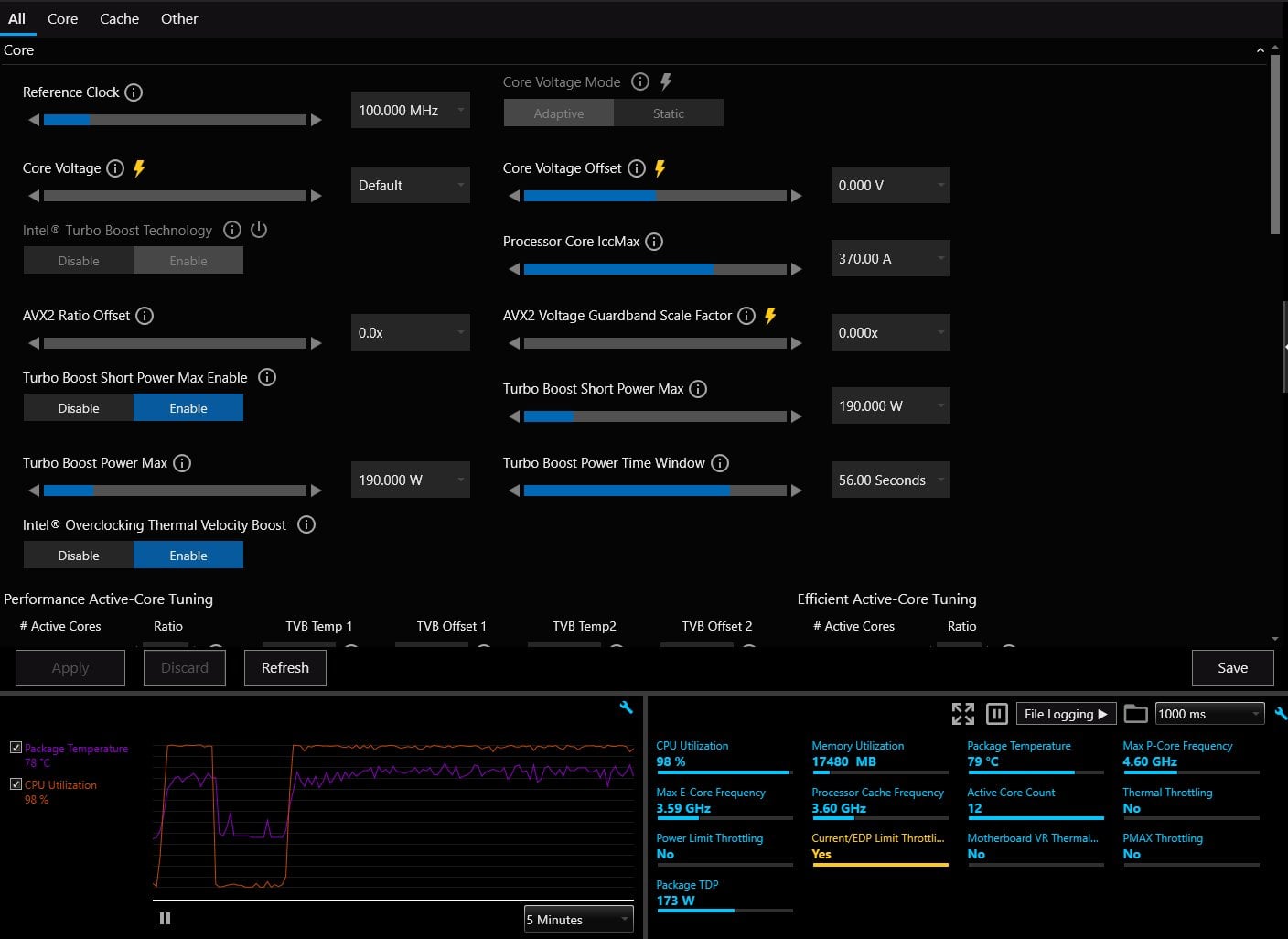
Hello everyone! Im not sure if this is the right place to post this, but I'm completely stumped…
I have not overclocked my CPU at all, but I saw a Jaystwocents short video that showed how Asus MBs auto AI overclocking is way over tuning your CPU, so I decided to take a look to make sure my CPU lasts a good long while..
Anyways, I had an outdated bios, so I updated the firmware and then I saw that Asus AI OC setting that ups the voltage limit to insane levels was ticked on, so I turned it off and changed to intel stock settings.
After doing so I did not notice any difference in performance, was getting the same FPS in the games I play and all that, but I found out about XTU and decided to download that and just check some more things. I ran the XTU stress test and everything passed with no errors or throttling, then I decided to check out Cinebench.
The second Cinebench launches XTU shows "Current/EDP Limit Throttling" for at least 50% of the time cinebench is running.
I did a little googling and people say to up the Turbo boost Power Max and Turbo boost short Power max – I upped these little by little until it was set to unlimited.. Nothing changed, still throttling. I played with Core voltage, IccMax, Core voltage offset and it seems no matter what I change nothing is different and I still get the Current/EDP Limit Throttling.
I also tried a few games and I get the same "Current/EDP Limit Throttling" when playing games..
Temps are all good.. I think haha, they do go up to 85c for like a second, but then they drop back down and fluctuate while running cinebench. While playing games, my temps very rarely get as high as they do during cinebench though.
This is driving my insane! but my question is, is this an issue that I can ignore, or should I keep trying to fix it and if this how should I go about that? I dont really know anything about overclocking or adjusting CPU settings, that said everything I changed while trying to get the throttling to go away I changed back to stock intel settings.
XTU Settings and throttle pic +HWMonitor + Cinebench score:
My PC Specs (I know, my GPU is bottlenecked by my CPU, will upgrade in the future, just got the 4090 for a super good deal and couldn't pass it up lol):
CPU: 12700k
MB: ASUS ROG Strix Z690-A Gaming WiFi D4
Cooler: Noctua NH-D15
Ram: CORSAIR Vengeance LPX 128GB DDR4 3600 – XMP is enabled
GPU: GIGABYTE Gaming GeForce RTX 4090 Gaming OC
PSU: MSI MPG A1000G PCIE 5 & ATX 3.0 Gaming Power Supply
Storage: Samsung 970 Evo Plus 2TB x2
Case: NZXT H7 Flow
Case Fans: 5 Noctua 140mm case fans(Front + Top) / 1 120mm exhaust fan(rear)
Monitor(dont know if this matters, but since its so big and high resolution, I figured i'd include it here): Samsung Odyssey G9 49inch
Let me know if I missed any information needed to help me out, I think I got everyhting.. And thank you to everyone in advance for any help. I greatly appreciate it!
1 Comment
AFAIK, ring limit reason will light up when at least one e-core is active and the ring is limited to max 36x. * or generally when it is at ratio limit with downbin enabled.
IccMax for the 12700K is actually 240A, fwiw. Asus seems to set 370 with MCE disabled, but that is what it is. If you are IccMax throttled you will notice because the core clocks will drop. I don’t have CB24, but in CB23 mine can run default all-core clocks at quite a bit lower than 240 set in bios.