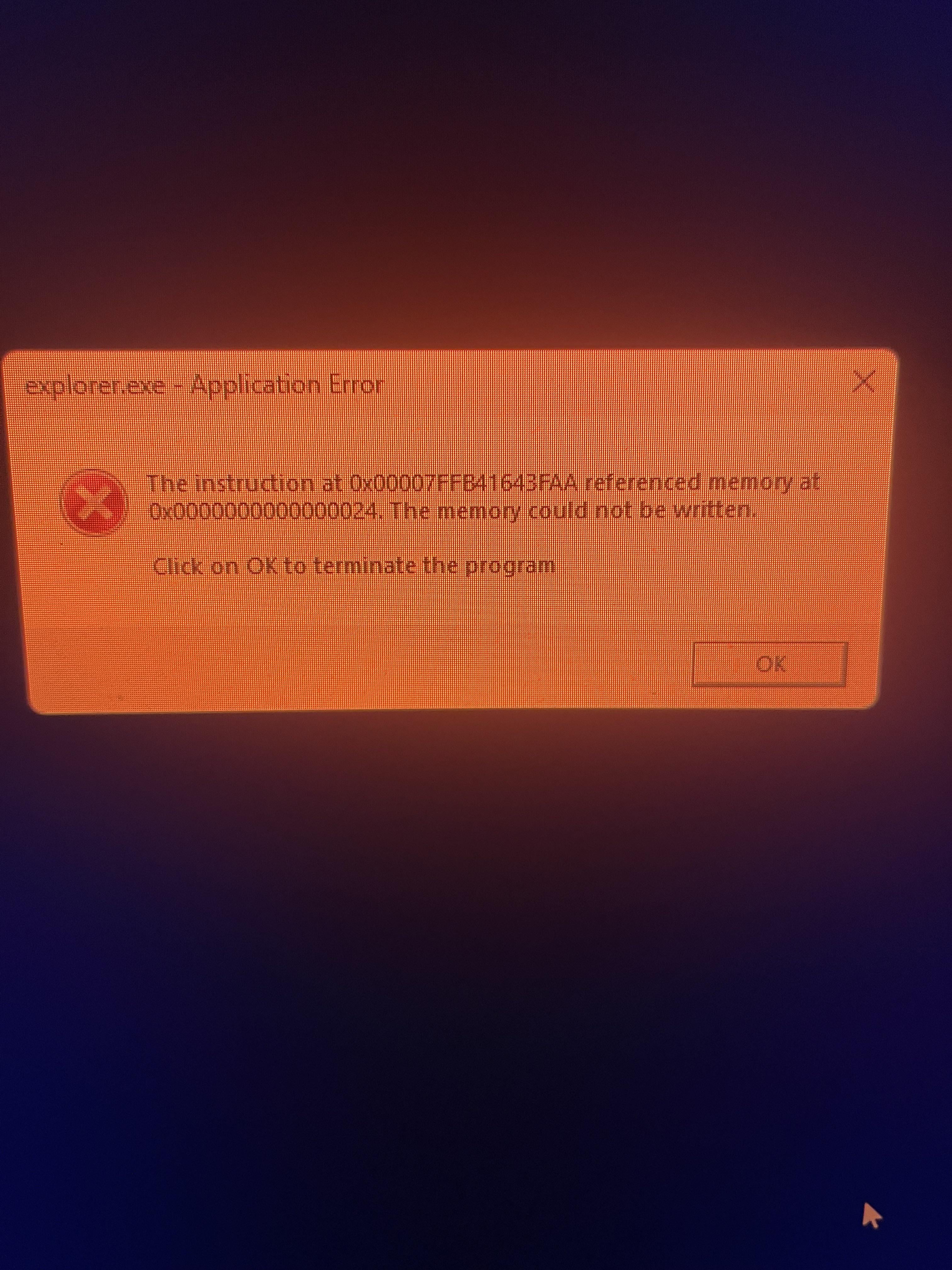
It’s probably not bad. I’ve seen this same error with various different codes on a few systems and it has usually just been some program that didn’t like being forced to close at shut down.
Try closing everything including background programs you have running in the system tray before you shut down, then see if it still happens when shutting down. That could help narrow down is causing that.
DivingRacoon
I’ve also been seeing it and it’s in reference to the Signal app on PC (for me).
So far nothing has happened.
fthisappreddit
Reddits crying about me posting a link just google the second error code and there should be a Reddit discussion on it just a heads up I’ll see if I can message the link to you also.
Edit: sent it hope it helps fix the issue
Spazzticus
Do you use a controller by chance? There’s an issue with Windows and controller support that triggers this but its nothing to worry about, just annoying.
rock_crockus
Off topic, but why is your screen so red?
FewConnection331
Win+R type services.msc
Then find GameInput, disable it.It won’t have any negative effect and you’re no longer gonna get that error
SiliconMadness
This annoyed me too. You can stop the behavior and forever use your comp while leaving your controller plugged in while seeing no error upon shutdown.
Here’s How:
* From your desktop press the `Windows key + R` to open the Run dialog box
* In there type `services.msc` and hit the Enter key
* Now, scroll through the list until you see `GameInput Service` right click on it, select `Properties` Toward the bottom click on `Stop` and in the same window, look above that and you’ll see a dropdown selection, labeled `Startup Type` on that select `Disabled.`
Reboot your rig, and you should be good to go (if the error comes up on the first reboot, don’t fret… just reboot it again).
I think `GameInput Service` may stop some Xbox stuff or something random like that, but I never use that stuff. I use my wired controller extensively and never had any nasty side effects, even after many months.
BobDaBilda
I’ve had this as well, didn’t know the controller thing, but I’ve noticed a different (possibly completely coincidental) reason I thought it happened: This only happens to me on Windows installs where I’ve installed Origin / EA App at some point since I formatted / reinstalled Windows. But the controller thing makes more sense.
storft2
Yuup, my lovely 360 wired controller makes me go wild too
BetweenThePosts
I have this issue whenever I close pdf’s on my work laptop
Queuetie42
Just deployed fresh win 11 and ran into this last night. It’s been an outstanding issue for years…
Disabled the service and now when I boot my xbox controller I get a quick popup about installing gamebar (local account, not using it).
Oh well… at least I have RTX HDR for games now. 🤷♂️
PhobosAE
Ohhh. So this is what i was getting (and why). Few weeks ago i had finished building my new pc, and actually had put a xbox controller on it to test out the usb ports. But because I rarely use a controller and it was always just sitting there I didn’t thought about it.
Could never get a look at the error because it came and went so fast that i just could never SS it.
Though about it yesterday “man never got that error again”. It had been a few weeks since i took the controller out.
What a strange but good coincidence. Now i know. Thanks my guys.
Disastrous_Pay7158
This is usually windows explorer not working in task manager for me.
Dr-False
Oh hey, I was putting up with that for weeks on a new rig and thought something was wrong. Turns out, my Xbox controller kept triggering this for some reason. When unplugged, no box
Laddertoheaven
Disable the gameinput service.
PM_ME_UR_MESSY_BUNS
I keep getting this but for discord.
IamrhightierthanU
I have this too. I tried to solve it with what the internet is providing on sources. Spoiler. It didn’t work.
But there are things like, task bar automatic closing can cause this and problems with your ram. So a wide degree of bad luck.
Are you on 10 or 11?
Ambitious_Silver6964
Just delete everything you can from your system32 folder. Should fix you right up.

18 Comments
It’s probably not bad. I’ve seen this same error with various different codes on a few systems and it has usually just been some program that didn’t like being forced to close at shut down.
Try closing everything including background programs you have running in the system tray before you shut down, then see if it still happens when shutting down. That could help narrow down is causing that.
I’ve also been seeing it and it’s in reference to the Signal app on PC (for me).
So far nothing has happened.
Reddits crying about me posting a link just google the second error code and there should be a Reddit discussion on it just a heads up I’ll see if I can message the link to you also.
Edit: sent it hope it helps fix the issue
Do you use a controller by chance? There’s an issue with Windows and controller support that triggers this but its nothing to worry about, just annoying.
Off topic, but why is your screen so red?
Win+R type services.msc
Then find GameInput, disable it.It won’t have any negative effect and you’re no longer gonna get that error
This annoyed me too. You can stop the behavior and forever use your comp while leaving your controller plugged in while seeing no error upon shutdown.
Here’s How:
* From your desktop press the `Windows key + R` to open the Run dialog box
* In there type `services.msc` and hit the Enter key
* Now, scroll through the list until you see `GameInput Service` right click on it, select `Properties` Toward the bottom click on `Stop` and in the same window, look above that and you’ll see a dropdown selection, labeled `Startup Type` on that select `Disabled.`
Reboot your rig, and you should be good to go (if the error comes up on the first reboot, don’t fret… just reboot it again).
I think `GameInput Service` may stop some Xbox stuff or something random like that, but I never use that stuff. I use my wired controller extensively and never had any nasty side effects, even after many months.
I’ve had this as well, didn’t know the controller thing, but I’ve noticed a different (possibly completely coincidental) reason I thought it happened: This only happens to me on Windows installs where I’ve installed Origin / EA App at some point since I formatted / reinstalled Windows. But the controller thing makes more sense.
Yuup, my lovely 360 wired controller makes me go wild too
I have this issue whenever I close pdf’s on my work laptop
Just deployed fresh win 11 and ran into this last night. It’s been an outstanding issue for years…
Disabled the service and now when I boot my xbox controller I get a quick popup about installing gamebar (local account, not using it).
Oh well… at least I have RTX HDR for games now. 🤷♂️
Ohhh. So this is what i was getting (and why). Few weeks ago i had finished building my new pc, and actually had put a xbox controller on it to test out the usb ports. But because I rarely use a controller and it was always just sitting there I didn’t thought about it.
Could never get a look at the error because it came and went so fast that i just could never SS it.
Though about it yesterday “man never got that error again”. It had been a few weeks since i took the controller out.
What a strange but good coincidence. Now i know. Thanks my guys.
This is usually windows explorer not working in task manager for me.
Oh hey, I was putting up with that for weeks on a new rig and thought something was wrong. Turns out, my Xbox controller kept triggering this for some reason. When unplugged, no box
Disable the gameinput service.
I keep getting this but for discord.
I have this too. I tried to solve it with what the internet is providing on sources. Spoiler. It didn’t work.
But there are things like, task bar automatic closing can cause this and problems with your ram. So a wide degree of bad luck.
Are you on 10 or 11?
Just delete everything you can from your system32 folder. Should fix you right up.