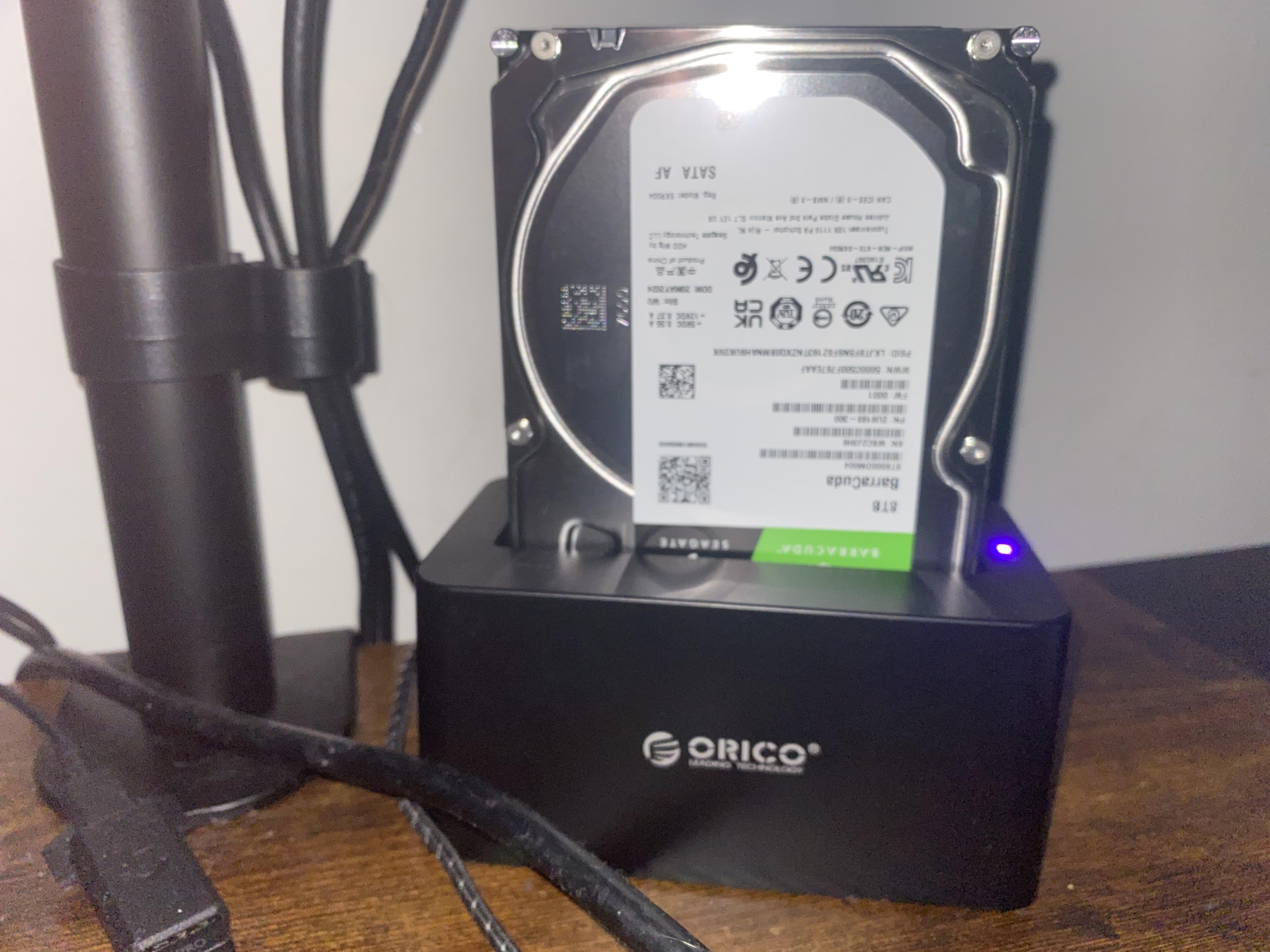
Instead of spending $200aud a year on 2tb digital storage’s I spend $200on a external hard deck with 8tb hard drive. Was this stupid and are they any down sides?

Instead of spending $200aud a year on 2tb digital storage’s I spend $200on a external hard deck with 8tb hard drive. Was this stupid and are they any down sides?
25 Comments
Probably has some pretty slow read and write times, but it’ll still be faster than uploading and downloading to “the cloud”
the only downside is that if that hard drive is physically destroyed you are screwed compared to the cloud
Bit more exposed in such a setup, and likely also a single point of failure vs. digital storage that tends to have some solid backup policies in place.
The major risk of an on-site backup is the loss of the site.
For important memories and such i still prefer cloud (i pay 100$ a year for 2TB), safer in case of hw malfunction/house fire/theft etc. I still have an old I5 6600k PC/16G RAM/GTX 1060 used as a NAS/Media server (4 x 6TB) for my Jellyfin server, flac music collection and some old game installation files.
Look at it this way… you’re spending $200 a year to host it on somebody else’s computer, who has easy access to your data and can easy go through it without you knowing, despite any TOS or privacy articles they have. If somebody successfully hacks them, your data is out there. Yes, you can probably access the data from any device but you can do that with any portable physical drive. And for another 200$, you can have another drive as a backup, that you can keep in your closet and periodically backup to.
EDIT: If you keep the drive in a fireproof bag or even safe, it’ll be much harder to damage or steal (if you use a safe).
To do proper backups, you’re going to need the original data, on site backup (that’s this external hard drive you have here) and an off-site backup. The problem you have with relying on one backup is that that one backup could somehow be corrupt or could somehow not work or you could have a disaster such as fire or flooding or theft. Not to mention, hard drives are fairly reliable for backups, but after 10 years you may start to get bit rot. So, you should probably rewrite your data within 10 years or you or your survivors may experience data loss. With ssds, we’re not quite so sure yet. What I’ve read is probably 5 years for ssds for Cold storage. But only one copy is not a reliable backup.
At all depends on your requirements. Both are having positive and negative aspect
Something all the other commenters seem to have missed… based on the fact that you have opted for an *external* drive/reader as a replacement for *cloud* storage (i.e. where the biggest benefit is being able to access it anywhere, any time) rather than just installing the 8tb drive internally in your PC… would I be right to presume that your intention is to transport this around with you as though it’s some kind of supersized flash drive, so that you always have your data with you?
Especially with a mechanical disk drive, this makes a drive failure boundlessly more likely, to the point that it’s almost a foregone result and more a matter of when than if. You would be far better off just installing the drive internally in your PC and setting up an SFTP server for remote access to it.
is this external hard deck connected to internet or just local?
Are you using the hard drive for backup or does that HDD contain the only copy of your data?
If it’s just for backups, it’s kind-of ok, but if that’s the only copy of your data, then it’s an incredibly dangerous setup. It’s certainly faster than having everything in cloud, but that’s about it. The problem?
You have a single point of failiure. If that HDD dies, gets knocked off the table, gets stolen, your house burns down etc, you’re losing your data. Also, and this is just my personal observation based on 2 large external HDDs I have, mounting HDDs vertically increases the noise and vibration which probably isn’t that great for their longevity.
If you don’t have anything important on there (eg. videos and/or games that you can always re-download), keep at it I guess, but if that HDD contains data you don’t want to lose, the recommended setup is to have 3 copies of your data, on 2 different types od media and 1 of those copies being off-site.
I’d add an external fan blowing at it, HDDs do heat up and it reduces their life. I use a case fan adapter to USB connector, works wonders for external drives (30-40c instead of 60 and above lol)
4x16Tb drives as NAS setup Raid 5 for redundancy… total available store capacity 48Tb and accessible from everywhere if I wanna keep it online… otherwise cold net storage. Never spent 1 penny for a cloud in my life 😉
Security in case of failure is a thing. I’m running a NAS for that reason.
for my personal network if one has a tech savvy relative… you can set up reciprocal backup severs on their and your own networks…. I have a back up sever on my brothers network (encrypted) and he has a back server on my network (also encrypted.) Should either of our locations be compromised / lost… my data would have been sent to my offsite backup (brother’s house) over a vpn.. which I could subsequently recover my data to a new network i set up after sorting the loss of my previous network / location..
That’s fine for backups, but I would recommend cloud storage for primary data storage.
If you’re not using at least a RAID 5 setup *and* off-site backup, you either don’t have anything you consider truly valuable, or you have very valuable things you can’t afford to protect.
“Arrrr me hearty!” movies? Sure, throw them on a backup hard drive.
Photos from your kids first birthday where grandma came to visit one last time before passing? Putting those on the HDD in the pic is the same as setting them on fire *verrrrrrrry* slowly – as in, you *will* inevitably lose them.
EDIT: Maybe not *necessarily* a raid 5 specifically, but like, sufficiently redundant physical media at a local level
You could have used SATA, if you have a tower. USB 3 is slower (depending on what you are doing).
I back up all my photos to Blu-ray discs. They’re also in the cloud but I don’t fully trust the cloud either. Cloud Strike proved my point. Big IT infrastructure failures are not beyond the realms of possibilities.
If it’s for storage of important files, I’d say you want an additional backup. Some cloud service for a couple of bucks per month will do fine.
If it’s for things you don’t care much to lose, this is pretty perfect.
For home use, this is super practical… but I would spend next year’s $200 on a backup for your backup and store it offsite. At a relative’s house, in a safety deposit box, etc. Put anything you can’t replace on it.
What I like to do is buy a bigger drive every two years and just archive the old one.
Step2 – get second drive and put it in mirror
Step3 – get offsite backup via hetzner storage box or storj
i rather have a NAS enclosure.
these USB docks things are unreliable over time. but i’m speaking about my experience in 2007-2010. after a catastrophic drive loss in one of these docks, i switched to a hotswap cage and power down the system before swapping.
a few years later i converted my older PC into a NAS.
Op isnt looking for advice, they’re looking for validation .
Your question isn’t fully answerable, but if just comparing your choice to other choices of the same type (discrete local storage or cloud) you picked the worst option – a temporary dock with an exposed internal part that you plan to use as a daily driver.
You should have got something that fully enclosed the drive, and you should have invested more in the drive, because you bought a Seagate barracuda, the industries least reliable drive.
You also can’t access that dock from the internet, and if you can you either are paying someone to do that negating the cost savings, or you’re opening your network ports to the internet, a huge security risk.
So basically – you set yourself up with the most likely to fail scenario, and you’re asking if it was a smart choice. Only time will tell my friend.
Depends what are you going to use it for, I mean there is no downside at all, if it’s backup then it’s better to have it then not to have it at all and listening people like “noo it’s not good, backup 3-2-1” bla bla bla. If you have this drive as backup you are already on better position then 99% of people using computer’s that don’t have even one backup at all.
I’m using 2 backups and most important data I also send to cloud but it’s only around 20-25GB, rest of data ~28TB I have on separate NAS and offline backup in my suitcase. Buckup system like 3-2-1 is very good but also very expensive, so you need to decide what is the best for you.