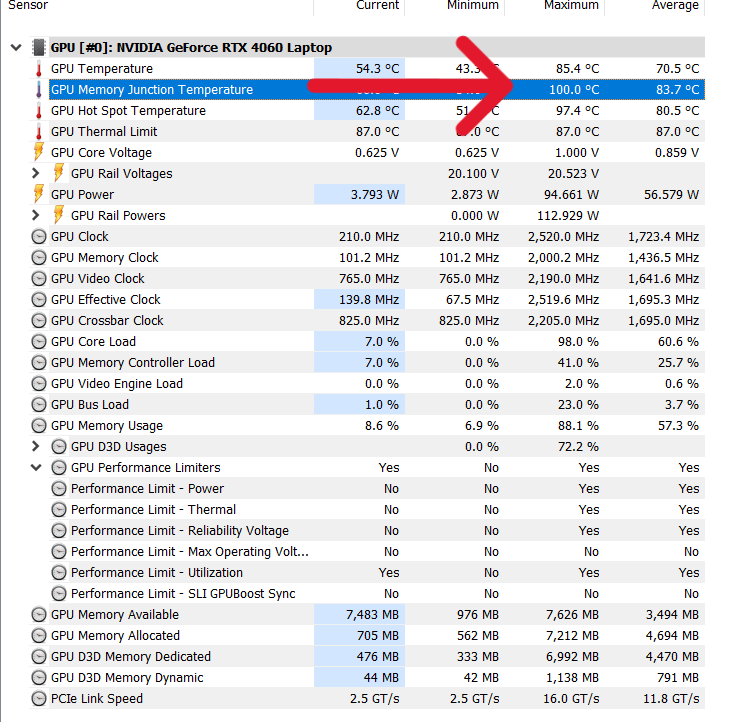
ASUS’ Support believes these are safe temperatures on my gaming laptop. Should I believe them? I recently repasted it with a really good thermal paste too.

ASUS’ Support believes these are safe temperatures on my gaming laptop. Should I believe them? I recently repasted it with a really good thermal paste too.
15 Comments
It’s a laptop. Sadly you need to get used to such temperatures.
Try changing VRAM modules pads to fresh ones.
normal for a gaming laptop..
The “max” value isn’t really that important – some spikes just do that, even on a desktop
More important is the temperature under sustained load. Try to game for 30 min and start the measurement after 10 min. Then you will have a better picture of what’s going on, if your repaste wasn’t successful
Try hwinfo64 it’s more accurate temperature and voltage readings.
oh lord. that absolut normal, stop fixing what works
*Edit: My applogies PedramHGH. I didn’t notice the username before I wrote this reply. It sucks putty and Phase Change are not readily accessible in your country, or easily shipped there. </edit>
I’d recommend looking into a Phase Change Material for the CPU and GPU core, and Thermal Putty for the VRAM, VRM, etc.
My general advice is to skip thermal pads entirely. They suck at compressing. Putty compresses and squishes out much easier, enabling better core contact, and also cooler VRAM.
Some decent putties to consider: Upsiren UTP-8, Fehonda LTP81, Laird T-Putty 607, CX-H1300. I’d also list Honeywell HT10000 here, but it’s harder to find online.
Here is a guide for using putty on a Videocard, but it’s much the same on a laptop. I’ll be making an updated guide for laptops very soon.
https://youtu.be/MhrykJtrfBA
And they are correct, check on continued loads
Normal DRAM chips handle up to 85C. Extended range handle up to 105C. Micron give 95C Tjmax for GDDR6X. Refresh cycles get shorter but it’ll handle it. You’ll never get the ideal 60C. I’d be more comfortable around 90C. 100 seems a bit too much to me. Get a cooling pad for it. I’m trusting Micron, if asus knows better they can make the chips themselves with that range.
How long was HWINFO running? Averages seem quite good for a laptop. Even the maximums are around what you can expect with high end component in a desktop without water cooling, so they do make sense for a laptop.
Turbo mode should lower those temps significantly if you can stand the noise.
Either way, nope, 100°C on Memory Junction is not happening on my 8 month old Tuf. I have that temp only on GPU Hotspot and only in Performance mode, not Turbo (because fan speed gets almost maxed out in Turbo and airflow improves by a long shot)
94W for a GPU alone on laptop is insane, dont know how the battery keep up with
Did you try undervolting?
Yes you should. Those are normal temps on laptop specially while your gpu is running at 95w.
They aren’t.
Did you use THICK paste? It’s within spec technically but will throttle here.
Ideally you’d want to see 80-90 but only during long benches and fans should be max by 90. Are they?
Something like syy, etc. mx4 and other thin pastes will pump out fast
Also: if that 100c is because of a late fan ramp then maybe normal. But sort it and find out how