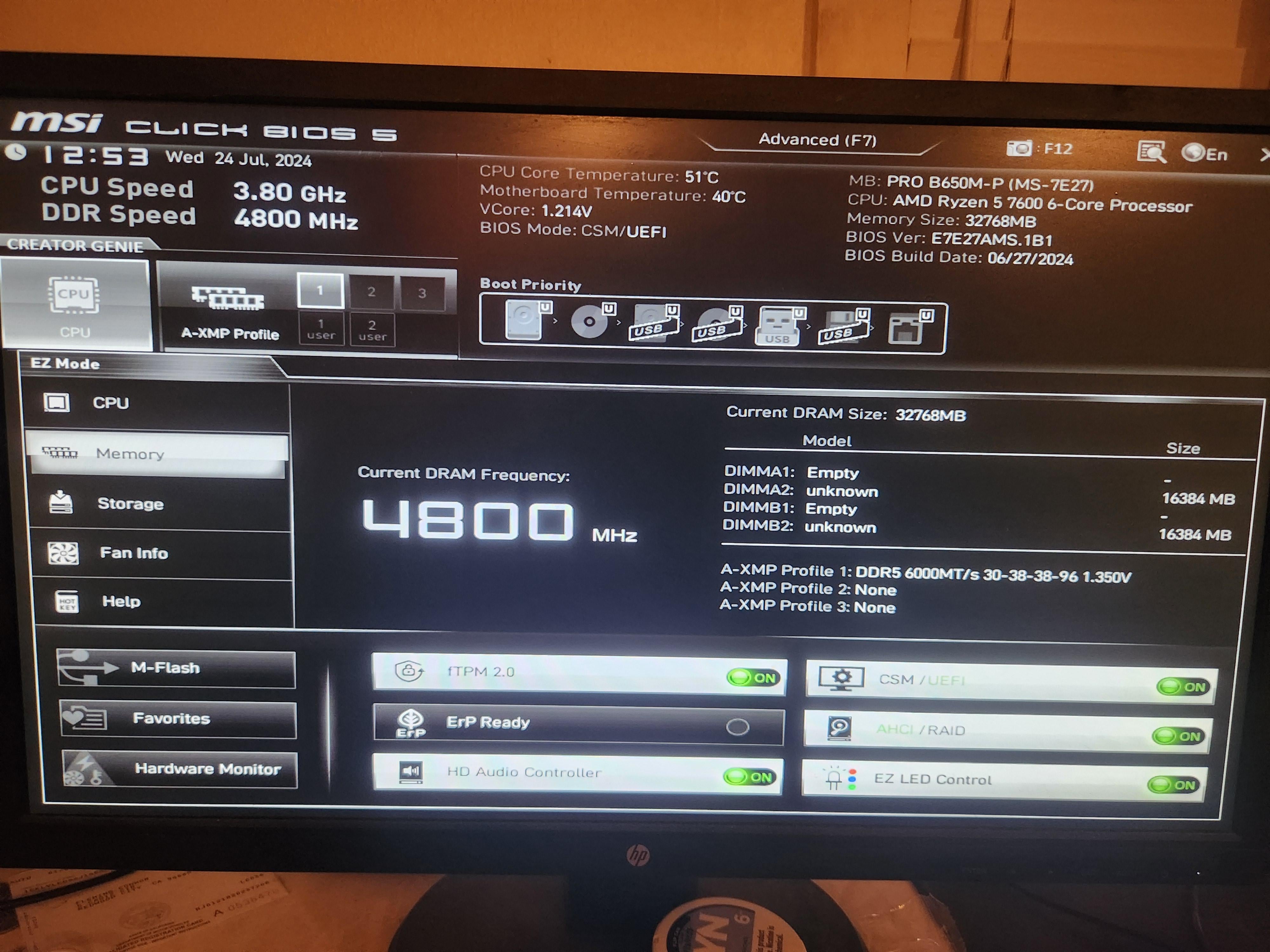
I have XMP enabled. But I don't know how to set my RAM to 6000 MHz. To me it looks like it's only running at 4800..
Any help appreciated

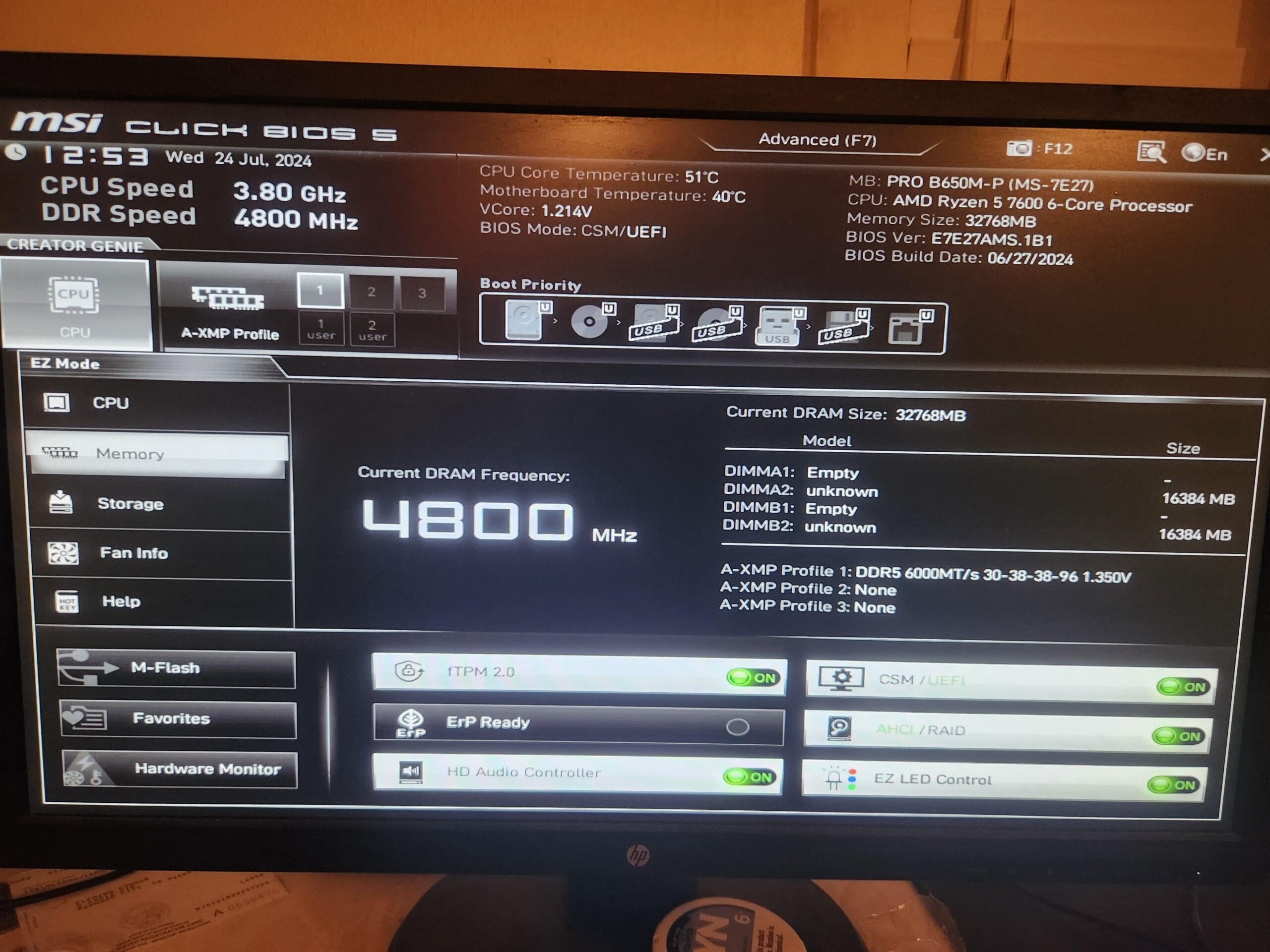
I have XMP enabled. But I don't know how to set my RAM to 6000 MHz. To me it looks like it's only running at 4800..
Any help appreciated
20 Comments
Did you click on the “1” next to A-XMP profile?
If you’re on Windows 11, save your BIOS setting after enabling XMP Profile and then you can open task manager -> performance -> Memory. At the bottom you’ll something similar to what I have for Speed:
https://preview.redd.it/5ngzda8geeed1.png?width=456&format=png&auto=webp&s=34807e0daf6ad632d4859b38fa787581d42e7e0b
It tells you if your RAM is running at 4800MHz or 6000Mhz
No?
MHz =/= MT/s
Looks like you’ve enabled xmp so should be once you boot. It always runs at base clock in bios
No
I think the Current DRAM Frequency might give it away. But hey, take screenshots with your phone and ask dumb questions.
restart after configuring bios and check again, it should be enabled afterwards
[deleted]
God I hate this mobo & bios lol have the same one as you in a Microcenter pre-built. Took me so long to get it “stable”. The memory context restore option fails randomly causing 2+ minute boots while it retrains the memory, turning dram power down off while mem context restore is on causes a blue screen, occasionally the mobo won’t detect the cpu causing an infinite dead boot with no display requiring a hard reset, & sometimes the whole system will hitch causing mouse/audio/video/system time stutters. Only way to avoid the hitching is full shutdown & power back on, using sleep or restart just about garuntees the system stutters tho they happen randomly on full power cycle as well. Occasionally when the mobo totally fails to find the cpu on boot, the fTPM settings or w/e are reset & I have to set a new PIN in windows.
35 days after buying it, it crashed mid game on me & refused to power back on (would light up for a split second then power off). Had to take it back to Microcenter & tech said the cpu died (7800x3D) so they replaced it. I suspect that’s because the mobo defaults the SOC voltage to 1.3v upon enabling XMP which is unnecessarily high for the 5600mhz memory it came with. Mobo’s setting the SOC voltage too high is exactly what was cooking the 7800x3Ds & melting the cpu socket when they first released. The bios in general just seems archaic compared to the motherboards I’ve used for the past 6-8 years. DRAM speeds are slower after waking the system from sleep. Bluetooth drivers provided on the mobo’s support page are faulty (continuous driver hangs in Event Viewer). Literally never had so much trouble with a motherboard in my entire life of using PCs. Shout out to Microcenter’s repair guys at least, ~7 hour turn around getting the PC back to me same day 🤷♂️
If the PC shits the bed again & I have to take it back to them a second time, I’m most likely demanding a motherboard swap cause my experience with this mobo has been horrible & there’s a sea of posts with similar issues when googling this mobo (almost exclusively mentioning it coming in a microcenter bundle)…
Never trust what task manager says. My ram runs at 3733mt/s (actually 3724 with 99.76mhz bclk), and task manager claims it is 3700.
There are multiple XMP profiles. Check the others out as well. You can read them out with a program like CPU-Z under the memory tab. But they should also be visible in your UEFI.
Your current speed for the selected profile is 4800MHz (DDR)
Does your Memory Supports AMD XMP Profile since it is shown as unknown in the picture you have provided ? Otherwise the mainbord cant overclock the CPU and Memory to the same clock
You have to check in the OS. If your BIOS can’t maintain a stable 6GHz it will automatically fallback to lower values (without properly telling you)
Press F7 to go into Advanced Options and select Overclocking in the menu on the left. You will see the option to adjust the DRAM frequency.
Press f7 and set the ram speed manually
Best to check in windows.
No
600MT/a is NOT speed, it’s transfer per second which is different to 4800 MHz, your ram is running at 4.8Ghz
could be your cpu limiting ram speed.
edit: nvm seems like u have a 7600 which should be more than capable, have you applied ur settings and restarted? if u have, check inside windows with some software to see the speed its running at.
My best tip tho is update ur bios if ur bios version is really old, or at least go through some of the patch notes in ur mobo website relating bios updates if anything like unlocking higher ram frequencies bios updates were uploaded.
MSI interface sucks so very, very badly. You need to click the A-XMP Profile button next to the CPU button. With both of the CPU and XMP buttons clicked, you get overclocking on the CPU and your true RAM speed. I switched to ASUS because I hated the MSI interface and software so much.