The immediate answer you’re going to get right now is that 13900K and other high end 13/14 gen intel CPUs have inconsistent instability issues, some chips unaffected, some chips dead after a short period of time. (Many YouTube videos out there on the subject at this point)
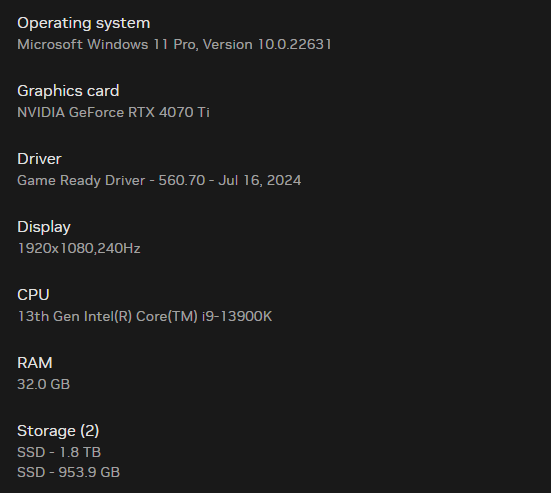
Why 1080p with such good hardware? Upgrade that monitor my guy. 1440p 144hz. It will take the strain off that cpu and lessen the stability issue that they have.
shaneo88
The 13900k is probably the problem
Admiral_2nd-Alman
Your CPU could be the issue. Update your drivers and bios
Hot_Cheese650
Stop buying Intel CPUs until they fix it.
AMDtje1
First off, what application?
We need more info. I am lucky cause my modest system works perfectly.
o_sooperstar_o
Before jumping to conclusions and blaming Intel we really more information on your build. Did you build it recently and how long has been going on for. What errors are you getting during these ‘crashes’, BSODs, specific error messages …
xz_nekto
Also check RAM clock, if overclocked it can be the issue
sirloindenial
Not enough info but just check what changed recently. Most likely driver updates or the recent hardware changes.
Lewinator56
Try a bios update, but…
It’s very very likely the 13900K is the issue and you are yet another victim to Intel’s ongoing CPU issues.
Try disabling E cores, it might help briefly, but in the long run the crashes and instability will get worse. Unfortunately the only fix is a new CPU, which is understandably undesirable due to cost, especially since you’d be swapping the motherboard too as buying any Intel CPU right now would be a braindead thing to do.
Comprehensive_Ship42
You cpu is broken you need to send it back to intel . Look up gamers nexus 13900k intel problems
Moscato359
It’s the cpu, possibly your ram.
MarkusRight
Buys 4070ti and plays on a 1080p monitor. I’m dead 💀
But seriously it’s the CPU. Intel is about to have a class action lawsuit most likely. This generation has some severe instability issues.
WayTooLazyOmg
do a bios update. trust me. my buddy had a brand new computer & it kept crashing. it’s bios
Unusual-East4126
Good ol raptor lake. Try under clocking/under volting your cpu a bit.
Nimbian
What PSU are you using?
JetstreamJefff
Canadacomputers had a crazy bundle deal on the ryzen 7900X3D + motherboard + DDR5 ram, might be worth it to look at a platform switch.
zero_x4ever
I might be the odd one here, but as a fellow intel user, download Intel XTU. Check your value for AVX2 that your motherboard defaults to. If it’s 7 or higher, that’s too low of a voltage that is supplied.
Wreeb
What if you update your bios?
ShasasTheRed
It’s probably that 13th gen intel, they’ve had issues
Renault_75-34_MX
The CPU is most likely, though the 560.70 Nvidia driver seams to cause some crashes in games as well (at least that’s the case with Farming Simulator 22)
ThoughtsOfYesterday
People acting like PCs never crashed before Intel 13th gen. 🤦♂️Was this computer ever stable? Have you made any recent changes? Have you recently updated anything? Are you overclocked? Have you tried a portable OS like Linux booted off USB to eliminate software being the issue? I wouldn’t blame the CPU until you’ve done some basic investigation.
CoeatSpv
I’m in pain seeing that your display is 1080p with those specs.
sHoRtBuSseR
While I am not downplaying the Intel issues, the most likely cause is RAM instability. Ddr5 is easily the hardest memory to get stable depending on configuration. Disable xmp and see if the issue goes way.
Every RAM kit I have used in the last 4 years I have had to manually time and set up my voltages because the canned profile just didn’t work. This includes Intel and AMD.

28 Comments
All drivers updated?
The immediate answer you’re going to get right now is that 13900K and other high end 13/14 gen intel CPUs have inconsistent instability issues, some chips unaffected, some chips dead after a short period of time. (Many YouTube videos out there on the subject at this point)
Other than that, have you tried updating your BIOS, chipset drivers, the [DDU Process](https://www.wagnardsoft.com/content/How-use-Display-Driver-Uninstaller-DDU-Guide-Tutorial), or other troubleshooting steps?
its just a new intel feature
13900K
Intel cpus are dying everywhere.
Why 1080p with such good hardware? Upgrade that monitor my guy. 1440p 144hz. It will take the strain off that cpu and lessen the stability issue that they have.
The 13900k is probably the problem
Your CPU could be the issue. Update your drivers and bios
Stop buying Intel CPUs until they fix it.
First off, what application?
We need more info. I am lucky cause my modest system works perfectly.
Before jumping to conclusions and blaming Intel we really more information on your build. Did you build it recently and how long has been going on for. What errors are you getting during these ‘crashes’, BSODs, specific error messages …
Also check RAM clock, if overclocked it can be the issue
Not enough info but just check what changed recently. Most likely driver updates or the recent hardware changes.
Try a bios update, but…
It’s very very likely the 13900K is the issue and you are yet another victim to Intel’s ongoing CPU issues.
Try disabling E cores, it might help briefly, but in the long run the crashes and instability will get worse. Unfortunately the only fix is a new CPU, which is understandably undesirable due to cost, especially since you’d be swapping the motherboard too as buying any Intel CPU right now would be a braindead thing to do.
You cpu is broken you need to send it back to intel . Look up gamers nexus 13900k intel problems
It’s the cpu, possibly your ram.
Buys 4070ti and plays on a 1080p monitor. I’m dead 💀
But seriously it’s the CPU. Intel is about to have a class action lawsuit most likely. This generation has some severe instability issues.
do a bios update. trust me. my buddy had a brand new computer & it kept crashing. it’s bios
Good ol raptor lake. Try under clocking/under volting your cpu a bit.
What PSU are you using?
Canadacomputers had a crazy bundle deal on the ryzen 7900X3D + motherboard + DDR5 ram, might be worth it to look at a platform switch.
I might be the odd one here, but as a fellow intel user, download Intel XTU. Check your value for AVX2 that your motherboard defaults to. If it’s 7 or higher, that’s too low of a voltage that is supplied.
What if you update your bios?
It’s probably that 13th gen intel, they’ve had issues
The CPU is most likely, though the 560.70 Nvidia driver seams to cause some crashes in games as well (at least that’s the case with Farming Simulator 22)
People acting like PCs never crashed before Intel 13th gen. 🤦♂️Was this computer ever stable? Have you made any recent changes? Have you recently updated anything? Are you overclocked? Have you tried a portable OS like Linux booted off USB to eliminate software being the issue? I wouldn’t blame the CPU until you’ve done some basic investigation.
I’m in pain seeing that your display is 1080p with those specs.
While I am not downplaying the Intel issues, the most likely cause is RAM instability. Ddr5 is easily the hardest memory to get stable depending on configuration. Disable xmp and see if the issue goes way.
Every RAM kit I have used in the last 4 years I have had to manually time and set up my voltages because the canned profile just didn’t work. This includes Intel and AMD.