Hey everyone! As the title suggests, I’m developing a web app to help PC builders visualize their build before actually assembling it. When I was looking to build a new PC recently, I couldn’t find a tool that met my needs, so I decided to create one myself.
# The Concept
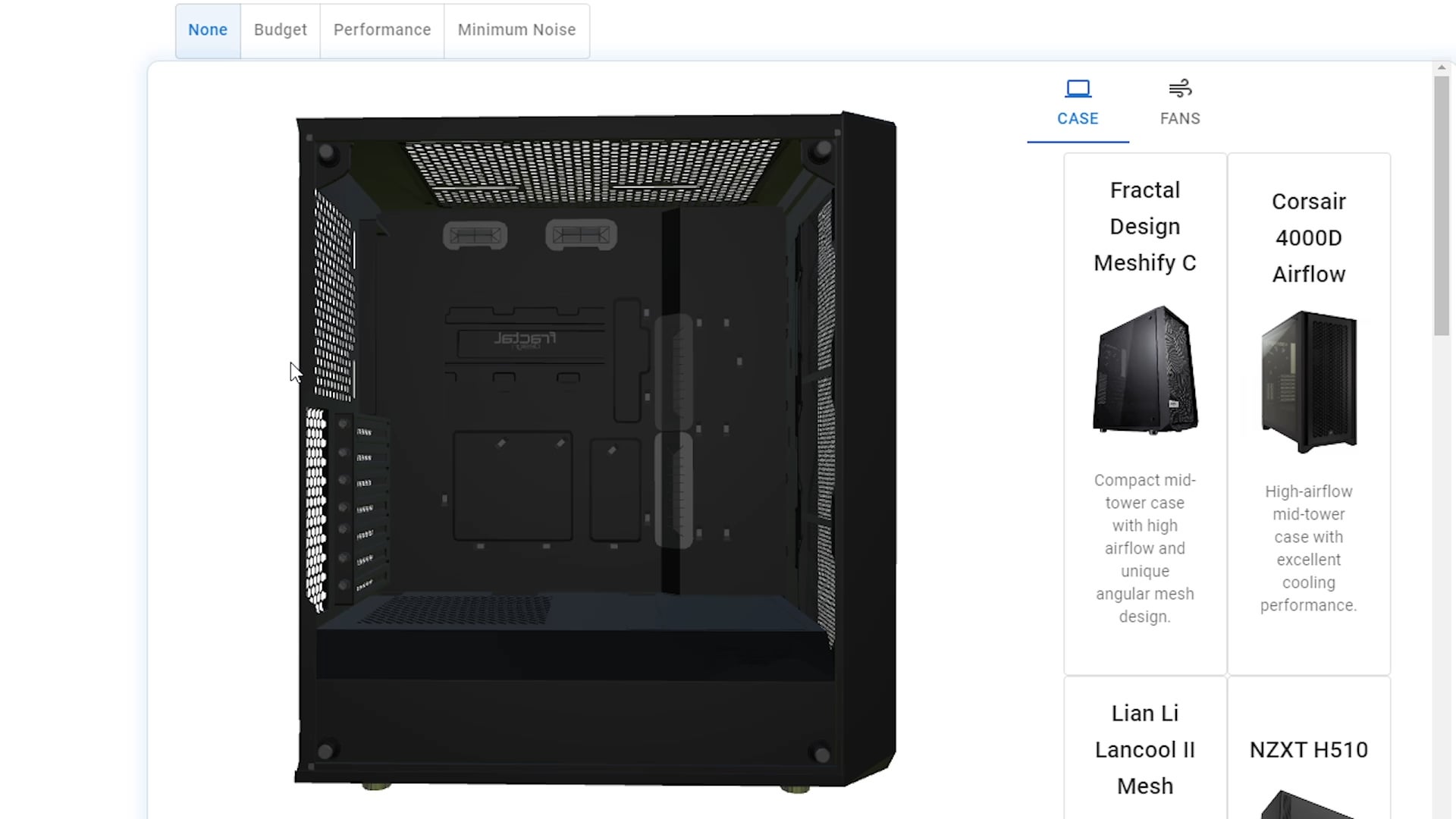
This app lets you select a case, choose a fan, and configure their setups. It’s designed to help everyone, from newbies to seasoned builders, with tips on the best fan placement, compatibility, and optimal numbers. Plus, you get a cool visual of your final build!
# Features and Potential
I have lots of ideas for useful features, including:
* **Configuration Visualization:** See how different fan setups look and perform.
* **Compatibility Advice:** Get recommendations on fan compatibility with your chosen case.
* **Beginner Tips:** Learn the basics of fan placement and cooling optimization.
* **Performance Indicators:** Understand how your fan setup impacts system cooling.
* **Personalized Recommendations:** Get suggestions tailored to your needs and user type.
# Community Input
Before I dive deeper into development, I want to ensure there’s real interest. I’ve seen some people mention they usually turn to YouTube for build guides, so I’d love to get your input:
* Do you think this tool is necessary?
* Would you use it?
* How beneficial do you think it would be?
What features would you like to see in a tool like this? Your feedback is crucial and will help shape its development.
**NOTE:** The video is a very early demo of the app to give you an idea of what it could be.
divergentchessboard
Why does your concept budget setup have an intake fan behind/above the CPU cooler and way above the GPU cooler so it ends up doing nothing besides fighting with the exhaust?
Eazy12345678
neat but i dont need a tool to know brown noctua fans are ugly.
twoplustwo_5
Nice! I could use this tool lol.
I’m actually considering getting 1 or 2 more fans for my PC. Maybe some of you can offer some advice on what is my best bet?
Right now I have the 2 intake fans at the front (2x140mm) and one single exhaust at the back of the case (1x120mm). I’m considering maybe getting another 120mm fan to put on the top of the case but as far back as possible and use it as an exhaust as well. Or alternatively, getting 2x120mm and putting them at the top as intakes.
My CPU idle temps are around 45 C. Under load it’s anywhere from 55-70 C.
sandexcool
This is genuinely fucking amazing. Please for the love of god finish it and add as many features as you can!
SoftcheeseWithJam
My input as someone that have built around 4 computers, and actively watch tech channels.
* Do you think this tool is necessary?
* The only use case that I can see is people sharing what they currently have, like a pcpartpiker but for fan configuration. That could replace the ugly draws that people post in reddit asking for advice.
* Would you use it?
* I can’t see a reason to use, personally.
* How beneficial do you think it would be?
* As mention, it can be helpful for people seeking help, either from the website or forums.
Optimus_13
r/PcBuild r/PcBuildHelp
Repost here as well
sayeenq
You deserve my upvote, please cherish it cuz its sacred and very rarely given.
allxOld13
I think this is a great idea and I would check it for every build if you consider adding:
(Ranked by importance)
1- Airflow Simulation! If you pull this, it could be SUPERB!
2- CPU air cooler support
3- aio support
4- GPU support
Being able to see the airflow visualized with relative temperatures could be a super helpful tool only available now to CADs with additional complexity.
TheRealMeeBacon
If it’s free, I’ll probably give it a look.
mml-official
That’s actually really cool imo
Would definitely use it
Csakstar
Fans are cool, but if you can combine it with pcpartpicker’s build tool to visualize an entire build with accurate measurements you’d have an amazing product (I realize that that’s asking a lot)

12 Comments
Hey everyone! As the title suggests, I’m developing a web app to help PC builders visualize their build before actually assembling it. When I was looking to build a new PC recently, I couldn’t find a tool that met my needs, so I decided to create one myself.
# The Concept
This app lets you select a case, choose a fan, and configure their setups. It’s designed to help everyone, from newbies to seasoned builders, with tips on the best fan placement, compatibility, and optimal numbers. Plus, you get a cool visual of your final build!
# Features and Potential
I have lots of ideas for useful features, including:
* **Configuration Visualization:** See how different fan setups look and perform.
* **Compatibility Advice:** Get recommendations on fan compatibility with your chosen case.
* **Beginner Tips:** Learn the basics of fan placement and cooling optimization.
* **Performance Indicators:** Understand how your fan setup impacts system cooling.
* **Personalized Recommendations:** Get suggestions tailored to your needs and user type.
# Community Input
Before I dive deeper into development, I want to ensure there’s real interest. I’ve seen some people mention they usually turn to YouTube for build guides, so I’d love to get your input:
* Do you think this tool is necessary?
* Would you use it?
* How beneficial do you think it would be?
What features would you like to see in a tool like this? Your feedback is crucial and will help shape its development.
**NOTE:** The video is a very early demo of the app to give you an idea of what it could be.
Why does your concept budget setup have an intake fan behind/above the CPU cooler and way above the GPU cooler so it ends up doing nothing besides fighting with the exhaust?
neat but i dont need a tool to know brown noctua fans are ugly.
Nice! I could use this tool lol.
I’m actually considering getting 1 or 2 more fans for my PC. Maybe some of you can offer some advice on what is my best bet?
This is my PC build: https://ca.pcpartpicker.com/list/YQbhbL
Right now I have the 2 intake fans at the front (2x140mm) and one single exhaust at the back of the case (1x120mm). I’m considering maybe getting another 120mm fan to put on the top of the case but as far back as possible and use it as an exhaust as well. Or alternatively, getting 2x120mm and putting them at the top as intakes.
My CPU idle temps are around 45 C. Under load it’s anywhere from 55-70 C.
This is genuinely fucking amazing. Please for the love of god finish it and add as many features as you can!
My input as someone that have built around 4 computers, and actively watch tech channels.
* Do you think this tool is necessary?
* The only use case that I can see is people sharing what they currently have, like a pcpartpiker but for fan configuration. That could replace the ugly draws that people post in reddit asking for advice.
* Would you use it?
* I can’t see a reason to use, personally.
* How beneficial do you think it would be?
* As mention, it can be helpful for people seeking help, either from the website or forums.
r/PcBuild r/PcBuildHelp
Repost here as well
You deserve my upvote, please cherish it cuz its sacred and very rarely given.
I think this is a great idea and I would check it for every build if you consider adding:
(Ranked by importance)
1- Airflow Simulation! If you pull this, it could be SUPERB!
2- CPU air cooler support
3- aio support
4- GPU support
Being able to see the airflow visualized with relative temperatures could be a super helpful tool only available now to CADs with additional complexity.
If it’s free, I’ll probably give it a look.
That’s actually really cool imo
Would definitely use it
Fans are cool, but if you can combine it with pcpartpicker’s build tool to visualize an entire build with accurate measurements you’d have an amazing product (I realize that that’s asking a lot)