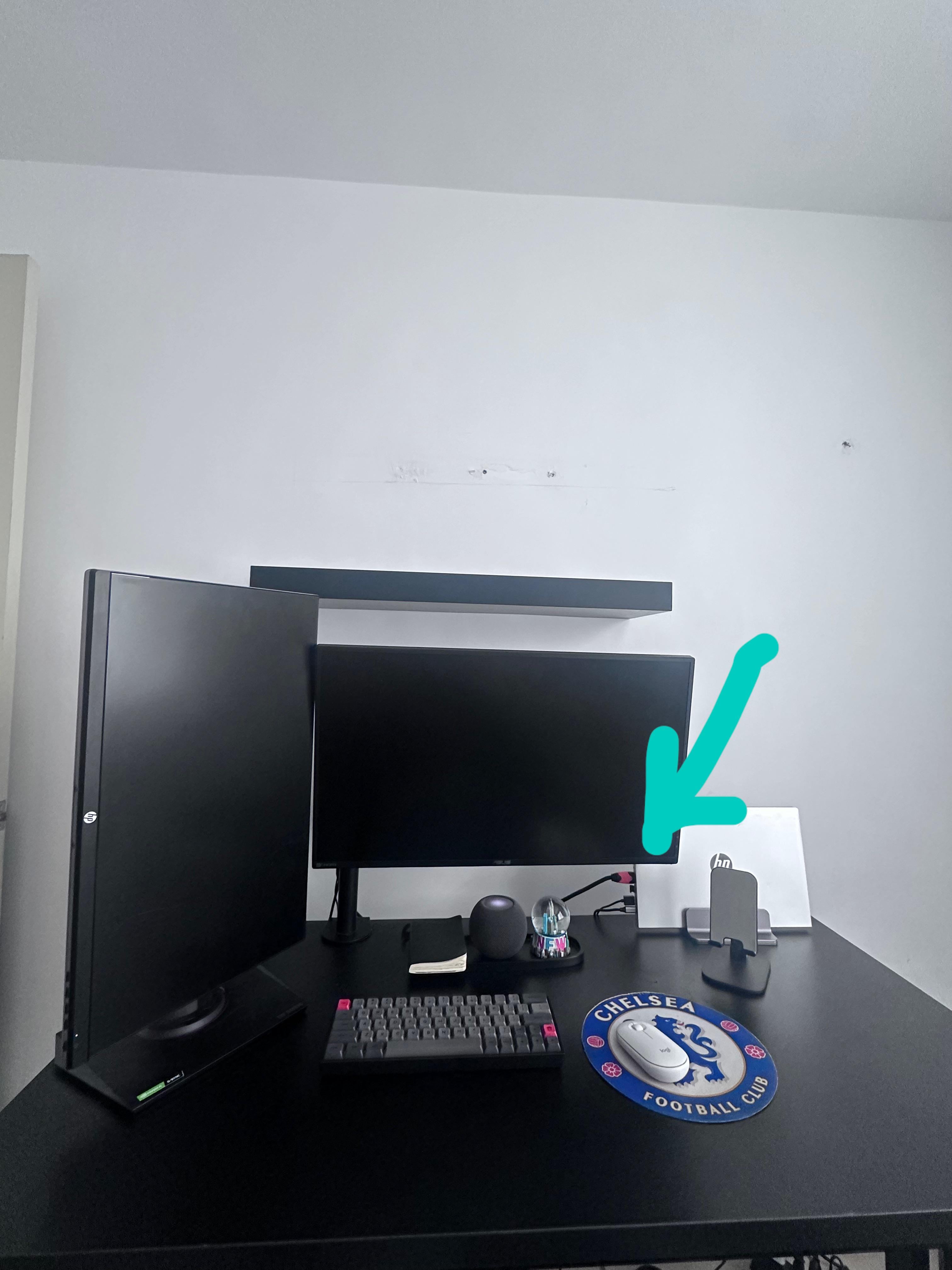
Use a dock so only utilizing a single cable from the laptop?
Wetwizard
90 degree cable adapters
THFourteen
Hide that mouse mat first mate 😉
fel_iks14
Hide that mouse bro
Kingmaker1669
Put the dock behind your vertical monitor shift everything to the right a little
JFITZY09
I usually have my laptop angled sideways so that the ports are facing the wall
Marble_Wraith
The short of it is, you can’t. The best you can do is try to minimize the impact.
If it were me i’d switch the vertical monitor and laptop positions. Then turn the laptop stand 90 degrees so the thin edge is facing you and the cables are facing the wall. There should be 2 advantages to doing this:
1. Your laptop is closer to the door with the cables still relatively accessible, rather than being where they are now behind the monitor. So you can more easily unplug it and walk out.
2. It looks like you’re getting quite a bit of glare on the vertical monitor in that position. If it’s on the opposite side (where the laptop is now) angled away from the light source, it should reduce if not eliminate that.
jeancv8
A Chelsea fan? Lol.
Material-Junket214
Mount the laptop underneath the table some, so then you won’t even see the laptop
fitzgera1d
Hide the entire laptop
AR15ss
Turn ur laptop / flip it so cables are away from view.
bananabean_
Scissors
MikeFu84
Hide the laptop or get a dock/port replicator.
YungKofdu
U can mount the laptop under the desk if u want to
KelpoDelpo
Mount dat second monitor
iamgarffi
Given you went with a laptop stand that remains in lid closed position, why not mounting the laptop under the desk? No cables that way.
2D_3D
You’d need to put a little enclosure over the top of it, preferably with wire holders. Can DIY your own , look to adapting something cheap off IKEA or amazon or 3d print one.
Weppe1983
+1 for the mouse mat 💙
only2pesos4u
After seeing that mouse pad, the cables are the least of your concerns!
Nonrefutal
right angle cables
The_Naked_Raider
Have a shelf on the wall directly behind the monitor.

22 Comments
Use a dock so only utilizing a single cable from the laptop?
90 degree cable adapters
Hide that mouse mat first mate 😉
Hide that mouse bro
Put the dock behind your vertical monitor shift everything to the right a little
I usually have my laptop angled sideways so that the ports are facing the wall
The short of it is, you can’t. The best you can do is try to minimize the impact.
If it were me i’d switch the vertical monitor and laptop positions. Then turn the laptop stand 90 degrees so the thin edge is facing you and the cables are facing the wall. There should be 2 advantages to doing this:
1. Your laptop is closer to the door with the cables still relatively accessible, rather than being where they are now behind the monitor. So you can more easily unplug it and walk out.
2. It looks like you’re getting quite a bit of glare on the vertical monitor in that position. If it’s on the opposite side (where the laptop is now) angled away from the light source, it should reduce if not eliminate that.
A Chelsea fan? Lol.
Mount the laptop underneath the table some, so then you won’t even see the laptop
Hide the entire laptop
Turn ur laptop / flip it so cables are away from view.
Scissors
Hide the laptop or get a dock/port replicator.
U can mount the laptop under the desk if u want to
Mount dat second monitor
Given you went with a laptop stand that remains in lid closed position, why not mounting the laptop under the desk? No cables that way.
You’d need to put a little enclosure over the top of it, preferably with wire holders. Can DIY your own , look to adapting something cheap off IKEA or amazon or 3d print one.
+1 for the mouse mat 💙
After seeing that mouse pad, the cables are the least of your concerns!
right angle cables
Have a shelf on the wall directly behind the monitor.
Plants.