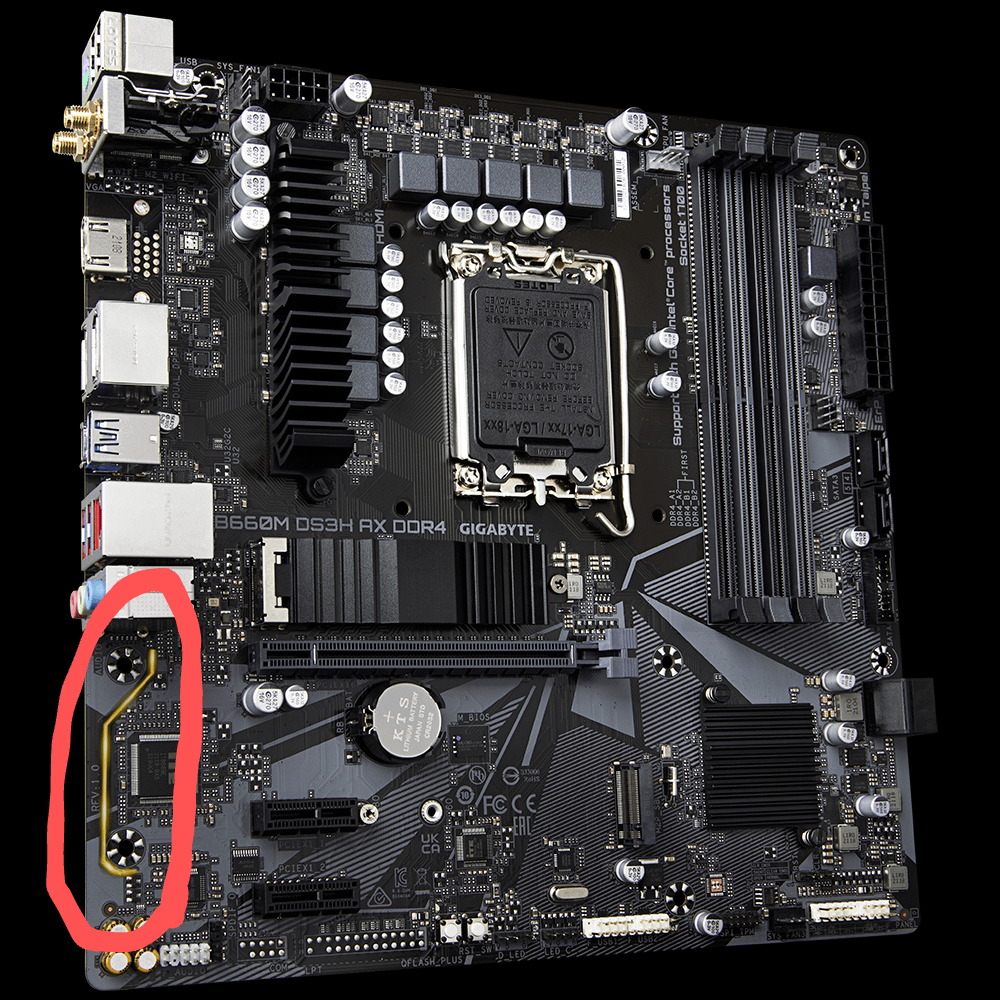
This bar lights up steadily, not flashing, didn't shine early, I didn't see anything about this in the manual (or I don't know how to look for it)

This bar lights up steadily, not flashing, didn't shine early, I didn't see anything about this in the manual (or I don't know how to look for it)
22 Comments
It’s cosmetic
audio part of the board is separated by that line.
thats a shitty mobo btw, i hope u didnt put a powerful cpu on it…
whats ur cpu?
edit:
lol why people downvote me?!
here is a proof how much this mobo sucks:
[https://youtu.be/PEa0vcJ0lRY?si=HQK2hK9XrWYwyRJf&t=1002](https://youtu.be/PEa0vcJ0lRY?si=HQK2hK9XrWYwyRJf&t=1002)
it failed with 12700 non k! the VRMs on this mobo are trash!
Generally it’s a cut on the PCB to physically separate the audio portion on the motherboard. It helps with distortion and ground problems.
In this case, it’s just for aesthetics.
It’s just to represent how audio is separated from the rest of the board, aka useless
it simply means the manufacturer wanted to make it orange 🙁
Means it’s the good stuff you know.
it’s just decoration.

I have a similar thing on my B550! it doesn’t really do anything, except ruin the aesthetics
decorated audio signal isolation
RTFM
Nothing, it’s just there for decoration.
if you don’t look at the back you don’t see the whole story
I have a similar board. It is an in-build LED strip
i swear, if i got a dollar for every “yellow line” question, i could buy me 2TB nvme
You cut it?
It lights up.
I have an older Gigabyte mobo with this. It is a LED that can stay on, pulse, light up based off audio being played, and be turned off in BIOS.
And remember don’t scrape your gpu mount over that part of the motherboard while placing it or else no sound via front panel and mobo.
You can turn off that LED light in BIOS, or, heaven forbid, their abysmal RGB software.
that rgb line follows mobo rgb set.. and it’s factory out-of-sync, so u have to split the rgb control to get a match.. smarty Giggabye
Peace