
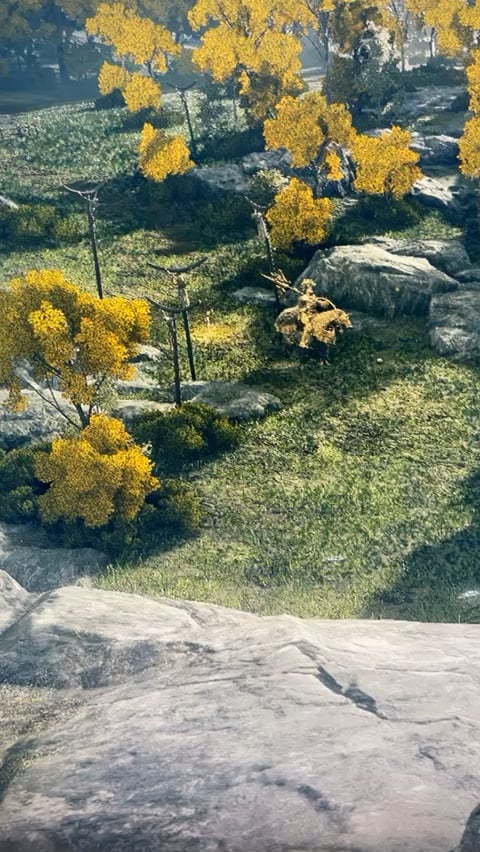
Why is every game I play so blurry??
Recently I’ve built a new pc with a RTX 3070, 5600x and 32gb ram. I also have a 1080p 165hz monitor (BENQ EX240n) I wanted to use this to play games at high settings but it seems like every game is unplayable for me. This happens to me for EVERY game and most recently Elden Ring. This is a game I really looked forward to playing but now it just hurts to look at making it unplayable. I have all my settings on high or maximum. Also when I first did my pc I did some YouTube optimisation videos which might have something to do with this but yesterday I used DDU and the problem is still there.
39 Comments
Disable TAA or temporal anything.
It could also be resolution scaling. Some games have a setting where they run at like 60% of the actual resolution of your monitor to improve fps, but imo it just looks like shit.
TAA makes things very blurry.
Make sure you kill that gold knight right away. He drops an essential item that will prevent you from upgrading your weapon if you don’t.
TAA, DLSS, FSR, Motion Blur, or DOF (depth of field)
I hope everyone sees this. Elden ring DOESN’T have a DLSS option nor an Upscale option in general. The only options for Anti-ailising is Low, Medium, High or Maximum. So you can’t turn anti-ailising off either.
First time playing any souls game and I walk right up to that dude thinking he was a npc with a quest. Nope. Got clapped.
Check resolution, turn off dynamic resolution/scaling. Increase settings.
it might be your geforce experience forcing settings on the game assuming you are using everything set to high in the game.
Have you tried looking into the graphical settings inside Nividia Control Panel? There are some settings in there that might cause the blurriness.
TAA makes that blurry and ghosty mess, basically anything with bad temporal AA implementation of TAA(U), you can fix with change AA for example SMAA or FXAA.
If game dosen’t have option to disable TAA, you can use SSAA/Resolution scaling above 100%, use DSR/VRS if game dosen’t support resolution scaling in options, can cost performance because renders in higher resolution but can fix blurry image because TAA have more samples.
R/fucktaa
Could also be Overdrive mode (or similar features) on your monitor that causes some form of ghosting/afterimage
It might be the camera on your phone 🤣
Are you running it at your monitors native resolution?
Disable TAA and motion blur in the game’s graphics settings
I play at 1080p and dlss looks like shit to me, blurry and appears like film grain.
There is some really bad unhelpful info in this thread. Yes TAA and other temporal solutions will generally make the image softer to varying degrees. That said, the biggest culprit is going to what resolution you are playing at. It looks like you are on a 1080P display, so it’s not going to very sharp regardless.
You can enable Super Sampling through your graphics driver which will help, as long as you have a decent GPU.
[https://www.pcmag.com/how-to/how-to-run-games-at-4k-on-a-1080p-monitor-with-supersampling](https://www.pcmag.com/how-to/how-to-run-games-at-4k-on-a-1080p-monitor-with-supersampling)
r/recordingishard
This is a terrible video to demonstrate the issue
Every games means not only elder ring right?
Go to nvida control panel choose prioritize graphics,
Since elden ring doesn’t give an option to turn off TAA go to geforce experience and see if there is an option to change it.
Edit : check in Geforce Experience if you enable any sort of resolution scaling.
Because almost every game uses TAA and its terrible at 1080p
You’re playing at 1080p, time to upgrade to 1440p or 4k and disable temporal AA (TAA).
1080p isnt sharp. Whats the size
Resolution scale isn’t 100%
TAA and Motion Blur are two things that shouldn’t have been created.
1080p is already a blurry mess itself. U may consider supersampling to 1440p and disable in game AA
Anti-Aliasing works by blurring edges. Turn it off in favor of increasing resolution (if you can). If it’s still blurry then start by lowering or disabling motion blur, DOF (Depth of Field), and anything with “temporal” in its name.
1080p gaming
That texture quality
It’s TAA…. Or you need to make a doctors appointment.
It’s looking blurry to me…through your phone.
Had same issue, turns out it was old hdmi cable. Then I replaced it with displayport and image became very sharp and clean.
Some games are just not meant to be played at 1080p and the devs don’t even bother trying to optimize textures for it. Go to nvidia control panel and turn on super resolution, set it to 1440p or 4k and you’re good. When you play a game at higher resolutions, it loads higher resolution textures. Higher resolution textures are noticeable even on 1080p displays.
Welcome to modern anti-aliasing. Looks great, don’t it? 😂
1080p is why. I had the same issue with RDR2, but using DSR 1440p solved the problem for me. Even though I play on a 1080p monitor, I use DSR to play solo games at 1440p because the games just looks better at 1440p. I also play Elite Dangerous at 4k with DSR.
Because you’re filming it with your phone.
There is depth of field in ER, turn it off. Also get a monitor that’s 1440p at least for that spec.
First off, google optimal settings for NVIDIA control panel and make sure you don’t have anything weird going on there.
Secondly, you are on 1080p my friend. No shit everything is blurry. That’s, like, the defining feature of 1080p screens.
Lastly, you can use the control panel to upscale the game to 1440p. It won’t be true 1440p but it will 100% look much better