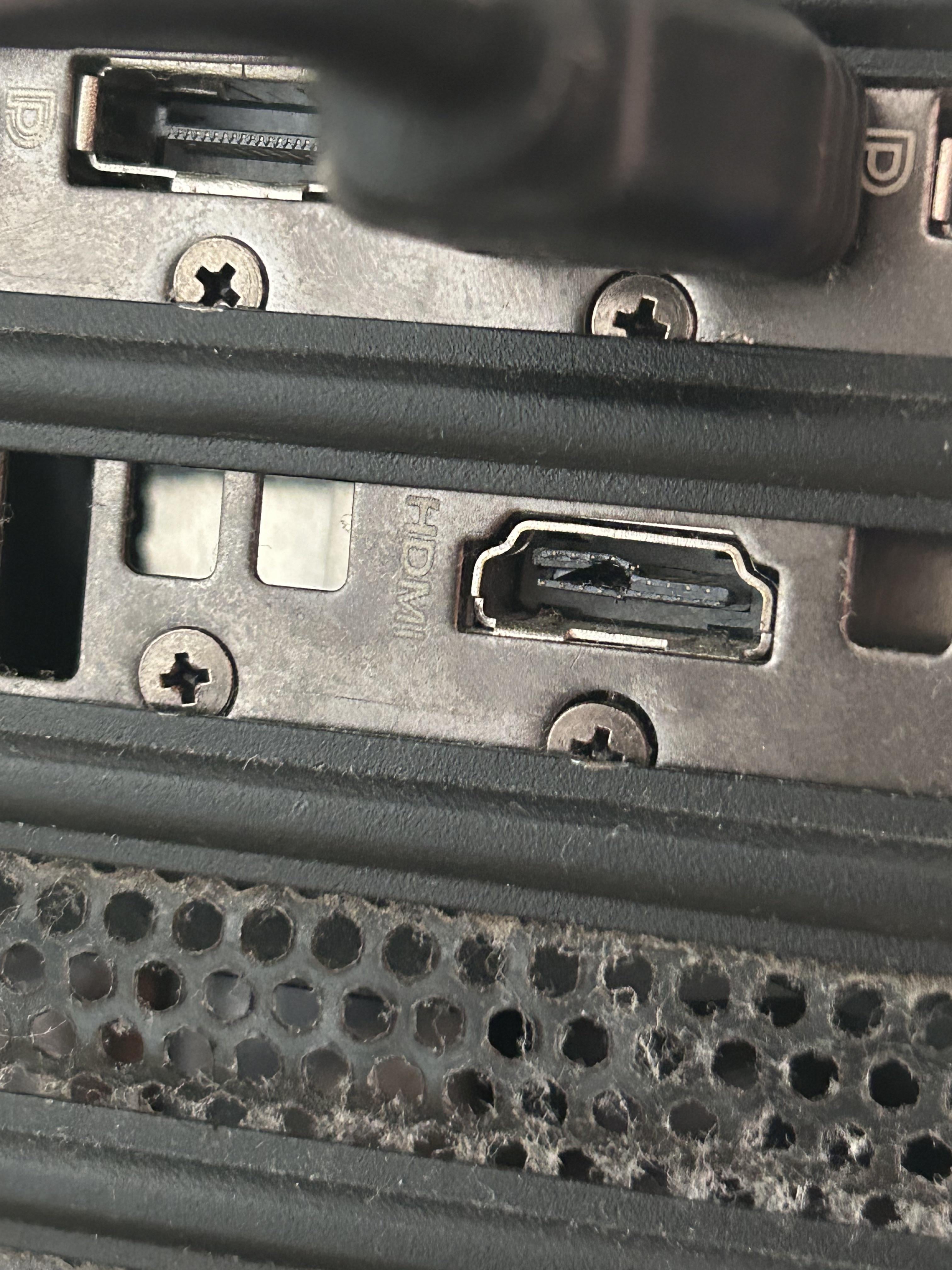
I think you try plug the displayport to hdmi port and crack the port
X3nox3s
Well the port is destroyed. Question is if it was already damaged as you got the PC or if you tried ti connect the wrong cable to it
Glad_Wing_758
That looks worse than trying a wrong cable. Make sure none of the metal contacts are touching so you don’t short the card. If it came that way then you need to return it. That looks like someone took a screwdriver to it
YellowFogLights
That port is ruined but you’re only as screwed as buying a cheap adapter to use one of the free ports.
PixelCortex
It’s possible to solder a new port to the PCB of the graphics card, that’s the only way to repair it, but It’s fairly involved, not a DIY job.
Smellfish360
yea, that’s cooked.
Mean_Cheek_7830
How does that even happen lol
OkAnimator34
Looks cooked
draig_requiem
Nope ur fried.
Voxelium
The PCMR gods are telling you to use Displayport like a true PC Gamer
MeakerSE
If it still has value and you need the port you can get an electronics repair place to solder on a new connector and it will work.
Red5Draws
The forbidden port.
kyle123real
You’re not cooked, it’s just a single port, GPU still works and is definitely still usable.
There’s many others to use, it shouldn’t be the biggest deal if everything else is working fine!
Luqboyy
Did you try putting it in rice? Heard it fixes lots of things..
Eastwindy123
Just buy a display port cable and use the top left port. It’s fine
ekimolaos
you’re definitely undercooked, a bit salmonely, but maybe you’re a bit fried or baked. What would be worse would be boiled.
LionStar303
Not you but that port seems to be cooked.
SolitaryMassacre
That can be fixed in the right hands..
What I would do – depending on if the metal tabs are damaged, place a small amount of CA glue and squeeze it back together.
If that fails, I would use my hot air tool to replace the entire port as its not that hard
Hey OP don’t let these guys make you feel dumb. You bought it second hand (probably shoulda checked the ports first but that’s yesterday’s problem) so you don’t even know if this is your fault. Display port is always an option but if you insist on using HDMI you could probably take it to a computer repair shop for less money and insurance than repairing it yourself.

25 Comments
I think you try plug the displayport to hdmi port and crack the port
Well the port is destroyed. Question is if it was already damaged as you got the PC or if you tried ti connect the wrong cable to it
That looks worse than trying a wrong cable. Make sure none of the metal contacts are touching so you don’t short the card. If it came that way then you need to return it. That looks like someone took a screwdriver to it
That port is ruined but you’re only as screwed as buying a cheap adapter to use one of the free ports.
It’s possible to solder a new port to the PCB of the graphics card, that’s the only way to repair it, but It’s fairly involved, not a DIY job.
yea, that’s cooked.
How does that even happen lol
Looks cooked
Nope ur fried.
The PCMR gods are telling you to use Displayport like a true PC Gamer
If it still has value and you need the port you can get an electronics repair place to solder on a new connector and it will work.
The forbidden port.
You’re not cooked, it’s just a single port, GPU still works and is definitely still usable.
There’s many others to use, it shouldn’t be the biggest deal if everything else is working fine!
Did you try putting it in rice? Heard it fixes lots of things..
Just buy a display port cable and use the top left port. It’s fine
you’re definitely undercooked, a bit salmonely, but maybe you’re a bit fried or baked. What would be worse would be boiled.
Not you but that port seems to be cooked.
That can be fixed in the right hands..
What I would do – depending on if the metal tabs are damaged, place a small amount of CA glue and squeeze it back together.
If that fails, I would use my hot air tool to replace the entire port as its not that hard
Did the hulk try connecting to this port ?
Did you try rice?
you are not cookeed, but that port definetly is
Gonna cost you 4 bucks
https://www.amazon.es/Adaptador-Conversor-DisplayPort-Hembra-Electr%C3%B3nica/dp/B077F5PMKL/
Use a display port. Hdmi is inferior anyway.
Hey OP don’t let these guys make you feel dumb. You bought it second hand (probably shoulda checked the ports first but that’s yesterday’s problem) so you don’t even know if this is your fault. Display port is always an option but if you insist on using HDMI you could probably take it to a computer repair shop for less money and insurance than repairing it yourself.
looks like you’re a display port guy now