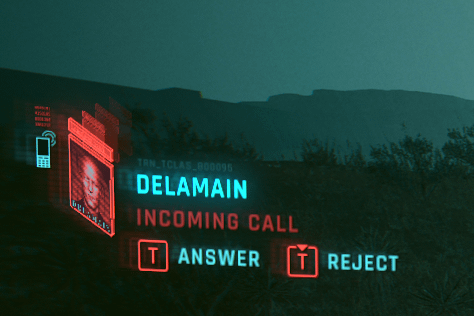
Does anybody know how to change the inputs for “answer call” & “reject call”? …Idk how I managed to screw this up^^

Does anybody know how to change the inputs for “answer call” & “reject call”? …Idk how I managed to screw this up^^
12 Comments
Bro it’s one button.
Press to pick up and hold press to reject seems easy enough.
Tap to answer, hold to reject.
Push T to answer, hold T to reject
Use 🧠
Go to C:Users [[[Your Windows Username]]] AppDataLocalCD Projekt RedCyberpunk 2077. Open usersettings. json and find whichever keybind you wish to change and switch it that way
It’s not screwed up, that’s literally the default controls.
Press T to answer. Hold down T to reject. It’s not rocket science.
Bruh
skill issue tbh
Press or tap T to answer the call, hold down T to reject the call, it is quite straight forward when you think about it 🤣

I’m not sure what your issue is, since I have never had this issue myself.
if you could just explain in some more detail what your issue is maybe I could help
is it that you haven’t realised that the reject is a hold (as indicated by the little tab at the top of the icon)?