It’s odd. Will you play the one till the last time
No_Profession_90
No need to
We handle the situation
palaceofcesi
Back up your data, reinstall Windows
Altruistic_Oven_779
just download the windows 11 installation assistant, itll probably fix it.
if that doesnt work,download the windows 11 iso (might take a while since its like 3 gigs in size), mount it and run “setup.exe”.
Amilo159
If you really must move to a inferior OS, download w11 iso and make a USB boot device from it.
blacklotusY
You can just install Windows 11 manually. Look up online how to install Windows 11 manually and there’s a lot of videos out there.
Thumbfury
UEFI or Legacy bios?
Xenoleff
I had the same thing happen to me a couple weeks ago and I think I just like reset my pc or somthing it still showed I couldn’t install it but let me
Key-Tiger449
Install Windows 11 using the ISO and create the boot medium (e.g., USB stick) using Rufus. It will deactivate the compatibility check, enable local-only user installation and turn of lots of the telemetry settings by default
cyberfrogg
Don’t use windows then. Try Linux
Electrical-Fill5190
I used to experience this issue as well, but I unknowingly resolved it once I upgraded from an integrated GPU to a discrete GPU.
fit_freak9
Have you tried enabling secure boot and to upgrade?
Maybe that would work, I mean if you are upgrading from windows 10 home to windows 11 home and need genuine windows, you could try this. Or the much easier method is to backup your data and install any OS via bootable USB drive.
Classic-Box-3919
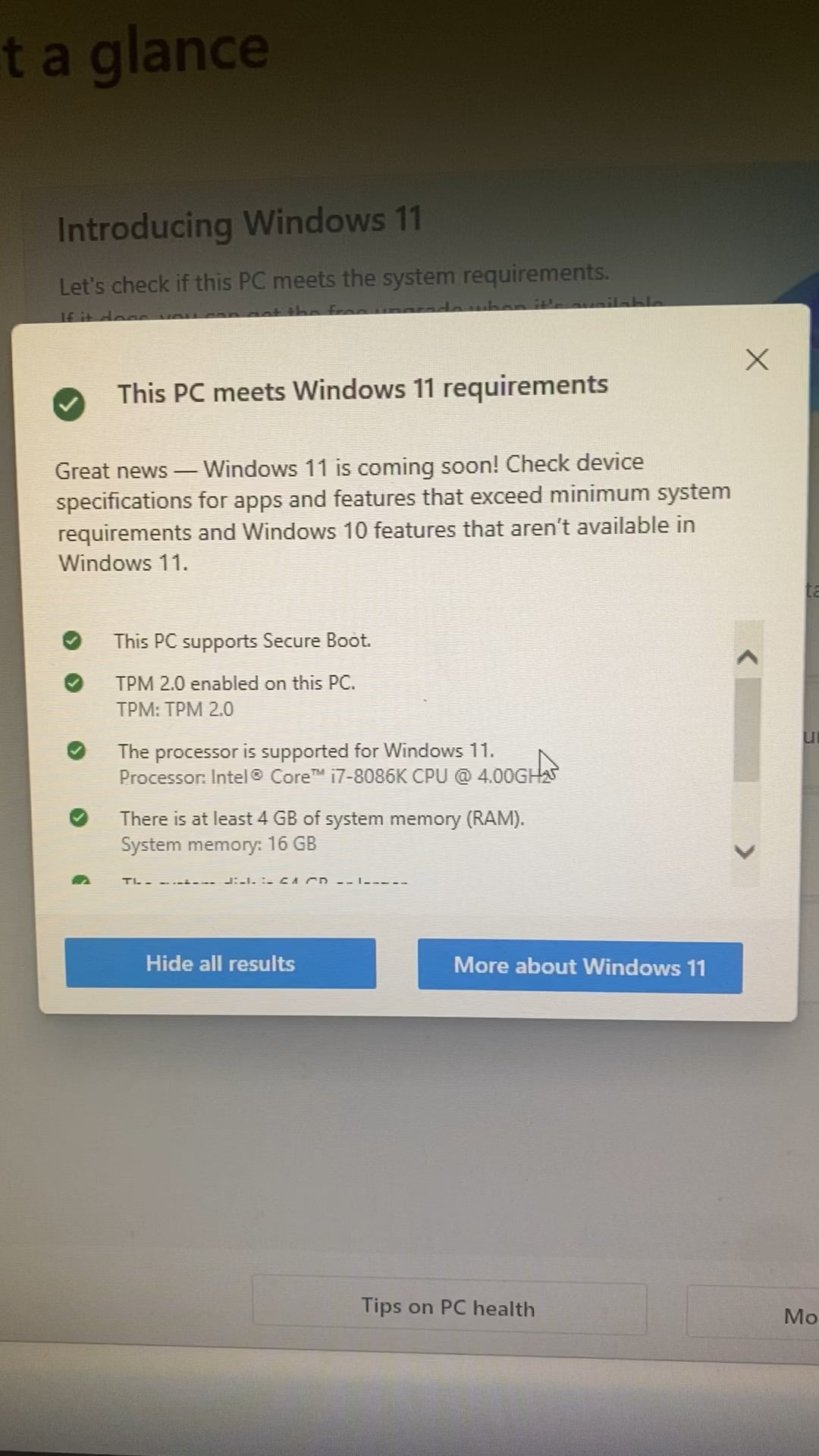
All my pc parts are from like 2021 or newer and i don’t qualify for windows 11. Kinda wild.
tssixtyone
reinstall windows with a boot stick, boot stick = 20min depend on Internet Speed, Win Installation = 15-20min
External_Ad_1476
Is TPM2 enabled in bios?
moon6080
For some reason, windows needs check from the pc health check app to verify it can install windows 11. If you follow the link and open the health check app, it should allow you to install windows 11
DJamPhishman
for me i had to update my mobo bios and then i was able to upgrade to 11 normally through Windows update
IcVictory
I had the same. The issue i had was the harddrive with the os was the wrong format or something. which resultat in not being able to make the right setting in bios, which made it not upgradeable.
totally_not_a_boat
I didnt choose piracy , it chose me
Blazer323
That means you’re safe from all the ads and bad features added to Windows 11. Don’t upgrade if you actually enjoy using a computer as a hobby.

20 Comments
It’s odd. Will you play the one till the last time
No need to
We handle the situation
Back up your data, reinstall Windows
just download the windows 11 installation assistant, itll probably fix it.
if that doesnt work,download the windows 11 iso (might take a while since its like 3 gigs in size), mount it and run “setup.exe”.
If you really must move to a inferior OS, download w11 iso and make a USB boot device from it.
You can just install Windows 11 manually. Look up online how to install Windows 11 manually and there’s a lot of videos out there.
UEFI or Legacy bios?
I had the same thing happen to me a couple weeks ago and I think I just like reset my pc or somthing it still showed I couldn’t install it but let me
Install Windows 11 using the ISO and create the boot medium (e.g., USB stick) using Rufus. It will deactivate the compatibility check, enable local-only user installation and turn of lots of the telemetry settings by default
Don’t use windows then. Try Linux
I used to experience this issue as well, but I unknowingly resolved it once I upgraded from an integrated GPU to a discrete GPU.
Have you tried enabling secure boot and to upgrade?
Maybe that would work, I mean if you are upgrading from windows 10 home to windows 11 home and need genuine windows, you could try this. Or the much easier method is to backup your data and install any OS via bootable USB drive.
All my pc parts are from like 2021 or newer and i don’t qualify for windows 11. Kinda wild.
reinstall windows with a boot stick, boot stick = 20min depend on Internet Speed, Win Installation = 15-20min
Is TPM2 enabled in bios?
For some reason, windows needs check from the pc health check app to verify it can install windows 11. If you follow the link and open the health check app, it should allow you to install windows 11
for me i had to update my mobo bios and then i was able to upgrade to 11 normally through Windows update
I had the same. The issue i had was the harddrive with the os was the wrong format or something. which resultat in not being able to make the right setting in bios, which made it not upgradeable.
I didnt choose piracy , it chose me
That means you’re safe from all the ads and bad features added to Windows 11. Don’t upgrade if you actually enjoy using a computer as a hobby.