Task Manager helps to close the app that’s wanting you to sign in.
You may also do a deep search, go into your System 32 folder, find the exact file that causes that to pop up, and delete it.
Tip: Did you know there are some “programs” on your System 32 folder, that does not allow you to “Own” your own personal computer?
Der_Hausmeisterr
I have the same problem since a few windows updates ago. Idk what is happening.
khrossjointz
Ah, the problem here is you have windows installed.
M34TST1Q
Dude… you need to clean up that taskbar.
TheOzarkWizard
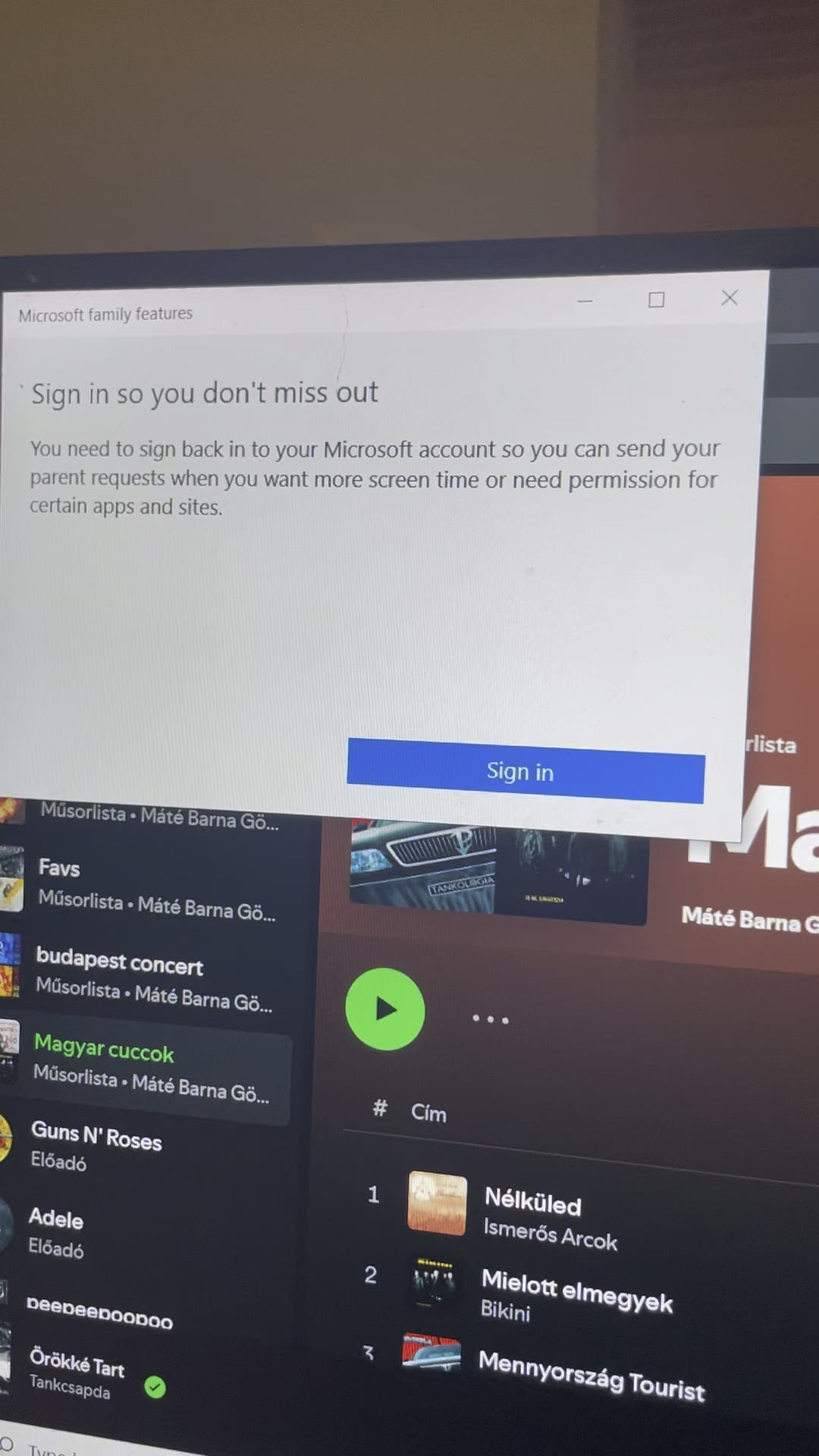
Sign in, so you don’t miss out.
Outrageous_Cupcake97
It’s like Microsoft’s job now is more focused in destroying windows 10 so people will get window 11🤷
Naive-Fondant-754
Sometimes the updates fuck up so much ..
past 3 months windows 11 is actively deleting my games on steam .. “extremely dangerous” according to the WD.
Asked on MS forum about that and their response was “trust in WD, it knows what it is doing” ..
Had to install few third party programs to “hack” windows and disable WD .. standard options were unsuccessful. It was like skynet was deleting my games and skynet was blocking from turning of skynet .. it was so fucked up.
I remember like 3 years ago or so, there was an update that fucked up so many SSD disks .. windows start up took like 15 minutes .. took over 6 months before they fixed that.
Checking on google about your problem .. its over a year old. So mamy options to choose from .. who knows which one will work.
TheTank18
Try signing out and back in to your Microsoft Account.
Unpopular opinion: Just install Linux and never again bother with problems that you didn’t cause yourself. If you aren’t doing competitive gaming, differences for private users won’t be that big anyways (and probably not the best idea if you are working with very specific professional software because Linux support is essentially non-existing).
PijanyRuski
Get Linux, it’s not a console, you have the freedom.
The-Casual-Lurker
Change to Linux
SwimmingPatience5083
To get rid of this, sign in (and also you won’t miss out)
MateD94
* Press the **Windows key + R** to open the Run dialog box.
* Type “**services.msc**” and press **Enter.**
* In the **Services window**, scroll down and locate the “**Microsoft Family Features**” service.
* Right-click on the service and select **Properties.**
* Change the Startup type to “**Disabled**” and click **Apply**.
* Restart your computer and check if the pop-up still appears.
Select-Election4064
You could just sign in?
reddit_is_bad_true
win+tab and throw it to the other window maybe?
Datuser14
Install Fedora 40 Workstation
txivotv
I would suggest trying to search for some debloating scripts. Read well before doing anything, as it can mess with your windows installation, but you get rid of many many many shit windows try to force feed you
conocobhar
Sign in. Duh.
LuceusXylian
Replace Windows by installing Linux Mint. You are welcome.
vjollila96
its sign to go to linux
VictorDelaviga
Don’t miss out 😉
SharpY2001
Obligatory bojler eladó comment
Melodic-Print2217
Press the (-) button and then just leave it don’t press on it
PcDealer007
Just google win 10 debloater works on 11 aswell its on github just use that and debloat your pc. You are most welcome dude
KanedaSyndrome
registry menu probably.
captainkingow
Magyar cuccok lol
Willing-Mine-5326
🇭🇺🇭🇺🇭🇺
Powerful-Cost-7227
Maybe just sign in lmao
amcco1
Turn off your computer and make sure it powers down.
Drop it in a 43 foot hole in the ground.
Bury it completely rocks and boulders should be fine.
Then burn all the clothes you may worn anytime you were alive.
No-Kiwi489
Just sign in already.
P_ump_ed
use linux
ToxicBuiltYT
fedoraproject dot org
ToxicTomahawk
Go get an apple ipad lol
zealouszorse
Vendor lock in is wild
Bielm0
Go to Microsoft family safety and remove yourself from the family. Or disband it completely, it’s of no use
iDaddyBird
Stop using Edge. -_-“
Qrlcg
I have this issue too. Just sign up/ log in and it disappears for some time and reappears the next day
MrFister028
Hungarian playlist detected, Obligatory post posted.

45 Comments
Turn off parental guidance?
Task Manager helps to close the app that’s wanting you to sign in.
You may also do a deep search, go into your System 32 folder, find the exact file that causes that to pop up, and delete it.
Tip: Did you know there are some “programs” on your System 32 folder, that does not allow you to “Own” your own personal computer?
I have the same problem since a few windows updates ago. Idk what is happening.
Ah, the problem here is you have windows installed.
Dude… you need to clean up that taskbar.
Sign in, so you don’t miss out.
It’s like Microsoft’s job now is more focused in destroying windows 10 so people will get window 11🤷
Sometimes the updates fuck up so much ..
past 3 months windows 11 is actively deleting my games on steam .. “extremely dangerous” according to the WD.
Asked on MS forum about that and their response was “trust in WD, it knows what it is doing” ..
Had to install few third party programs to “hack” windows and disable WD .. standard options were unsuccessful. It was like skynet was deleting my games and skynet was blocking from turning of skynet .. it was so fucked up.
I remember like 3 years ago or so, there was an update that fucked up so many SSD disks .. windows start up took like 15 minutes .. took over 6 months before they fixed that.
Checking on google about your problem .. its over a year old. So mamy options to choose from .. who knows which one will work.
Try signing out and back in to your Microsoft Account.
Typical Microsoft shit
might be an error with a 3rd party program, this thread should help
[https://answers.microsoft.com/en-us/windows/forum/all/sign-in-so-you-dont-miss-out-constant-pop-up/21664bdf-eb90-4755-b109-ce230888cfab](https://answers.microsoft.com/en-us/windows/forum/all/sign-in-so-you-dont-miss-out-constant-pop-up/21664bdf-eb90-4755-b109-ce230888cfab)
Put your monitor in the microwave
Revert back to Windows 10.
*laughs in Linux*
Unpopular opinion: Just install Linux and never again bother with problems that you didn’t cause yourself. If you aren’t doing competitive gaming, differences for private users won’t be that big anyways (and probably not the best idea if you are working with very specific professional software because Linux support is essentially non-existing).
Get Linux, it’s not a console, you have the freedom.
Change to Linux
To get rid of this, sign in (and also you won’t miss out)
* Press the **Windows key + R** to open the Run dialog box.
* Type “**services.msc**” and press **Enter.**
* In the **Services window**, scroll down and locate the “**Microsoft Family Features**” service.
* Right-click on the service and select **Properties.**
* Change the Startup type to “**Disabled**” and click **Apply**.
* Restart your computer and check if the pop-up still appears.
You could just sign in?
win+tab and throw it to the other window maybe?
Install Fedora 40 Workstation
I would suggest trying to search for some debloating scripts. Read well before doing anything, as it can mess with your windows installation, but you get rid of many many many shit windows try to force feed you
Sign in. Duh.
Replace Windows by installing Linux Mint. You are welcome.
its sign to go to linux
Don’t miss out 😉
Obligatory bojler eladó comment
Press the (-) button and then just leave it don’t press on it
Just google win 10 debloater works on 11 aswell its on github just use that and debloat your pc. You are most welcome dude
registry menu probably.
Magyar cuccok lol
🇭🇺🇭🇺🇭🇺
Maybe just sign in lmao
Turn off your computer and make sure it powers down.
Drop it in a 43 foot hole in the ground.
Bury it completely rocks and boulders should be fine.
Then burn all the clothes you may worn anytime you were alive.
Just sign in already.
use linux
fedoraproject dot org
Go get an apple ipad lol
Vendor lock in is wild
Go to Microsoft family safety and remove yourself from the family. Or disband it completely, it’s of no use
Stop using Edge. -_-“
I have this issue too. Just sign up/ log in and it disappears for some time and reappears the next day
Hungarian playlist detected, Obligatory post posted.
https://preview.redd.it/v49enp71pk9d1.jpeg?width=600&format=pjpg&auto=webp&s=14d91b9f94178943d89a977e6b5c036b673d384b
Sign in so you don’t miss out