
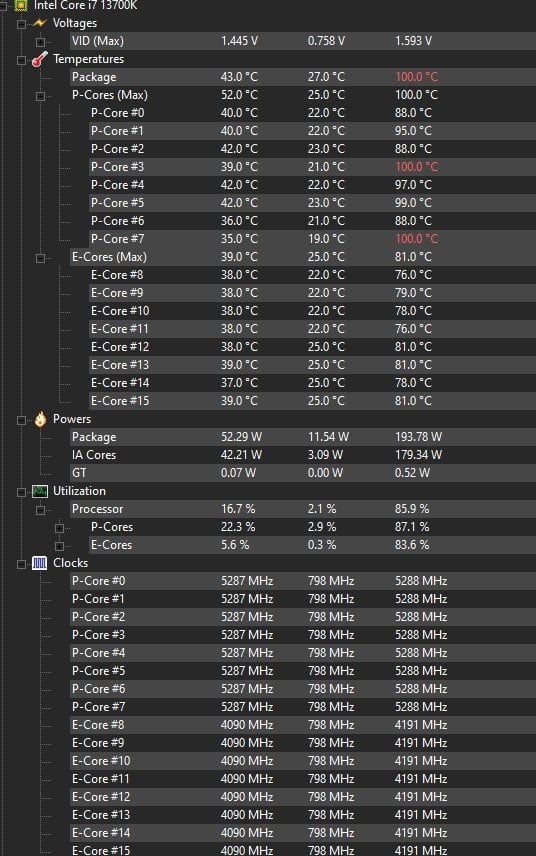
Hi I'm not experienced at all in undervolting and it's been 2 years of me running my 13700k at 100c, and just a month ago i found out about it. I've been experimenting undervolting and messing with the bios what do you guys recommend
i tried this guide my offset limit sadly is -0.05 it lowered my temps by a little but still hits 100 when benchmark testing or stress testing also some games hit 100 i can never tame it
i also disabled the enchantment thing, changed the lcc to 4, limited my cpu powers to PL1-125 PL2-200 and i still hit 100
one thing i noticed when downloading a game on steam my temps hit +90
this is my HWMonitor readings https://imgur.com/a/E5RB2UC after one Cinebench test
i ordered the Thermalright contact frame it will be here in days
sorry my english isn't great
my pc specs are:
13700k cpu
3080 gpu
2 Corsair Vengeance Rgb Pro Sl 32Gb rams
asus rog strix b660-a gaming wifi d4
lian li galahad 360 cooler
edit: offset crashed at 0.05 so i lowered it to 0.04 here is the new HWMonitor after Cinabench test https://imgur.com/a/MUAPcbb my score was 24835 i saw people with 30k 🙁
here is hwinfo64 reading after one test https://imgur.com/a/d6UyenN idk what to look for sorry if not correct
2 Comments
Don’t use hardwaremonitor, use hwinfo64
Those Lian Li Galahad AIOs have some reliability issues, I’ve seen plenty of posts on the Lian Li sub about those things, so might be worth checking
Im not a intel guy but you can probably run a bigger voltage offset if you lower your boost frequency a bit and increase your vcore load line
Thermal Grizzly Contact Frame.