get some kind of fishing wire or string and separate the IHS from heatsink, don’t grab the cpu by hand in this state
edit: heating up method is better
Lisata598
Everyone’s done it once (including me). Use a hair dryer to soften the adhesive then rotate the CPU whilst prying.
No-City-3293
Some heat from a hair dryer or a heat gun on a low setting should make it easy for you to rotate the CPU and get it off. You could also use a thin thread to create a bit of spacing between the IHS and the heatsink
NotNoahsArk
always run the PC with some CPU benchmark for 5 mins before taking off the CPU cooler.
Bu77L1cker
I had this exact situation a couple days ago! I just twisted it a few times from the edge and it loosened and got off easily.
David0ne86
Hot gun/hair dryer, let them run for about 5 minutes on it at like 10 cm away and then gently wiggle the cpu side to side and should come off prety easily.
You at least learned a lesson: always run a cpu benchmark (like cinebench, aida64, prime95 or OCCT) for a couple of minutes before changing cooler/thermal paste).
metalbrick55
For future reference, ALWAYS twist before pulling up. If it doesn’t twist off like a bottle cap, run a stress test on it (something like cinebench or even a cpu intensive game) and try it again after shutting the computer off.
If the heatsink brings the chip with it again, just wiggle it by the corners until it comes off. You won’t break it by doing so unless you’re extremely rough about it, just be careful to not bend a pin.
HardwareSpezialist
Let me quote Jason Derulo and Snoop Dogg:
You know what to do with that big fat butt (CPU)
Wiggle, wiggle, wiggle Wiggle, wiggle, wiggle Wiggle, wiggle, wiggle Just a little bit
tsunoro
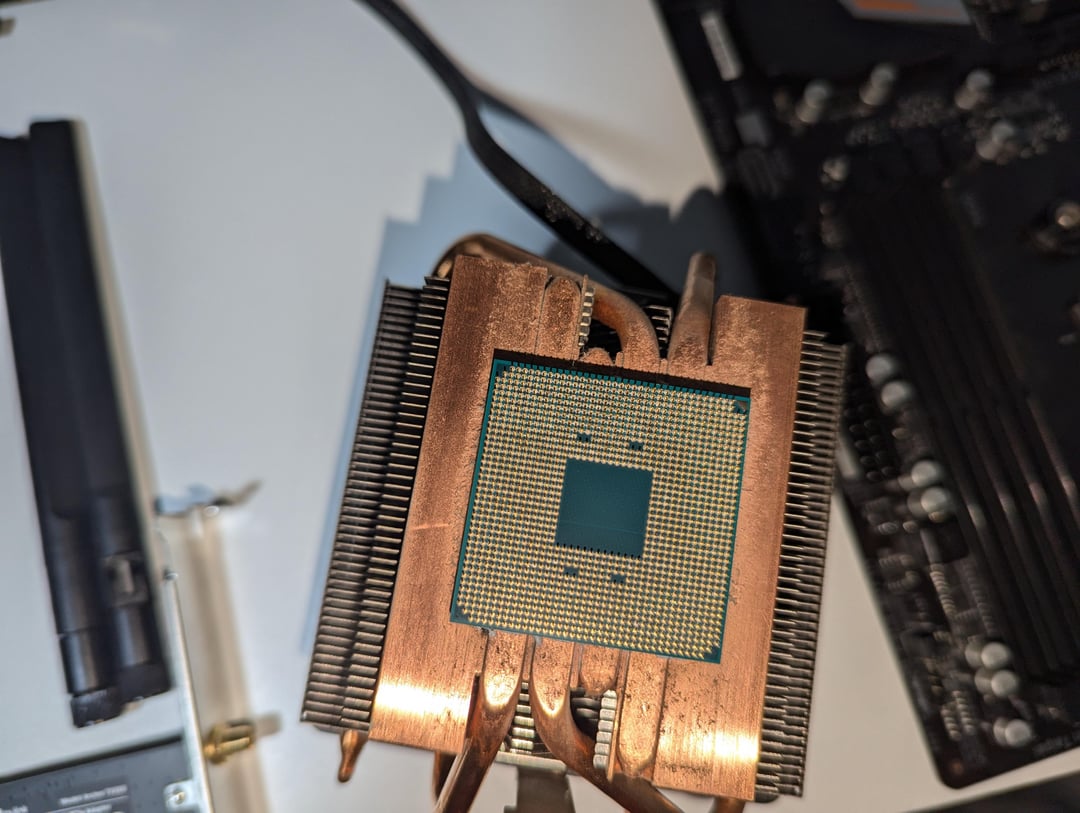
3rd slide: those pins on the right side look slightly bent, or is that the camera distortion
LigmaStonks
Hammer and chisel baby
wolfino00
Use a hairdryer to loosen the paste and wigle it like there is no tomorrow
masterquiggles
Rubbing alcohol
ExtraTNT
Get a razor blade, slowly wedge it in and add alcohol (80% or more)
Aggressive-Picture13
Try to heat the heatsink just a little and that should soften the thermal paste.
arbygoodknight
Happened to me once, my heart dropped. But i did manage to get it off, with a few bent pins. But all good, fix the pins, put it back in, use a new cooler and thermal paste. Pc works fine. Good as new.
Foxhound84
Heat it up to near operational temp, then gently turn. I chose the violence when it happened to me. I pried it with a screwdriver. No damage was done, but it was a fresh thermal paste.
Practical_Adagio_504
Gotta twist it off like separating an Oreo cookie apart…
NewspaperFabulous
pry it open with something, a spoon or a knife, been there, done that.
AJ-MeiMei
Twist it, bop it, pull it.
Proper_Belt
Clamp it on the sides and twist.
Heat will help.
AnyScore4287
run the pc fir a while,
allow the thermal paste to heat then shut down the pc and remove the cooler
Trashrascall
What cpus still have pins? Is this an AMD thing?
Beautiful_Rough9463
Use a tiny crowbar.
Natonelife
Happened to me last week. Warmed the PC up, did some benchmarks, opened up, twisted, turned rolled over, but nope. Came out glued to the damn plate.
I took a bit of thread and pulled it between the ihs and copper tubes. Sometimes just a little push will work, but always be careful.
TheReal_Kovacs
I love seeing a “how do I save this” post where the problem is actually really easy to solve without it being “buy a new thing.” I had this happen to me with my own rig while I was testing my CPU cooler! Came off with only a couple of gentle twists, and the CPU was perfectly fine. Hope all the great advice frim the others in this thread helps out, OP!
uL4G
Rookie mistake, always *wiggle wiggle wiggle* your cooler before pulling out.

26 Comments
get some kind of fishing wire or string and separate the IHS from heatsink, don’t grab the cpu by hand in this state
edit: heating up method is better
Everyone’s done it once (including me). Use a hair dryer to soften the adhesive then rotate the CPU whilst prying.
Some heat from a hair dryer or a heat gun on a low setting should make it easy for you to rotate the CPU and get it off. You could also use a thin thread to create a bit of spacing between the IHS and the heatsink
always run the PC with some CPU benchmark for 5 mins before taking off the CPU cooler.
I had this exact situation a couple days ago! I just twisted it a few times from the edge and it loosened and got off easily.
Hot gun/hair dryer, let them run for about 5 minutes on it at like 10 cm away and then gently wiggle the cpu side to side and should come off prety easily.
You at least learned a lesson: always run a cpu benchmark (like cinebench, aida64, prime95 or OCCT) for a couple of minutes before changing cooler/thermal paste).
For future reference, ALWAYS twist before pulling up. If it doesn’t twist off like a bottle cap, run a stress test on it (something like cinebench or even a cpu intensive game) and try it again after shutting the computer off.
If the heatsink brings the chip with it again, just wiggle it by the corners until it comes off. You won’t break it by doing so unless you’re extremely rough about it, just be careful to not bend a pin.
Let me quote Jason Derulo and Snoop Dogg:
You know what to do with that big fat butt (CPU)
Wiggle, wiggle, wiggle Wiggle, wiggle, wiggle Wiggle, wiggle, wiggle Just a little bit
3rd slide: those pins on the right side look slightly bent, or is that the camera distortion
Hammer and chisel baby
Use a hairdryer to loosen the paste and wigle it like there is no tomorrow
Rubbing alcohol
Get a razor blade, slowly wedge it in and add alcohol (80% or more)
Try to heat the heatsink just a little and that should soften the thermal paste.
Happened to me once, my heart dropped. But i did manage to get it off, with a few bent pins. But all good, fix the pins, put it back in, use a new cooler and thermal paste. Pc works fine. Good as new.
Heat it up to near operational temp, then gently turn. I chose the violence when it happened to me. I pried it with a screwdriver. No damage was done, but it was a fresh thermal paste.
Gotta twist it off like separating an Oreo cookie apart…
pry it open with something, a spoon or a knife, been there, done that.
Twist it, bop it, pull it.
Clamp it on the sides and twist.
Heat will help.
run the pc fir a while,
allow the thermal paste to heat then shut down the pc and remove the cooler
What cpus still have pins? Is this an AMD thing?
Use a tiny crowbar.
Happened to me last week. Warmed the PC up, did some benchmarks, opened up, twisted, turned rolled over, but nope. Came out glued to the damn plate.
I took a bit of thread and pulled it between the ihs and copper tubes. Sometimes just a little push will work, but always be careful.
I love seeing a “how do I save this” post where the problem is actually really easy to solve without it being “buy a new thing.” I had this happen to me with my own rig while I was testing my CPU cooler! Came off with only a couple of gentle twists, and the CPU was perfectly fine. Hope all the great advice frim the others in this thread helps out, OP!
Rookie mistake, always *wiggle wiggle wiggle* your cooler before pulling out.