On is if you’re a gamer. Ultra is you’re a gamer-gamer.
thebebee
i’ve heard ppl say if the game has a low latency option to use that and not the one in nvidia’s panel. not sure what basis it’s on
thebebee
i’ve heard ppl say if the game has a low latency option to use that and not the one in nvidia’s panel. not sure what basis it’s on
DeepJudgment
Means negative latency. The game will predict your input and send signals in advance
ghoxen
They are the equivalent of Reflex & Reflex+ that you sometimes see in game options. Reflex+ is better, but sometimes Reflex has better compatibility.
Reflex+ is essential for DLSS 3 frame generation, otherwise you will experience severe latency. Indeed, in most implementations of frame gen Reflex+ will be forced on.
KrucyG
Controls cpu render pipeline and can minimize the time the gpu is waiting for a frame to send to your monitor.
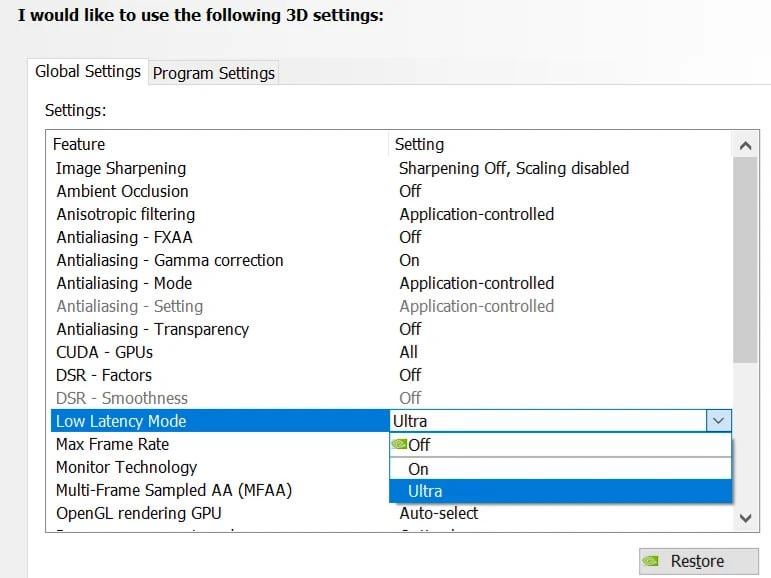
Setting it to “On” minimizes to 1 pre-rendered frame, “Ultra” tries to have no pre rendered frames similar to activating Reflex in supported games.
With more pre rendered frames you might have slightly higher fps and more consistent frame times but some added latency as the gpu can lag behind the most current “true” frame as it processes previous frames in the queue.
Different games/engines can act a little differently depending on these settings so it’s worth experimenting.
Also if the game/scenario is cpu or gpu limited can affect how useful these settings are.
That’s my simple understanding of it. Google/research and read up more if that wasn’t enough of an explanation. Many resources available. Or maybe someone can comment below to add on more details.
No_Response7340
Marceting…Nvidia is always ON but you can also choose ultra…
GoldenGamer175
Also, I would recommend leaving these settings alone. The defaults are set for a reason and should work best for the vast majority of games.
yorii
Unlike what others are claiming, it’s not strictly the same as Reflex or Reflex+Boost, but if a game supports Reflex those settings will take priority over what Low Latency Mode you have selected in the driver.
As for a more detailed explanation on what each thing does, I’ll try to explain it as simple as I can:
Low Latency Mode On = Literally the same thing as setting maximum prerendered fames to 1 in the old drivers, it caps the render queue to maximum 1 frame ahead.
Low Latency Mode Ultra = Sets maximum prerendered frames to 0, but without actually using the Reflex API, putting all the hope on coincidence or other factors that your GPU will render the correct frames in time, meaning your end result may end up stuttery or jittery.
Reflex On = Completely eliminates the need for a render queue and attempts to synchronize the framerate with the monitors refresh rate without anything buffered.
Reflex On+Boost = Actually the same as previous, but with the addition that your GPU will always be running at maximum power, even if you are CPU limited and not needing all the extra GPU power, this can sometimes provide additional reduced input latency but will result in a higher overall power consumption.
AllMyFrendsArePixels
On is low latency mode. Ultra is ultra low latency mode. Ultra low latency mode has lower latency than low latency mode. This seems fairly self-explanatory.
Spiritual_Navigator
On: reduce gpu latency
Ultra: also try to reduce cpu latency
Worldcupbrah
If im using reflex should i still keep it “on” or just leave it off?
dwolfe127
It really does not matter at this point because the game setting is going to override it in most cases. Go ahead though and play with it and see if it makes a difference (Pro tip– It Wont)

16 Comments
One Google search.
Reduces input lag up to 33%.
IIRC: 1 and 0 (On = 1ms, Ultra = 0ms)
On is if you’re a gamer. Ultra is you’re a gamer-gamer.
i’ve heard ppl say if the game has a low latency option to use that and not the one in nvidia’s panel. not sure what basis it’s on
i’ve heard ppl say if the game has a low latency option to use that and not the one in nvidia’s panel. not sure what basis it’s on
Means negative latency. The game will predict your input and send signals in advance
They are the equivalent of Reflex & Reflex+ that you sometimes see in game options. Reflex+ is better, but sometimes Reflex has better compatibility.
Reflex+ is essential for DLSS 3 frame generation, otherwise you will experience severe latency. Indeed, in most implementations of frame gen Reflex+ will be forced on.
Controls cpu render pipeline and can minimize the time the gpu is waiting for a frame to send to your monitor.
Setting it to “On” minimizes to 1 pre-rendered frame, “Ultra” tries to have no pre rendered frames similar to activating Reflex in supported games.
With more pre rendered frames you might have slightly higher fps and more consistent frame times but some added latency as the gpu can lag behind the most current “true” frame as it processes previous frames in the queue.
Different games/engines can act a little differently depending on these settings so it’s worth experimenting.
Also if the game/scenario is cpu or gpu limited can affect how useful these settings are.
That’s my simple understanding of it. Google/research and read up more if that wasn’t enough of an explanation. Many resources available. Or maybe someone can comment below to add on more details.
Marceting…Nvidia is always ON but you can also choose ultra…
Also, I would recommend leaving these settings alone. The defaults are set for a reason and should work best for the vast majority of games.
Unlike what others are claiming, it’s not strictly the same as Reflex or Reflex+Boost, but if a game supports Reflex those settings will take priority over what Low Latency Mode you have selected in the driver.
As for a more detailed explanation on what each thing does, I’ll try to explain it as simple as I can:
Low Latency Mode On = Literally the same thing as setting maximum prerendered fames to 1 in the old drivers, it caps the render queue to maximum 1 frame ahead.
Low Latency Mode Ultra = Sets maximum prerendered frames to 0, but without actually using the Reflex API, putting all the hope on coincidence or other factors that your GPU will render the correct frames in time, meaning your end result may end up stuttery or jittery.
Reflex On = Completely eliminates the need for a render queue and attempts to synchronize the framerate with the monitors refresh rate without anything buffered.
Reflex On+Boost = Actually the same as previous, but with the addition that your GPU will always be running at maximum power, even if you are CPU limited and not needing all the extra GPU power, this can sometimes provide additional reduced input latency but will result in a higher overall power consumption.
On is low latency mode. Ultra is ultra low latency mode. Ultra low latency mode has lower latency than low latency mode. This seems fairly self-explanatory.
On: reduce gpu latency
Ultra: also try to reduce cpu latency
If im using reflex should i still keep it “on” or just leave it off?
It really does not matter at this point because the game setting is going to override it in most cases. Go ahead though and play with it and see if it makes a difference (Pro tip– It Wont)