You needed to use physical jumpers back in the day to tell the motherboard which device was first and second on a particular ide connection (whicj each connection could have two devices on it). There was primary (master), secondary (slave) and usually CS (cable select). Cable Seiect was supposed to be the set it and forget it setting but in practice sometimes you just had to set it manually to get it to be detected.
widowhanzo
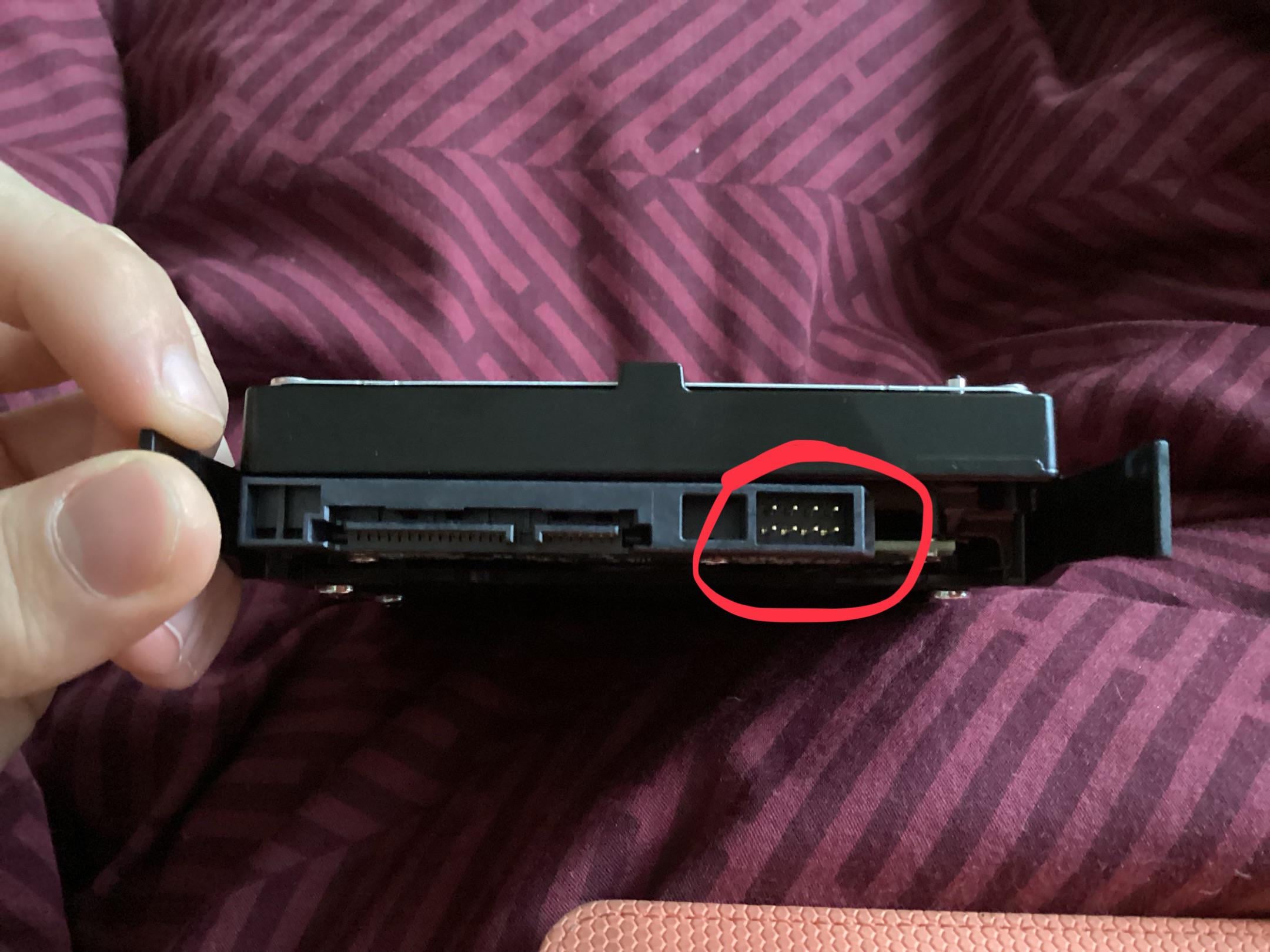
Jumper pins, you don’t need to do anything with them.
Remember when you had to set your HDDs to Master and Slave manually via jumpers?
Noch_ein_Kamel
For HDD SLI obviously
RansomStark78
Cable select wins
flippinbird
Master/Slave jumper
AKA: Hard Drive BDSM Jumper
Well, that’s what my friends and I called it.
NoseMuReup
Old BDSM hdd slave/master jumpers.
UnderFirewalled
People have already mentioned the jumper pins setting master/slave drives but another interesting thing they can be used for is to set the drive to report a lower capacity for compatibility. For example a 20GB hard drive could be jumped to report 8GB or 2GB for compatibility with DOS 6.22
Essentially the jumper pins are just a way to change drive behavior
qmiras
oh my sweet sweet summer child…i was there…on lonely nights building pcs….fighting demons and flat cables. Cold surround us all gathered in front of a monochromatic monitor looking at the characters dancing in the mist of something so primal and basic…the BIOS.
All waiting for a signal, an omen of truth that would enlighten us…doubt grew as we decided and ponder…MASTER or SLAVE.
mikpgod
Doesn’t look like a connector. Google the model and see what comes up. Seems more like a jumper as seen on old hd models
frog_o_war
That’s where you connect the flux capacitor link.
X3nox3s
It‘s crazy how long these jumper have been obsolete
hydrophile-fish
Coming up next, what is that little hole above the keys on my 1530 datasette?
Termin8rSmurf
Jumper connectors. You don’t need them, unless you want to run it as a slave or master drive, or want to change the SATA connection speed.
Brorim
jumpers were never used on sata ssds
kaeia23
Master slave, it was used on old cables when u connected more than one HDD on one cable
Sufficient_Serve_439
On IDE drives these jumpers decided if it’s master or slave, you had to have it in right configuration for the alot else the disk wouldn’t boot. In SATA it’s automatic.
bamsillo
On mac, when they used to use these type of hard drivers, they had a sensor cable to check temperatures from the disc, if you installed an ssd, you needed to disconnect that cable from the mobo or the system would have thing you had no drive installed and boost your fan speed to max all the time
SIN-apps1
Holy shit do I feel old right now…
Grunt636
It’s from the dark times when hard drives had masters and slaves before they were freed by SATAham Lincoln
Hrair
Read the manual! Or, RTFM.
But seriously, you don’t need it anymore.
FullAir4341
Jumpers to determine what function your hdd will be used for.
DocGerbill
it’s a jumper block, before SATA we used to have to set one of our devices to master and the other to slave on the same ribbon
brandmeist3r
Here you can learn more about interfacing with your drive over UART: [https://www.elektroda.com/rtvforum/topic3239509.html](https://www.elektroda.com/rtvforum/topic3239509.html) I do not think it is a header for jumpers.
Aggravating_Kick2911
OMG jumper 🙂
kekblaster
When you lose your jumper and steal the clear cmos jumper lol
Anonymous-CIAgent
Most of the time. in my days – they where used to make you select a master drive – and others you would put them on slave- so it would know your primary drive – and the others would be back up – or whatevers
topgun966

RG_Reewen
A lot of people have mentioned master/slave but that’s not what it is.
SATA doesn’t support master/slave, only IDE did.
These are just for some configuration stuff like limiting the max RPM on power up to reduce the max power draw for external USB drives.
What exactly they do can vary by drive manufacturer
Im not old enough to have needed to use jumpers but had to learn about them for my apprentiship 10 years ago, honestly sometimes i wish I was born 20 years eariler just because tech was so much more interesting than what it is today.
InterstellarReddit
Wow don’t ever @ me like that again
ilovetpb
It’s a test/diagnostic connector.
__ToneBone__
It’s not necessary, don’t worry about it
sabin1981
Damn…. This made me feel so, so old!
BrokenDusk
Some PSU cables only go in the square hole
QuiteFatty
If you know what it is and used it on an IDE drive your knees probably hurt.
Emu1981
Those pins are for debugging purposes and you can safely ignore it as a typical end user.
Those people who think that it is for master/slave/cable select jumpers are forgetting that there is no such thing for SATA drives as you can only ever have a single drive per cable.
Funcron
Master is going to be angry if the Slaves are not in line…
MrMallok
One of my Seagate Hard drives bricked years ago, it went by simply not being detected at all at BIOS.
One USB UART board, some cables from such board to some of those pins and some commands through COM did the trick and the disk went back online like nothing happened

47 Comments
Sometimes master/slave pinouts, other times it’s something else but I forget.
jumper block. Its function is dependent on the specific drive. Not really used much on SATA based drives.
It is not needed.
Learn more about Drives and their connections: [https://www.ufsexplorer.com/articles/how-to/connect-drive/](https://www.ufsexplorer.com/articles/how-to/connect-drive/)
Ah kids 😀
I was there, 10000 years ago…
You needed to use physical jumpers back in the day to tell the motherboard which device was first and second on a particular ide connection (whicj each connection could have two devices on it). There was primary (master), secondary (slave) and usually CS (cable select). Cable Seiect was supposed to be the set it and forget it setting but in practice sometimes you just had to set it manually to get it to be detected.
Jumper pins, you don’t need to do anything with them.
https://pcpartpicker.com/forums/topic/359090-what-is-this-8-pin-connector-on-my-hard-drive
cuz your all old enough Happy Father’s Day all
Remember when you had to set your HDDs to Master and Slave manually via jumpers?
For HDD SLI obviously
Cable select wins
Master/Slave jumper
AKA: Hard Drive BDSM Jumper
Well, that’s what my friends and I called it.
Old BDSM hdd slave/master jumpers.
People have already mentioned the jumper pins setting master/slave drives but another interesting thing they can be used for is to set the drive to report a lower capacity for compatibility. For example a 20GB hard drive could be jumped to report 8GB or 2GB for compatibility with DOS 6.22
Essentially the jumper pins are just a way to change drive behavior
oh my sweet sweet summer child…i was there…on lonely nights building pcs….fighting demons and flat cables. Cold surround us all gathered in front of a monochromatic monitor looking at the characters dancing in the mist of something so primal and basic…the BIOS.
All waiting for a signal, an omen of truth that would enlighten us…doubt grew as we decided and ponder…MASTER or SLAVE.
Doesn’t look like a connector. Google the model and see what comes up. Seems more like a jumper as seen on old hd models
That’s where you connect the flux capacitor link.
It‘s crazy how long these jumper have been obsolete
Coming up next, what is that little hole above the keys on my 1530 datasette?
Jumper connectors. You don’t need them, unless you want to run it as a slave or master drive, or want to change the SATA connection speed.
jumpers were never used on sata ssds
Master slave, it was used on old cables when u connected more than one HDD on one cable
On IDE drives these jumpers decided if it’s master or slave, you had to have it in right configuration for the alot else the disk wouldn’t boot. In SATA it’s automatic.
On mac, when they used to use these type of hard drivers, they had a sensor cable to check temperatures from the disc, if you installed an ssd, you needed to disconnect that cable from the mobo or the system would have thing you had no drive installed and boost your fan speed to max all the time
Holy shit do I feel old right now…
It’s from the dark times when hard drives had masters and slaves before they were freed by SATAham Lincoln
Read the manual! Or, RTFM.
But seriously, you don’t need it anymore.
Jumpers to determine what function your hdd will be used for.
it’s a jumper block, before SATA we used to have to set one of our devices to master and the other to slave on the same ribbon
Here you can learn more about interfacing with your drive over UART: [https://www.elektroda.com/rtvforum/topic3239509.html](https://www.elektroda.com/rtvforum/topic3239509.html) I do not think it is a header for jumpers.
OMG jumper 🙂
When you lose your jumper and steal the clear cmos jumper lol
Most of the time. in my days – they where used to make you select a master drive – and others you would put them on slave- so it would know your primary drive – and the others would be back up – or whatevers

A lot of people have mentioned master/slave but that’s not what it is.
SATA doesn’t support master/slave, only IDE did.
These are just for some configuration stuff like limiting the max RPM on power up to reduce the max power draw for external USB drives.
What exactly they do can vary by drive manufacturer
[Wait a minute, where’s me jumper?](https://youtu.be/jxmZZBJQAKM)
Master / slave. Not in a 1800s way though
Im not old enough to have needed to use jumpers but had to learn about them for my apprentiship 10 years ago, honestly sometimes i wish I was born 20 years eariler just because tech was so much more interesting than what it is today.
Wow don’t ever @ me like that again
It’s a test/diagnostic connector.
It’s not necessary, don’t worry about it
Damn…. This made me feel so, so old!
Some PSU cables only go in the square hole
If you know what it is and used it on an IDE drive your knees probably hurt.
Those pins are for debugging purposes and you can safely ignore it as a typical end user.
Those people who think that it is for master/slave/cable select jumpers are forgetting that there is no such thing for SATA drives as you can only ever have a single drive per cable.
Master is going to be angry if the Slaves are not in line…
One of my Seagate Hard drives bricked years ago, it went by simply not being detected at all at BIOS.
One USB UART board, some cables from such board to some of those pins and some commands through COM did the trick and the disk went back online like nothing happened