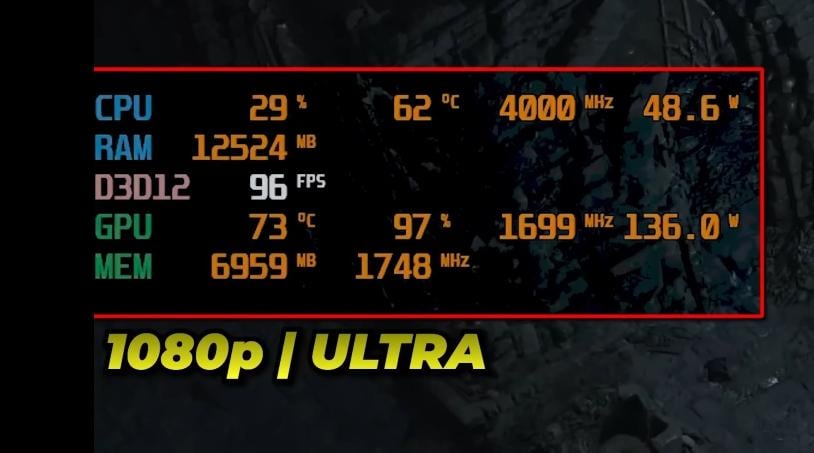
RivaTuner, often in conjunction with MSI Afterburner. Afterburner will offer to install RivaTuner when you install it.
retiredrlplayer
MSI afterburner
Weetile
MangoHud
agldyne
Pornhub
NotJustBibbit
MSI Afterburner gives you a prompt to download River Tuner
Trivo3
The program that displays is Riva Tuner Statistics Server
The numbers and parameters it draws from are likely MSI Afterburner which iirc comes **with** RTSS?
In any case if you want to have a better and more custom display, I would suggest you install RTSS standalone and also install HWinfo64 (monitoring software). Use Hwinfo to output to a running RivaTuner, anything you want in any position you want it.
Savings_Set_8114
MSI Anusburner.
UlteriorMotive66
That’s RivaTuner addon used alongside MSI Afterburner.
There are some other useful hardware monitoring tools like CPU-Z, GPU-Z, CrystalDiskInfo, HWiNFO if ur interested!
Smooooochy
Good people above me already gave you the answer, I’m just here to give me 2 cents:
I’ve been using Afterburner/RTSS/HWinfo64 for years, but I did have some weird points of struggle (Vulkan games not always detecting FPS, in some games the OSD looks weird, etc), and also the set up is not completely foolproof or straightforward.
My warm suggestion, if you’re on AMD just use Radeon Settings’ Overlay. Super easy to setup and has most or all of the info you need.
prombloodd
3Dmark
cumetoaster
On Windows Afterburner. On Linux MangoHud. Same look and function
jaypets
as many others have mentioned it’s RivaRuner but I personally recommend nvidia frameview. i find the ui to be less invasive and i like the default font it uses.
Proof_Cress3653
Msi afterburner
KM68
I use Nvidia overlay
ImCursedM8
Msi afterburner
Jarnis
Not a benchmark. Just indicator of some stats (Afterburner/RivaTuner Statistics Server overlay)
Note that overlays like this can sometimes cause conflicts and even driver crashes. Be sure to have up to date version or you will have endless issues…
B_ThePsychopath
Riva Tunner. I do not recommend to use it with AMD when Overclocked cuz it fucks up the settings. Use AMD built in overlay, it’s good enough
Dreammemek
Either RivaTuner (for windows), or Mangohud (for steam deck/Linux)

21 Comments
RivaTuner, often in conjunction with MSI Afterburner. Afterburner will offer to install RivaTuner when you install it.
MSI afterburner
MangoHud
Pornhub
MSI Afterburner gives you a prompt to download River Tuner
The program that displays is Riva Tuner Statistics Server
The numbers and parameters it draws from are likely MSI Afterburner which iirc comes **with** RTSS?
In any case if you want to have a better and more custom display, I would suggest you install RTSS standalone and also install HWinfo64 (monitoring software). Use Hwinfo to output to a running RivaTuner, anything you want in any position you want it.
MSI Anusburner.
That’s RivaTuner addon used alongside MSI Afterburner.
There are some other useful hardware monitoring tools like CPU-Z, GPU-Z, CrystalDiskInfo, HWiNFO if ur interested!
Good people above me already gave you the answer, I’m just here to give me 2 cents:
I’ve been using Afterburner/RTSS/HWinfo64 for years, but I did have some weird points of struggle (Vulkan games not always detecting FPS, in some games the OSD looks weird, etc), and also the set up is not completely foolproof or straightforward.
My warm suggestion, if you’re on AMD just use Radeon Settings’ Overlay. Super easy to setup and has most or all of the info you need.
3Dmark
On Windows Afterburner. On Linux MangoHud. Same look and function
as many others have mentioned it’s RivaRuner but I personally recommend nvidia frameview. i find the ui to be less invasive and i like the default font it uses.
Msi afterburner
I use Nvidia overlay
Msi afterburner
Not a benchmark. Just indicator of some stats (Afterburner/RivaTuner Statistics Server overlay)
Note that overlays like this can sometimes cause conflicts and even driver crashes. Be sure to have up to date version or you will have endless issues…
Riva Tunner. I do not recommend to use it with AMD when Overclocked cuz it fucks up the settings. Use AMD built in overlay, it’s good enough
Either RivaTuner (for windows), or Mangohud (for steam deck/Linux)
Kind of reminds me of FPS monitor on steam.
FurMark manda, betazos
Msi afterburner