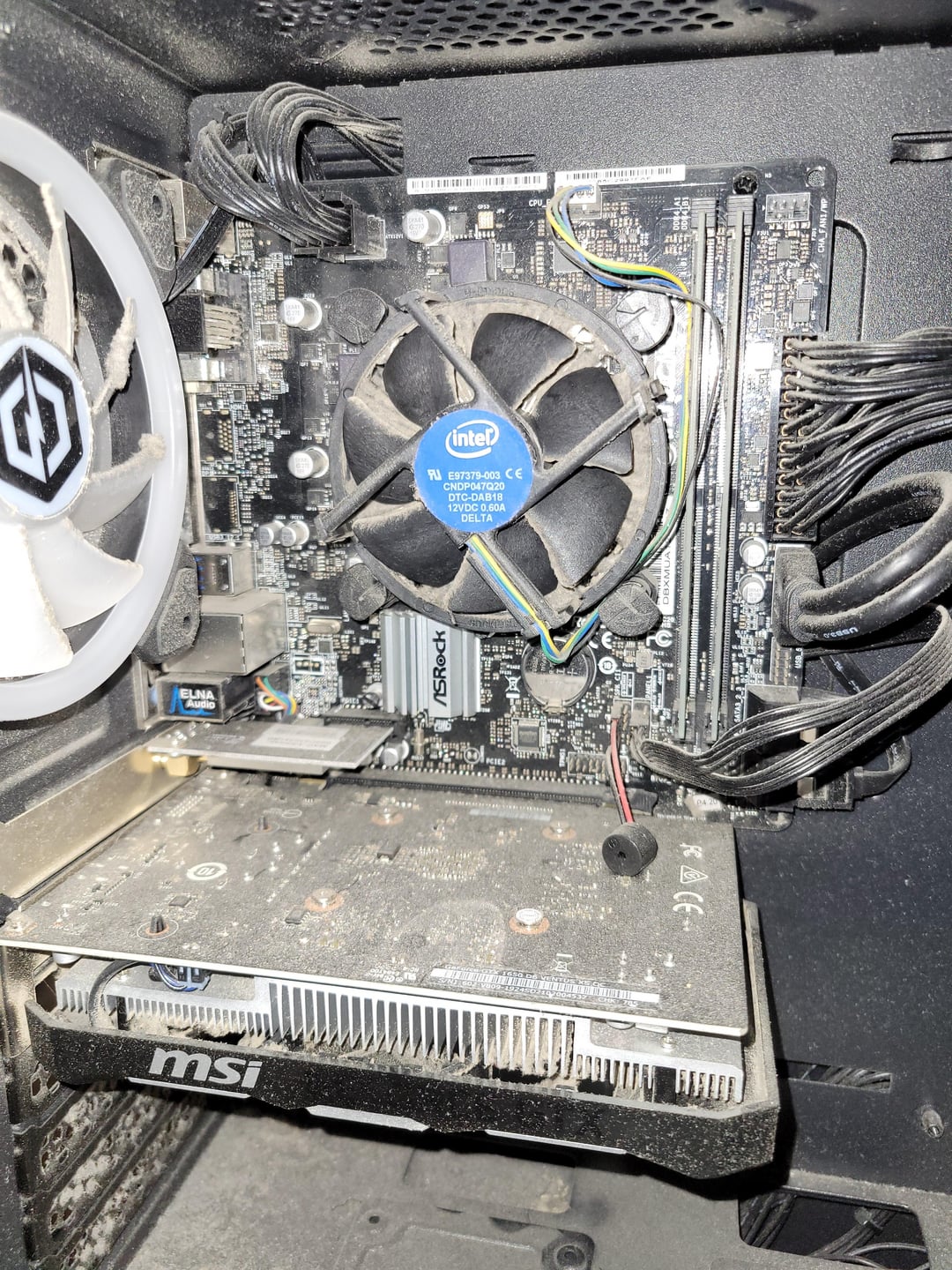
This pc is a prebuilt and I have no idea if it even has any extra slots for storage. I currently have a 220gb ssd and a 1tb hdd. I would like to add in a 1tb ssd if i can but I don't know if there is even space for one.

This pc is a prebuilt and I have no idea if it even has any extra slots for storage. I currently have a 220gb ssd and a 1tb hdd. I would like to add in a 1tb ssd if i can but I don't know if there is even space for one.
25 Comments
The two cables on the bottom right of the mptherboard should be sata. Check if there’s more slots to plug into
The better option tho is to go find your motherboard manual online and read thru that
Bro lives on Tatooine
Is this the poster art for Dune Part 3?
Dust is taking up storage space.
The first step in upgrading your storage is getting an old toothbrush and a bottle of Isopropyl alcohol and with the computer unplugged cleaning it. Once it’s clean get yourself a hard drive and put it in a USB enclosure and plug it into a USB port.
Ok forget the dust, is noone going to talk about that bios speaker hanging over the gpu?
Provided you have connectors on the board and power supply for them the two panels on the bottom with thumb screws are each for attaching a drive to, probably 2.5” sized.
If you take off the other side of the case your existing drives are maybe mounted behind the motherboard, depending on what case you have. Or they could be under the fan stack. At worst you could swap out one of them for a larger drive if the board doesn’t have enough connections for another.
You’d also probably need to pie through a badly organized chunk of cables on the other side to find power attachments.
BRO CLEAN THAT SHI- RN
Looks like you’re storing enough dirt and dust already. JFC. You need to worry about cleaning that sand box before you worry about adding anything.
one blow and an entire storm gonna start
Storage? You’ve got like, 12TB of dust in there.
Damm bitch, you live like this ?
you should ask “how should i clean my pc” before worrying about adding storage.
I bet you have a Sandy Bridge CPU there.
You don’t need it. You have plenty of room to store more dust in there.

I get that this is a satire post, but I do see two empty SATA ports.
That is entirely up to what kind of storage you want to have. If it’s a nvme/sata, you can look for an m.2 slot. If it’s a sata3 slot, it looks like you have some of them unoccupied.
Follow the cable connected from your 128gb ssd to your motherboard
How are people not ashamed to post this kind of pictures?
It takes few minutes to clean it up and you already have the case open…
My brother in Christ please clean your shiet
You can’t do this to us…seriously??!?
Step one clean it.
Friendly reminder, never take your desktop computer to the beach with you
I store dirt in plant pots, add seeds, water to keep moist hopefully some nice flowers will grow
Personally I’d never ever post my rig anywhere without cleaning it out first unless I wanted the comments to look like this