I heard rdna 4 will fix the high idle power draw but I don’t know much about gpus so don’t quote me on it.
Available-Tradition4
It’s 90 with every things close ? Chrome etc
SortOfaTaco
Another user said something about desktop recording being enabled in the software or something and that when they disabled it, dropped them down to 10 watts.
“I don’t have a 7900xt but a 6750xt. Was wondering why my power consumption was so high at 40-50watts using multi monitors with different hz and resolution. Then realized that desktop recording and all the other recording settings were turned on so maybe this might help someone if you try changing the live recording settings. It now idles at around 10 watts~ so it’s worth to at least try messing with those settings. Maybe it might help some people here.”
PireFenguin
Just checked mine using a MSI Gaming Trio classic 7900XT and I’m at 10-15w idle
Edit: Curious how much your fans are drawing seeing a 50° idle temp.. my fans are completely off and idling at 37° in a 25° Florida bedroom. I’d check any game launchers or discord for GPU acceleration and usage in the background.
Razex15
I have a 7900 xtx and its pretty much the same if i have two monitors. What sort of fixed it for me is i just plugged the second (60hz) monitor into the mobo, since the 7000 series cpus have integrated graphics. Now it idles at around 10w and playing games is the same.
I do have some weird artifacting/lag on the bottom 5%ish of the second screen and its very consistently glichy but i have no idea what causes it. Its not that noticable tho so i take it over having my gpu idle at 100w
IlTossico
Pretty normal if you have a high end CPU, with a big GPU, lot of ram, lot of fans and lot of RGB. Then add mouse and keyboard too, if they have RGB even worse. Then big PSU, very bad conversation rate at low wattage and the magic is done.
I’ve a 9900k, 2080 and 32gb of ram. 80w idling, CPU less than 6W, GPU 30W, 5x 140mm RGB fans, 1x120rgb fan, motherboards with lots and lots of VRM and RGB, GPU have RGB, ram have a ton of RGB, liquid cooling, keyboard a lot of RGB, mouse wireless. I’ve done the match, I’ve 40W of RGB, circa.
I’ve 3 monitors, but that doesn’t matter at all.
Paulo1143
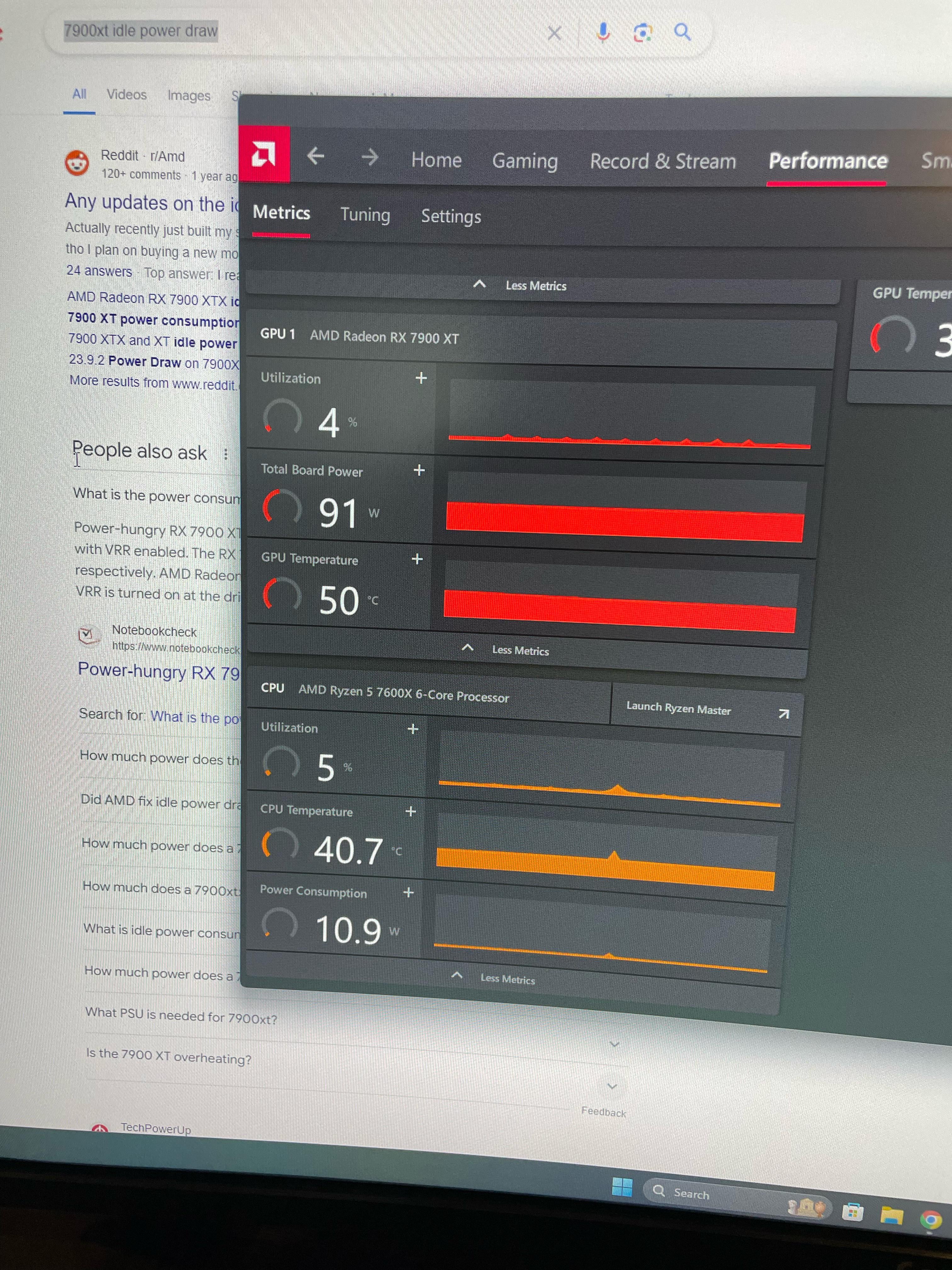
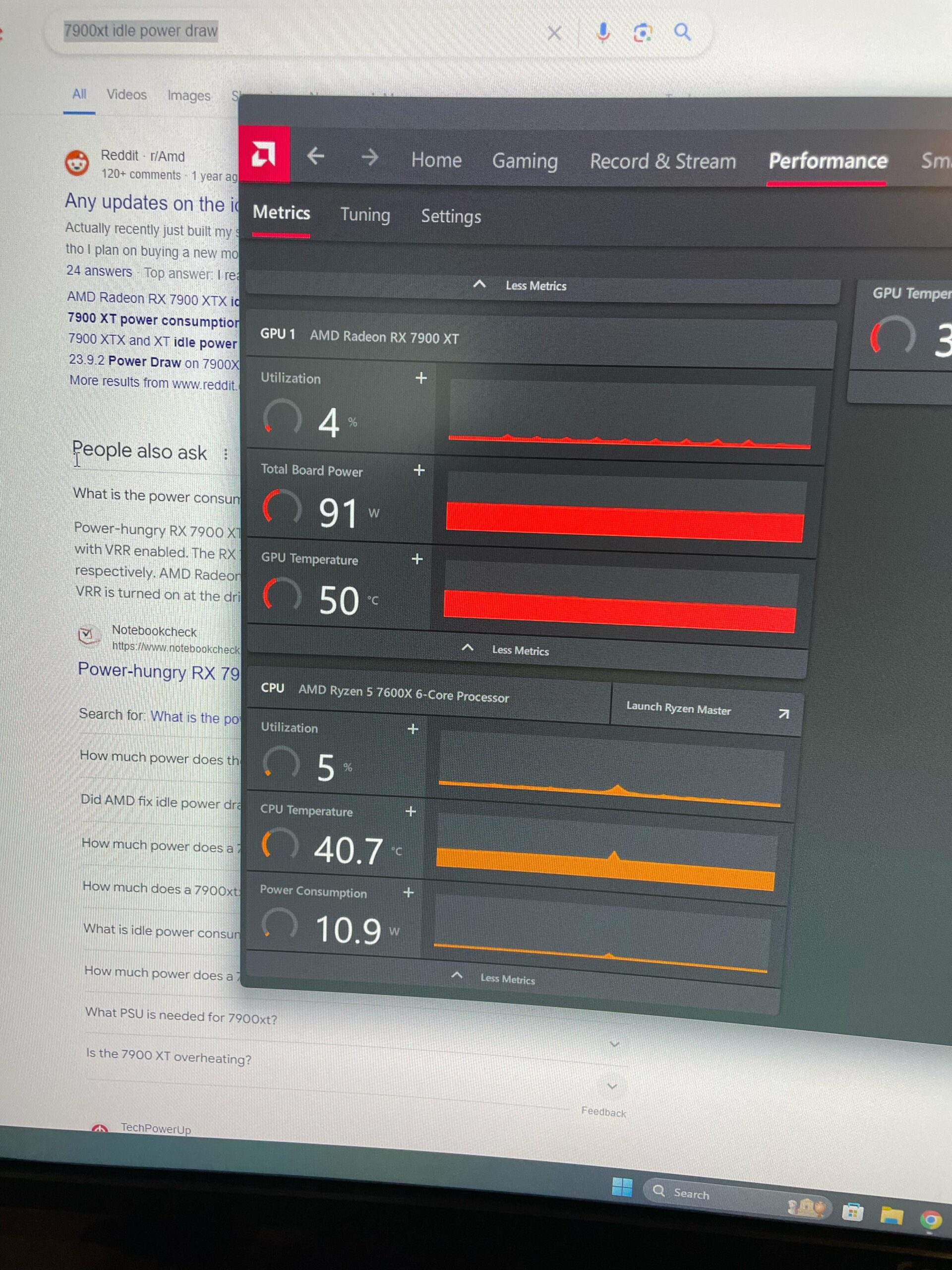
91W iddle? lmao wtf
kamil234
Do you have 2 monitors and each running at 120hz+? If yes, that’s the problem.
Ok-Agency3679
I’m a bit jealous of your cpu temp… my 7600x runs at 50° on idle…
SignalGladYoung
try turning off chrome hardware acceleration.
Chronos669
My 7900 xtx only draws 10 on idle
Dos-Commas
Make sure free sync is actually turned on.
clone2197
Is it a multi monitor setup? What’s the monitor’s model?
Homuman
Click tab tuning and see if Vram clock speed is running at max speed when idle. Mine (rx6800) was drawing 65w in idle.
aveidti
Perhaps put second monitor to 60fps if you have one.
MassiveCantaloupe34
Should be easy fix by enabling free sync / adaptive sync.
Captobvious75
Odd. I run a 7900xt with a C1 120hz attached and i’m at about 50w idle
demonslayer9911
Check for your startup apps, there might be apps using your gpu.
Mine too, I’m new to PC had no idea this is considered high. Have you got any solution??
thatfordboy429
Hehe… my 3080 pulling 120w idle. Oh, more is not better in this case? Well, shit.
igibit99
I have a 6900xt and noticed the same thing. Got out another hardware monitor and when the adrenaline software is open to a different tab, GPU utilization was at 1-2%. Click on the performance tab and it jumps to 6-7% and the wattage jumps from 12 up to in the 50s.
V4_Sleeper
you download anything shady lately? hopefully not
crypto miner malware…. something i had an experience with, not pleasant.
viper2035
All modern browsers use the GPU. So this is not idle.
mortiferousR
Thats my XFX 7900xt with 2X32″ monitors. It used to idle quite high (100w or so) with my 2nd monitor on 144hz. Since i only use it for discord i dropped it to 60hz and the power draw went down. However i flicked through the thread and you said you only have one monitor so i got nfi. You on old drivers by any chance? I remember hearing that drivers from november last year i think it was, had power draw issues. Dont quote me on that though
It’s a known bug when using a multi monitor setup.
AMDs already put out 3 drivers which were supposed to fix it, but didn’t fix it.
Very bad IMHO and the sole reason I went with nVidia this generation
s1cknasty
Dual monitor setups on these AMD cards draw so much idle power it’s so fucking stupid.
xblue555x
Mine is 70w idle
WhatIsPun
Have you tried rolling your driver’s back?
DzekoTorres
It’s a known amd bug with more than 1 monitor connected, only fix is buying nvidia
Rhazli
OP, dont know if this fixes it for you, but it did for me.
I have a multiple monitor display of different sizes and hz, by enabling freesync on my main monitor, both on the monitor and in adrenaline it fixed my high idle power usage. This was on a 7900xtx.
Level-Yellow-316
Is one of your screens using an HDMI connector? If so, try unplugging it – if that helps, try using DisplayPort if possible.

33 Comments
The card draws what it’s Vbios demands.
I heard rdna 4 will fix the high idle power draw but I don’t know much about gpus so don’t quote me on it.
It’s 90 with every things close ? Chrome etc
Another user said something about desktop recording being enabled in the software or something and that when they disabled it, dropped them down to 10 watts.
“I don’t have a 7900xt but a 6750xt. Was wondering why my power consumption was so high at 40-50watts using multi monitors with different hz and resolution. Then realized that desktop recording and all the other recording settings were turned on so maybe this might help someone if you try changing the live recording settings. It now idles at around 10 watts~ so it’s worth to at least try messing with those settings. Maybe it might help some people here.”
Just checked mine using a MSI Gaming Trio classic 7900XT and I’m at 10-15w idle
Edit: Curious how much your fans are drawing seeing a 50° idle temp.. my fans are completely off and idling at 37° in a 25° Florida bedroom. I’d check any game launchers or discord for GPU acceleration and usage in the background.
I have a 7900 xtx and its pretty much the same if i have two monitors. What sort of fixed it for me is i just plugged the second (60hz) monitor into the mobo, since the 7000 series cpus have integrated graphics. Now it idles at around 10w and playing games is the same.
I do have some weird artifacting/lag on the bottom 5%ish of the second screen and its very consistently glichy but i have no idea what causes it. Its not that noticable tho so i take it over having my gpu idle at 100w
Pretty normal if you have a high end CPU, with a big GPU, lot of ram, lot of fans and lot of RGB. Then add mouse and keyboard too, if they have RGB even worse. Then big PSU, very bad conversation rate at low wattage and the magic is done.
I’ve a 9900k, 2080 and 32gb of ram. 80w idling, CPU less than 6W, GPU 30W, 5x 140mm RGB fans, 1x120rgb fan, motherboards with lots and lots of VRM and RGB, GPU have RGB, ram have a ton of RGB, liquid cooling, keyboard a lot of RGB, mouse wireless. I’ve done the match, I’ve 40W of RGB, circa.
I’ve 3 monitors, but that doesn’t matter at all.
91W iddle? lmao wtf
Do you have 2 monitors and each running at 120hz+? If yes, that’s the problem.
I’m a bit jealous of your cpu temp… my 7600x runs at 50° on idle…
try turning off chrome hardware acceleration.
My 7900 xtx only draws 10 on idle
Make sure free sync is actually turned on.
Is it a multi monitor setup? What’s the monitor’s model?
Click tab tuning and see if Vram clock speed is running at max speed when idle. Mine (rx6800) was drawing 65w in idle.
Perhaps put second monitor to 60fps if you have one.
Should be easy fix by enabling free sync / adaptive sync.
Odd. I run a 7900xt with a C1 120hz attached and i’m at about 50w idle
Check for your startup apps, there might be apps using your gpu.
Weird. My 6900xt idles at like 5 watts or so
https://preview.redd.it/w4zy1br0wa1d1.png?width=1894&format=png&auto=webp&s=057a8b5a09d920f016d7d93c8024e1ae8931e807
Mine too, I’m new to PC had no idea this is considered high. Have you got any solution??
Hehe… my 3080 pulling 120w idle. Oh, more is not better in this case? Well, shit.
I have a 6900xt and noticed the same thing. Got out another hardware monitor and when the adrenaline software is open to a different tab, GPU utilization was at 1-2%. Click on the performance tab and it jumps to 6-7% and the wattage jumps from 12 up to in the 50s.
you download anything shady lately? hopefully not
crypto miner malware…. something i had an experience with, not pleasant.
All modern browsers use the GPU. So this is not idle.
Thats my XFX 7900xt with 2X32″ monitors. It used to idle quite high (100w or so) with my 2nd monitor on 144hz. Since i only use it for discord i dropped it to 60hz and the power draw went down. However i flicked through the thread and you said you only have one monitor so i got nfi. You on old drivers by any chance? I remember hearing that drivers from november last year i think it was, had power draw issues. Dont quote me on that though
https://preview.redd.it/2x6a423zhb1d1.png?width=728&format=png&auto=webp&s=4dd0c33e4cb98c24d84f14de01dc8ff4940c383c
It’s a known bug when using a multi monitor setup.
AMDs already put out 3 drivers which were supposed to fix it, but didn’t fix it.
Very bad IMHO and the sole reason I went with nVidia this generation
Dual monitor setups on these AMD cards draw so much idle power it’s so fucking stupid.
Mine is 70w idle
Have you tried rolling your driver’s back?
It’s a known amd bug with more than 1 monitor connected, only fix is buying nvidia
OP, dont know if this fixes it for you, but it did for me.
I have a multiple monitor display of different sizes and hz, by enabling freesync on my main monitor, both on the monitor and in adrenaline it fixed my high idle power usage. This was on a 7900xtx.
Is one of your screens using an HDMI connector? If so, try unplugging it – if that helps, try using DisplayPort if possible.