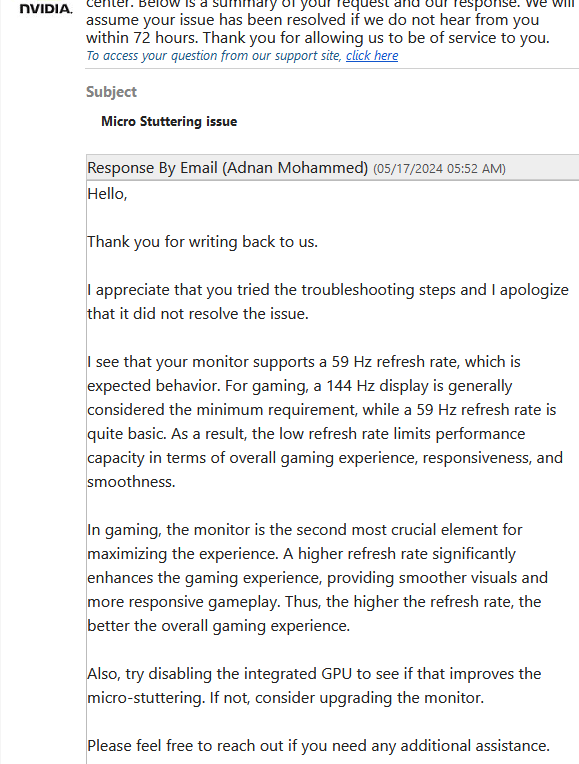
Spoke to Nvidia support recently about microstuttering in Helldivers 2 and Halo, support rep told me 60hz monitor is the problem?

Spoke to Nvidia support recently about microstuttering in Helldivers 2 and Halo, support rep told me 60hz monitor is the problem?
31 Comments
144hz isnt a minium requirement to not have microstutters, but it is a requirement for gsync which I think the support means.
Microstuttering has to do with poor frametimes and the fact that you most likely have vsync enabled which causes bad frametimes and input lag which is why disabling vsync and having a gsync/freesync compatabile monitor( need display port connector) with no vsync or with adaptive/fast sync( vsync without input lag) is needed for most consumers in 2024. You don’t need to buy a new monitor( even if reconmended), but you need to not use vsync and to use Rivatuner or any fps limiter( like in your nvidia control panel) to force it on 60fps, so you do not have screen tearing.
Microstuttering could also be because of using a hdd and other factors like running background programs that use hardware acceleration like OBS and Discord.
This is the dumbest support suggestion I’ve seen in a long time
Microstuttering is an undiagnosABLE issue. It can happen due to a myriad of factors, troubleshooting which is near impossible on PC. The support rep can’t just say “I don’t know”, so they say this.
I had this problem in Halo MCC. Turns out it was my Logitech software somehow. It could be anything
144hz is considered the minimum requirement for most games? Lol.
Latencymon can be really helpful for diagnosing stuttering problems.
Nvidia using AI tech support apparently. This is typical “ask an AI a question and receive words related to your topic” behavior.
Complete and total bullshit
I had this issue too it drove me insane I could never get the bottom of that was when i had a rtx 3090.
I remember a while ago that my gaming mouse caused microstutters because of it’s high poll rate. Could always check your mouse settings.
Expected Behaviour — is he saying you are poor 😭
I would suggest to try to force the game to use dgpu and tweak some settings in Nvidia Control Panel . That solved my micro stutter.
So basic bro
He’s basically saying upgrade your shit, just politely.
You know what? I’m not even mad about this. They’re basically saying “why do you care about micro-stutters you 59hz dork?”. Hilarious
Have you tried an external framerate cap like NVCP or RTSS? Blurbusters has a good article on best settings for gsync
https://blurbusters.com/gsync/gsync101-input-lag-tests-and-settings/14/
IF your pc can handle 60fps and it’s not an issue with the game engine. You should be able to achieve a flat frame time graph aka no stutters.
They called you poor
lol bro literally told you your monitor is basic! What a joke
Yeah its not the refresh rate wtf? Lol
144hz a minimum requirement? The fuck?????
Reads like an AI bot response
“you see 59hz is trash, we recommend going for 144hz but for that you need a better GPU. LIKE OUR RTX 4090!”
OP try checking page file
my computer > right click on the blank space > properties > advanced > performance > advanced > virtual memory > set page file only on your fastest SSD and set “no page file” to your HDDs or slower drives
this helped my ramdom stutters I was having in genshin open world.
Also check if chrome is running in the background, a recent update was making chrome stay running in the notification area, it appears as the small chrome logo (if it is there, right click and mark the option that enables chrome running in the backgroun)
https://preview.redd.it/ebkxugt6621d1.png?width=478&format=png&auto=webp&s=652a63f2e46bcab77ddccd4849378742430b67b5
One thing I did was change my in game mouse sensitivity super low and my mouse dpi very high. Sometimes that helps depending on the cause. Took me months to figure that out after switching from Xbox and noticing micro-stutters.
59 Hz is basic and a monitor is only the second-most crucial element, huh?
That’s either peak Nvidia marketing, or you were talking to A.I.
Slightly off topic, but enabling “fast mode” on your GPU helps on lower hertz displays
This is a classic “I think I’m really smart at technology” made up on the spot fact. There is zero basis of truth in this bullshit answer.
I have 60 hz monitor and the only issue I have is the ones that everyone else has, ie stretching, screen going nuts when a charger runs you over etc
Nvidia support basically called you broke. Damn
If you have 16GB of RAM or less. 90% probability it’s that. Many people I know or have talked to had micro stuttering in multiple games. All fixed by RAM upgrades.
dang roasted
What kind of moron would message the card manufacture over a game issue.