Hold function and try, light grey usually means fn+
DdasReich
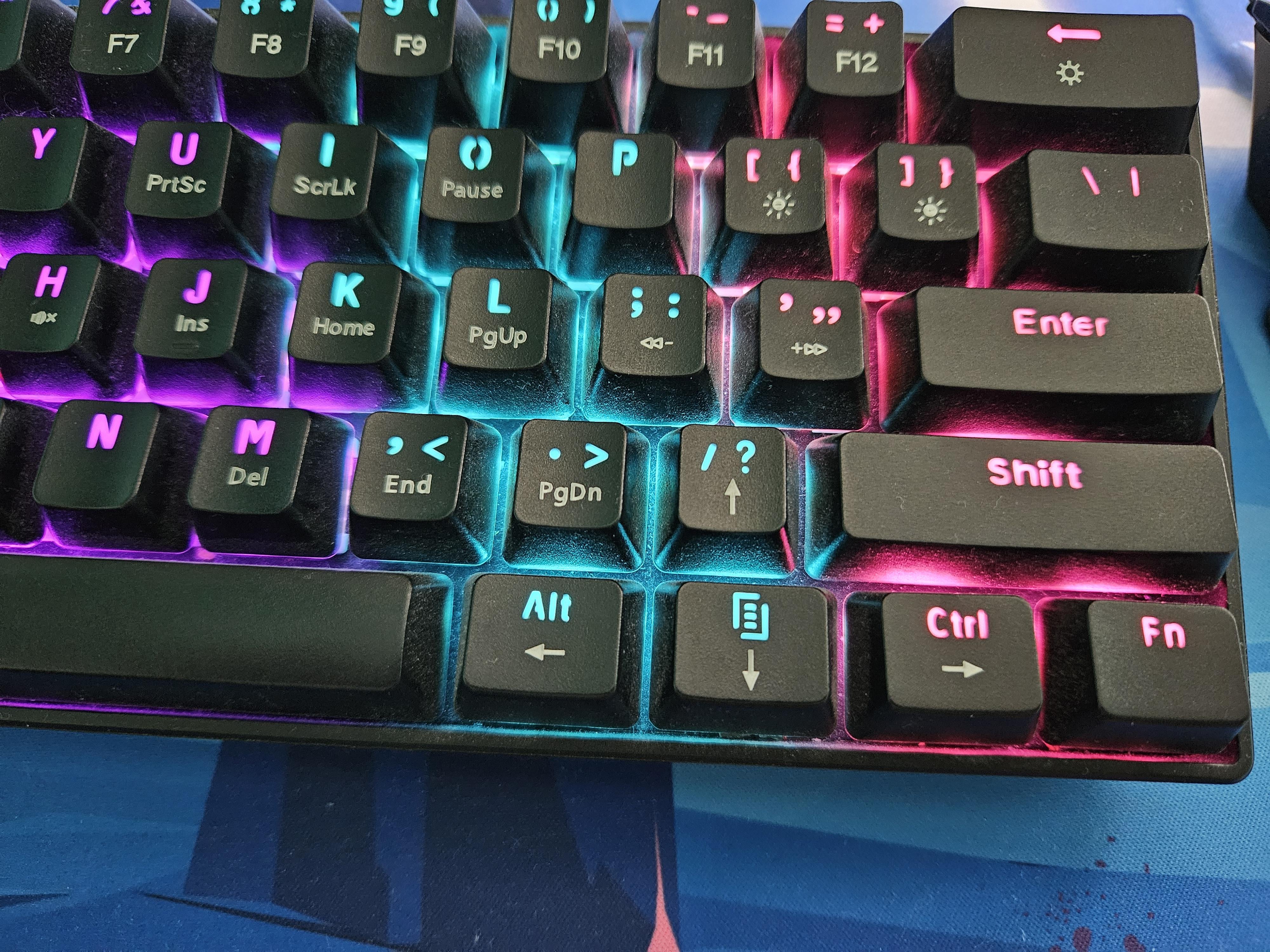
Press Fn and Clipboard key at the same time then you can use the arrow keys.
CenturioLabia
That’s the neat thing. You don’t.
HappyFeetHS
hold down the fn key and then press the arrow key button
Coconelli21
stop buying dogshit 60% kb – they’re a stupid fad.
Aubys
I’d be so pissed if I bought that lol
EJ_Tech
Switch to 75% kb
TheLegendOfTrain
Buy a 60% Keyboard, get a 60% Keyboard.
CheCazzoFaciamo
If only devices like this came with documentation on the functionality of their features.
msto3
Simple! You return it and buy a full keyboard
PremiereBeats
press Fn+Shift it should go to another mode and let you use arrows, to go back to normal mode ress Fn+Shift again
xrelian
With my Anne pro 2 the arrow keys work that if you quickly tap it it registers as an arrow key press, but if you hold it down or press it normally, it registers as the button normally should. Not sure what keyboard you have but it might be configurable in the software.
Ok_Plantain_8338
hold Fn, FN
awake283
No offense, but get a new keyboard brother.
pawan757
Bro I did the same mistake first I ordered a membrane keyboard and didn’t noticed it has no arrow keys whiw I was ordering after 2 days I returned it and bought a blue switch mech keyboard, guys don’t do this mistake
rawsausenoketchup16
fn + enter?
fiittzzyy
Hold FN usually but I use the keyboard software to assign those keys to arrows.
Zhabishe
I like how the answer (Fn) is literally there on the photo.
Transformator-Shrek
One by one
guillotinedlove
Why did you even buy this?
Uplandfriend987
You don’t. I have a mini razor keyboard and Love the thing,even though I don’t have arrow keys. You can use the function button to activate them but while gaming that’s like handicapping yourself it feels like lol
Sea-Matter-1092
Fn with the arrow keys. You can change the key mappings through the software
mrAnmol
This gotta be the shittiest keyboard I have seen in a while. (I guess you have to enable the secondary function by that ‘Fn’ key.)
CNR_07
I don’t get 60% keyboards. They’re so incredibly inconvenient.
But maybe that’s just because I’m a sys admin.
nick91884
I prefer a full keyboard with 10 key but to each their own.
Wheelbaron12
By throwing it in the garbage and then getting a good game board? Lol
That would drive me crazy
robbstarrkk
Try finger, but hole.
bradfo83
Buy a new keyboard with arrow keys.
And a 10 key number section
NinjaBr0din
Man, it’s a real shame they don’t include some sort of material that has instructions on how the thing works.
Elite_Wolf_1
Ok, this just hurt my brain. What keyboard is this?
JCFlyingDutchman
This keyboard would get on my nerves real quick.
Captain_Klrk
Lol wtf did you buy
firestar268
And this is why I always buy full size
NO_PHOBIA
Hold both shift keys
EarthrealmsChampion
Should be Fn + those keys. Most games will use WASD though.
Zidahya
This looks like a “gaming” keyboard. For what do you need the arrow keys?
Jackhas_doneA_Redit
I have a similar key board. I pressed fn and the down arrow to toggle between arrow keys and non

38 Comments
You try using Fn with the arrow keys?
Hold function and try, light grey usually means fn+
Press Fn and Clipboard key at the same time then you can use the arrow keys.
That’s the neat thing. You don’t.
hold down the fn key and then press the arrow key button
stop buying dogshit 60% kb – they’re a stupid fad.
I’d be so pissed if I bought that lol
Switch to 75% kb
Buy a 60% Keyboard, get a 60% Keyboard.
If only devices like this came with documentation on the functionality of their features.
Simple! You return it and buy a full keyboard
press Fn+Shift it should go to another mode and let you use arrows, to go back to normal mode ress Fn+Shift again
With my Anne pro 2 the arrow keys work that if you quickly tap it it registers as an arrow key press, but if you hold it down or press it normally, it registers as the button normally should. Not sure what keyboard you have but it might be configurable in the software.
hold Fn, FN
No offense, but get a new keyboard brother.
Bro I did the same mistake first I ordered a membrane keyboard and didn’t noticed it has no arrow keys whiw I was ordering after 2 days I returned it and bought a blue switch mech keyboard, guys don’t do this mistake
fn + enter?
Hold FN usually but I use the keyboard software to assign those keys to arrows.
I like how the answer (Fn) is literally there on the photo.
One by one
Why did you even buy this?
You don’t. I have a mini razor keyboard and Love the thing,even though I don’t have arrow keys. You can use the function button to activate them but while gaming that’s like handicapping yourself it feels like lol
Fn with the arrow keys. You can change the key mappings through the software
This gotta be the shittiest keyboard I have seen in a while. (I guess you have to enable the secondary function by that ‘Fn’ key.)
I don’t get 60% keyboards. They’re so incredibly inconvenient.
But maybe that’s just because I’m a sys admin.
I prefer a full keyboard with 10 key but to each their own.
By throwing it in the garbage and then getting a good game board? Lol
That would drive me crazy
Try finger, but hole.
Buy a new keyboard with arrow keys.
And a 10 key number section
Man, it’s a real shame they don’t include some sort of material that has instructions on how the thing works.
Ok, this just hurt my brain. What keyboard is this?
This keyboard would get on my nerves real quick.
Lol wtf did you buy
And this is why I always buy full size
Hold both shift keys
Should be Fn + those keys. Most games will use WASD though.
This looks like a “gaming” keyboard. For what do you need the arrow keys?
I have a similar key board. I pressed fn and the down arrow to toggle between arrow keys and non