
Hey!
Specs:
7800X3D
ASUS TUF GAMING X670E-PLUS
32GB Corsair Dominator Titanium 6000MHz CL30 (30-36-36-76)
Gigabyte 3070 Ti Gaming OC
Corsair TX750m
Samsung 990 Pro 1tb
Background:
I upgraded my build a couple of months ago with the 7800X3D, new mobo and RAM. First thing I did was to update BIOS (since I read about the ASUS issues). After that I installed Windows and set everything up. That whole day I had great performance, everything felt smooth and good and benchmarks looked good.
Soon the issues started though. I started to notice worse performance. I figured it was due to some settings or something OS-related. But I’ve tried probably 10 different installations of Win10 and 11 and tried multiple BIOS versions. I’ve tried everything from default settings to undervolting. I’ve tried two different RAM kits (with and without expo) and ran memtest86 multiple times without errors.
I just could not get near the performance I had on the first day and benchmarks show that it’s performing quite a bit below the average for my hardware, especially in CPU benchmarks.
Question:
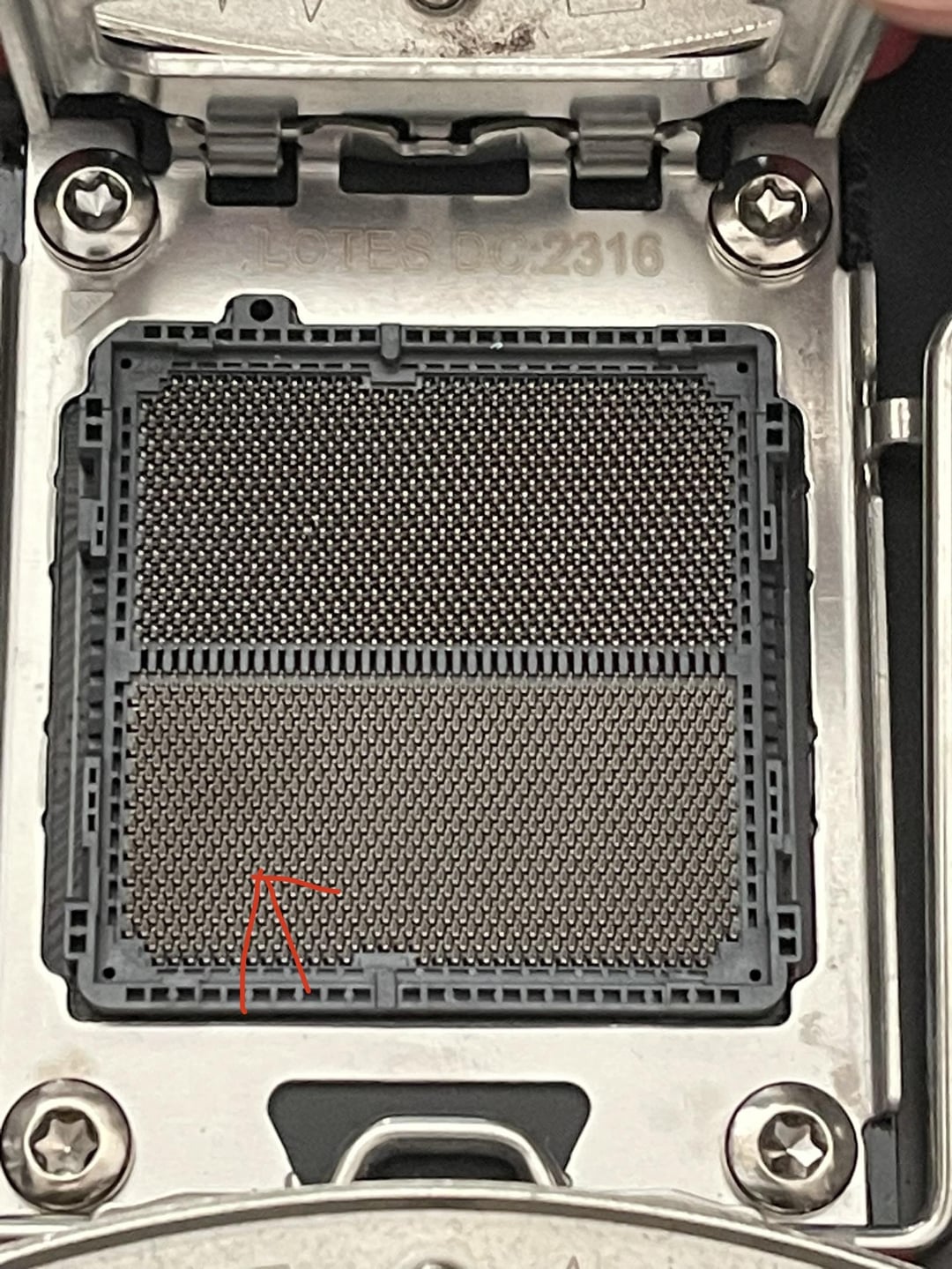
Now on to the question(s). I went to RMA the CPU to see if that’s the issue. When I removed the CPU I did notice what looks like a slight darkening of the CPU socket? Or is this just a normal variance in colour? It was hard to snap a good photo of it, but it’s quite apparent irl. Due to the ASUS mobo issues this had me a bit worried. I also noticed what looks like a slightly bent or damaged pin (highlighted in photo)? Could this be the culprit?
3 Comments
I don’t think so, but try these settings even for 7800x3D and when you change BIOS go back and make sure they save. I was changing them there, but they were being overwritten by duplicate settings on advanced CPU settings.
https://www.reddit.com/r/Amd/s/RlpdNCe2Kt
It depends upon what that pin is assigned to on the CPU. It certainly could cause problems depending upon what it does (some pins are redundant grounds). It’s genuinely difficult to damage a CPU unless you’ve been running high core voltages while overclocking. It’s much more likely a mobo issue but with that bent pin Asus will refuse to issue an RMA to replace it for free.
Gently bring the bent pin back up with a bit of luck it’s the source of all the issues you’re having, as for the scorch marks that’s potentially an issue with the platform you can clean off some of the damage with a pencil eraser (on the CPU side not the motherboard) to hopefully ensure better contact in the future but if the pads got too hot there’s a small chance you’ll rip them off in the process.
Go look at the AM5 pinout if there’s any datalines near that bent pin and it’s VCC or GND the chip could be completely fucked; still worth trying to fix/troubleshoot.
As for RMA-ing the board for the bent pin that’s probably not going to work but again… you never know.