
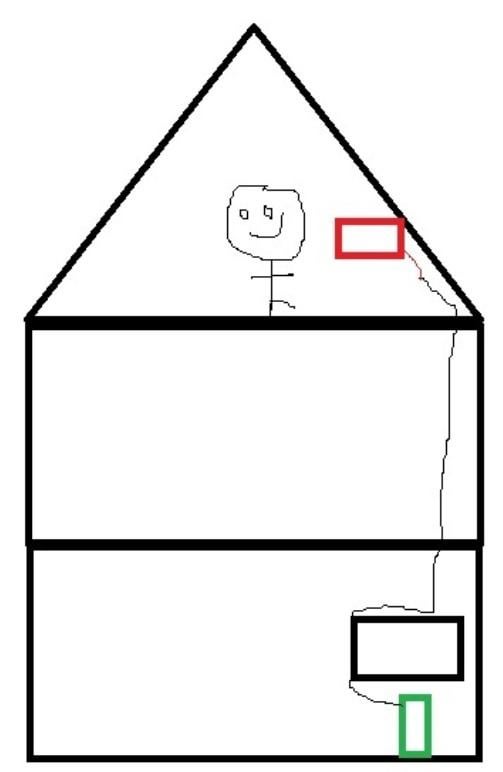
Hopefully this is allowed, just looking for some simple advice for my simple brain. I want to play games on my monitor on the top floor, my PC is located 2 floors below and usually plugged into my TV in the lounge. I've just ran an ethernet and HDMI up through the floors/ceilings to the top room, but what I'm missing is the ability to connect a controller/mouse on the top floor, obviously wireless won't work that far up through the floors. Am I being stupid?
I've attached a happy image of the layout, including myself hopefully enjoying some gaming in the future.
40 Comments
Get yourself a **USB hub**, and an **active USB extension cable**. Plug controller/mouse/whatever into the hub, connect the hub to the active extension cable, run the extension cable down along with the ethernet and HDMI cables, and plug it into the pc.
Look into steam link. No need for long optical cable, just a decent Ethernet connection.
With an Nvidia Shield you can stream games from your PC.
your smile is beautiful, ur body to head ratio is kinda fucked up tho.
Moonlight[moonlight](https://moonlight-stream.org/) works perfectly for me.
Look up HDMI-over-Cat6 or HDMI-over-Ethernet. Both will help you
Parsec
https://www.reddit.com/r/pcmasterrace/comments/1943f1h/i_asked_if_this_is_possible_last_year_and_yes_it/
You really have to go to your attic for porn?
May I ask why?
You stand on one leg while gaming? Impressive!
Why not move the pc upstairs?
Get yourself anything that can run the Moonlight streaming software (nvidia shield, apple tv, steamdeck, any linux computer really).
Install Sunshine on your pc.
Enjoy
Do you have an Ethernet connection between your PC and the red screen? If so, you can set up a steam link.
Since you were able to pass an hdmi cable, you can also pass a usb cable. I have a 10m one and have no input lag
Since you were able to pass an hdmi cable, you can also pass a usb cable. I have a 10m one and have no input lag
sunshine + moonshine + scripts to turn off extra monitors when using tv and switch back on when done
I need the back story behind this 😂
I use moonlight loaded onto a nvidia shield tv. Much better latency than steam link (I’ve tested both, hardware and software based), although you need a nvidia GPU. That mixed with playnite works amazingly well. I use it to play games on the tv downstairs .
Streaming is a quick solution, but in my experience can involve a lot of troubleshooting. It can work really well with a powerline adapter for a neat solution, but depends on your home wiring.
I did something like your image and used 30meters of an active HDMI cable with an active USB over ethernet hub (2 cables in total) and it was amazing. It was like my PC was plugged right there and no troubleshooting. Mainly need to make room for cables.
[https://moonlight-stream.org/](https://moonlight-stream.org/)
Run a network cable through the house. It’s useful anyway. Use the link above. I am using it to play games with my gaming pc being in a different room. Works flawlessly.
You’d need a second pc though. Which will still be cheaper than trying to run a optical cable and thunderbolt over that (what Linus does at his home). The sender/receiver for that cost like 1000$ per piece.
rasperi pi running a steam link, or an nvidia shield if you have a nvidia card
Moonlight
I guess you would need a REAAAALLLLLYYYY long usb extension cable but I would just go with what u/oamster said and use a Steamlink compatible device.
Parsec and a raspberry pi
KVM switch?
Steam link is a possibility but it really depends on what you want to play. If it’s shooters with a mouse, the latency is already too high.
It also locks you into the steam ecosystem. There are ways to make 3rd party launchers and games work but you may have mixed results and you sometimes need to fiddle around.
Since you have the hdmi cable in place, an Ethernet attached Laptop to send the inputs to you PC over Ethernet via “virtual here” may be the better solution.
Then, you only have the one way latency from the control inputs to your PC and the rest is a direct hdmi output.
Shouldn’t be noticable at all. It’s there in like 1ms…
Bear in mind though, the last time I used virtual here (which is like 5 years ago) it was as stable as a phone call to your uncle in africa from your mobile phone while you’re on the subway in the outskirts of a town with a population of 5000 people.
I’ve done this before with a 10 metre USB extender with a hub, and 10 metre HDMI cable, which goes in and out of the windows… Wish I could’ve just drilled into the floor but it’s not my house.
Moonlight and Sunshine. I’d advise against Steam Link, outdated, increased input lag, and overall worser experience compared to Moonlight.
This is how I did it, and even use Bluetooth dongles to support a separate keyboard, mouse, PS4 controllers, and headset. Works flawlessly. I play games at 4k on my 65″ OLED and it’s amazing.
https://preview.redd.it/wbcsbnfikgzc1.jpeg?width=928&format=pjpg&auto=webp&s=61535b22b542b0ebfca8a0d5363eeb7dbe880e35
Optical displayport
What weird timing, sex with hitler 3 gets announced and you already making the goon cave? Got room for 2?
Get a laptop
Take the green box and put it with the red box
If you have conduit in the walls, or are just fine drilling holes in the floor, a 1 way optical HDMI or Display Port would work just fine
i was convinced this is a troll/bot post until i saw op actually answer. some other dude had the same question in the same subreddit iirc, with a ms paint artwork aswell. usb extension and longer hd cable was his solution iirc, while i dont geht why soone would want to do this type of bs setup.
Been asked before. you might find your answers here…
[Here](https://www.reddit.com/r/pcmasterrace/comments/1b2noyy/i_want_to_play_pc_games_in_my_living_room_without/)
[also here](https://www.reddit.com/r/pcmasterrace/comments/150pgoo/i_want_my_pc_in_my_cellar_and_50_m_cabels_to_my/)
also [here](https://www.reddit.com/r/pcmasterrace/comments/14j4h7a/gaming_in_another_room_on_another_floor/), [here](https://www.reddit.com/r/pcmasterrace/comments/qpvcnv/whats_the_best_way_of_playing_my_pc_on_a_tv_in/), [here](https://www.reddit.com/r/pcmasterrace/comments/148dmi7/possible_to_build_a_pc_the_price_of_console_for/) and [here](https://www.reddit.com/r/pcmasterrace/comments/vlxqql/pc_gaming_on_tv_on_a_different_floor/)
I’d suggest doing some basic search in the future.
100 foot hdmi cable
100 foot USB extender
USB hub
I do exactly this, my pc is located in my office connected to my main monitor, and connects to the lounge TV with long HDMI and long USB extension cable.
Powered USB hubs at the TV end of the USB extension. I game at the lounge TV using wireless mouse/keyboard and/or a usb dongle for an Xbox controller
My lengths are 20m, the cables run through the roof. I use an active fibre HDMI cable (for high bandwidth over long distance), and an USB 2.0 active extension cable, which is more than enough for mouse/keyboard/xbox adapter
From experience, avoid wifi/ethernet options like steambox if you can run the cables. I’ve found them to be less reliable, lower quality, and more limited functionality. Depends what you’re going for though
Get a controller or mouse with a detachable USB cable, probably USB c these days.
Then get a 50foot cable on Amazon. Maybe more depending on distance, plus extra to let you move around