
Note: I am still testing all of these settings all week long to see if I can find any stability issues beyond just synthetics. Gaming, web browsing, etc.
Overview and Settings
Hello, everyone!
I started my journey here figuring out what was wrong with my 7900X, but it seems that it was "clock stretching" due to a bug in Precision Boost Overdrive. I reset my bios and thought I could at least make the real performance better. So I set out to do just that. I wanted to see how much performance I could get away with at 170-180 Watts, not the 200 Watts that came out of the box.
Let me say, I am in VERY uncharted territory. I have never tuned a processor this way and it feels so alien I'm not sure it's even real at this point. But the more I tested, the more it validated. My settings were validated with OCCT CPU Stress/Stability as well as Linpack to make sure the memory operation would be fine.
| Bios Setting | Value |
|---|---|
| CPU Load Line Calibration | Low, Low |
| PBO Curve Optimizer | All Core, -24 |
| PBO Limits: | Custom, PPT: 172 Watts, TDC: 162 Amps, EDC: 168 Amps |
| Custom Temperature Limit: | 90 degrees Celsius |
| Precision Scalar | Manual, 6X |
| CPU Boost Override | +200 Mhz |
| PBO Enhancement (Gigabyte) | 80, Level 5 |
| CPU VCore Voltage | Normal, -0.030 V |
| CPU VCore SOC Voltage | Normal, -0.030 V |
| CCD Voltage (VDDG Setting) | 960 mV |
| IOD Voltage (VDDG Setting) | 960 mV |
This really feels like it shouldn't work, but it is, and I have the scores/stability tests to show for it. As you can see, with PBO I have limited CPU Package Power to a mere 172 Watts. Temperatures average 10 degrees Celsius cooler than stock.
PBO "Weirdness"
- The reason the scalar is so high, my goal was to see if 4.9 Ghz or 5 Ghz all core was stable on 170-180 Watts, and before I started increasing the scalar, it would tap out at 4.7 Ghz even with the CPU Boost Override. It wasn't until I took the scalar to 6X/7X that it was achieving the clocks I was looking for. And again, it tested stable.
- Through some combinations, I could create a custom PPT/TDC/EDC limit that would all run at 80% of their effective maximums. No matter what I tried, the CPU/PBO algorithm didn't want to hit 100%. As an example, I set PPT/TDC/EDC based on a 105W profile I saw on a forum, and while that ran fine, it would not maximize any one particular category. It had lots of temperature to go with. It had lots of PPT to go with. It had lots of EDC.
- Until I set my TDC/EDC values so high, the algorithm would not clock higher. However, even with higher limits, it is still doing the same number of amps. About 120 Amps when performing sustained load tasks.
- The maximum clock did not increase until I found a combination of TDC/EDC that would yield 100% PPT Utilization/usage. This means the processor would hit the power threshold I set for it, and then begin to regulate.
Scores and Such
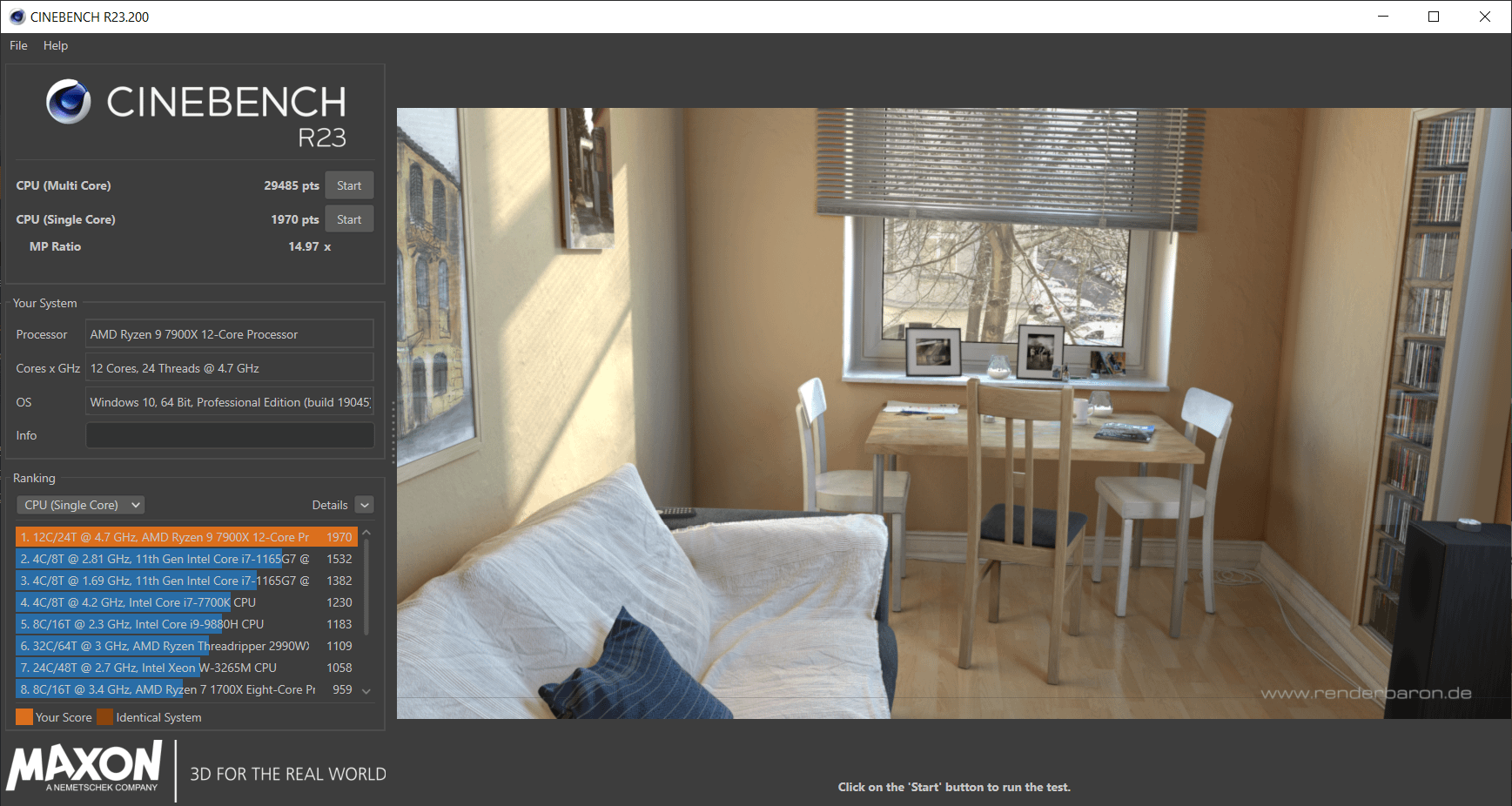
Cinebench R23 Multicore, 29485 Pts
Cinebench R23 Single Core, 1970 Pts
TimeSpy Score, 14714 CPU Score\)
\)I have no clue why it says "couldn't validate system" when I have other results from this same machine.
Final Thoughts
If anyone can explain the "why" of this behavior, I would love to hear it. I understand running Scalar beyond 1X is risking damage, but how much damage if it's using less power? This is what I mean by "uncharted". It used to be, more volts, more amps, more performance. Now it's less volts, less amps, more performance? My PBO Curve has remained at -24 since I started too. On my particular chip, -24 for CCD1, -28 for CCD2 was stable at one point as well.
Core voltages haven't reached beyond 1.105 Volts when under serious load, and this tells me that something is changing this voltage somewhere and I haven't seen where it can be adjusted in PBO settings. I thought it might be VDDG, but I couldn't change it too much.
I am getting better or same performance with 30 watts less power over stock.
2 Comments
Since the chips are never 100% identical, the values are set in a range that works with a wide variation of chips that pass QC, because of this reason they can’t always be set at the optimal values, so they are essentially running more voltage then they need to guarantee stability and this causes more heat which leads to lower average clocks.
Ok, first SCALAR will NOT damage a CPU…this is the multiplier that tells the algorithm how LONG to hold the boost frequencies…
The power you allow it to draw, is what will affect the boost clock it’s able to achieve, along with the curve settings of the VID voltage table with offsets, programmed into that CPU.
The way AMD has set this up is basically, it gonna try and hit max Thermals first..if that does not trip the algo, then it moves to power targets, and then clock speeds available at that power level.
EDIT: also the curve optimizer is working completely different than the 5000 series behaved…they introduced some adjacent core offset into the algorithm…makes it very difficult to align the cores to all run at the same voltage at a given frequency under a full load test as before.