
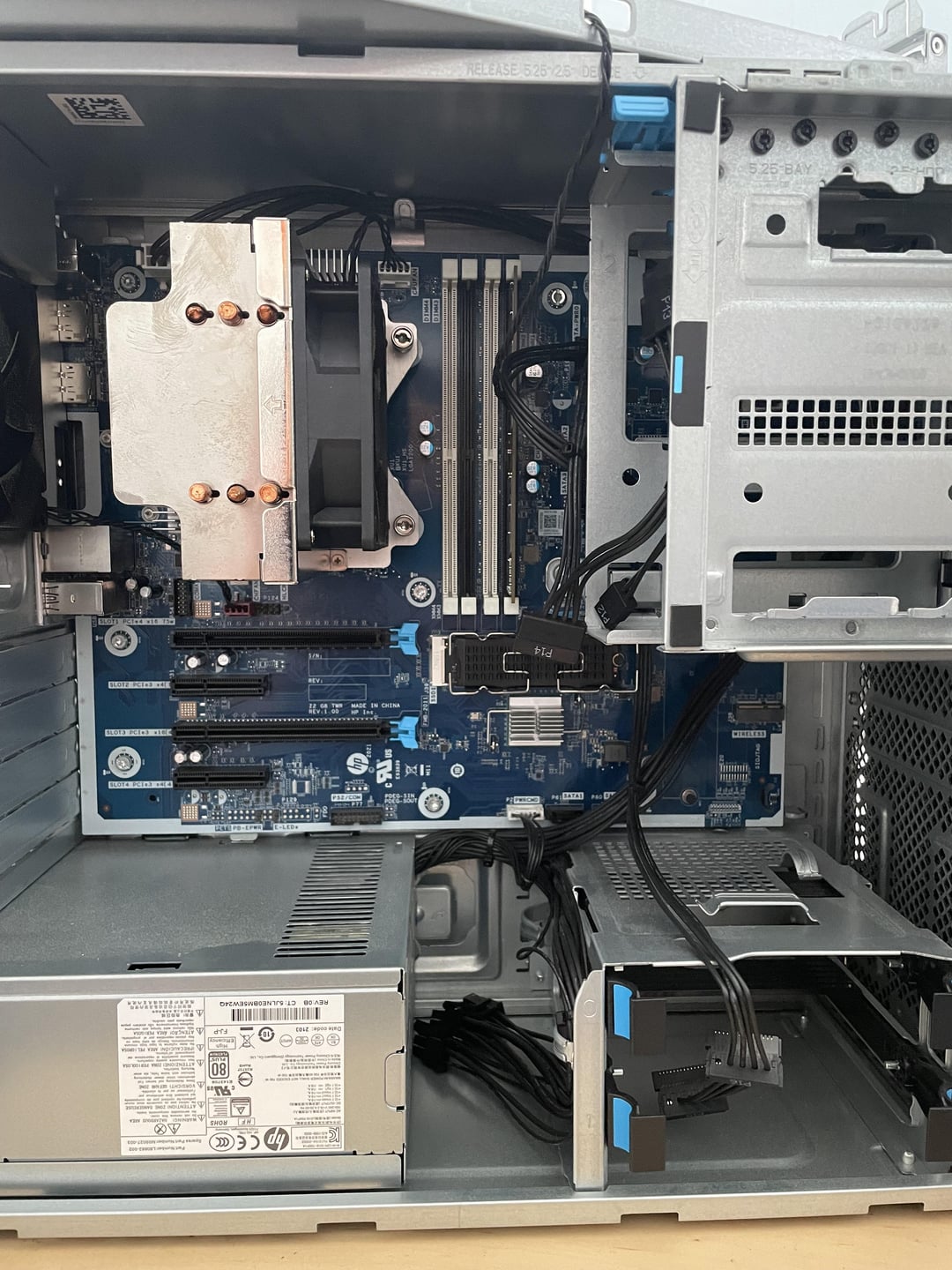
I have this pc from my last job, I only have to pull the ssd.
I was planning to build a gaming PC, not sure if I should use this as a base.
My concerns are the case size, if there are enough ports, if I’d have to replace all the parts anyway, etc.
Pictures are the inside and back, idk what I’m looking at.
25 Comments
Repurpose it, it’s an LGA 1200 board which can go up to a 10900k or 11900k, and it has a 700 W PSU
What CPU is in it now?
I would get a new one.
PSU is crap. will probably die and kill the GPU, mobo support will be trash (its not even clear what kind of CPUs it can support in the first place), bios options will be very limited who knows if it even supports XMP, RAM is probably extremely slow either way. I would just get a new one. wouldnt risk it. at best you would save what? 80 bucks for PSU and like 60 for a case maybe 150 for a mobo? risking with this PSU is not worth it. I would say its nonsense.
Would need to know what the actual parts are…
Seems pretty solid to me. Like another user mentioned the socket isn’t too old and whatever CPU you installed probably wouldn’t bottleneck a fairly recent GPU. If you remove the top drive cage you can probably fit a larger GPU in if needed, or just do a case swap. I don’t know what PSU is in there but you might need to get a better one. What is the model on this? Is this made by a company like Dell or HP or something?
media center , smart home center, NAS , Router , Server of any type , countless options to keep it up and running with almost no investment, for gaming or heavy workload go for a new one , but never give up on good old working hardware, repurpose it
Found the specs:
HP Z2 G8 Tower Workstation Desktop PC
Processor family
11th Generation Intel® Core™ i7 processor
Processor
Intel® Core™ i7-11700K (3.6 GHz base frequency, up to 5.0 GHz with Intel® Turbo Boost Technology, 16 MB L3 cache, 8 cores)
Chipset
Intel® W580
Memory
16 GB DDR4-3200 MHz non-ECC RAM (1 x 16 GB) Transfer rates up to 3200 MT/s.
Memory Slots
4 DIMM
Internal drive bays
Two 3.5″; One 2.5″ SSD
External drive bays
One 5.25″
Hard drive
512 GB HP Z Turbo Drive PCIe® M.2 SSD
Storage controller
Integrated SATA (4 ports 6 Gb/s) with integrated RAID 0, 1, for PCIe SSDs supported. Requires identical hard drives (speeds, capacity, interface).
Compatible displays
All HP Z Displays and HP DreamColor Displays are supported. For more information see http://www.hp.com/go/zdisplays
Graphics (integrated)
Intel® UHD Graphics 750
I/O Port location
Front
Ports
2 SuperSpeed USB Type-A 10Gbps signaling rate; 1 universal audio jack; 2 SuperSpeed Type-A USB 5Gbps signaling rate (1 charging)
Ports
1 audio-in; 1 audio-out; 1 RJ-45; 2 DisplayPort™ 1.4; 2 SuperSpeed USB Type-A 10Gbps signaling rate; 1 SuperSpeed USB Type-A 5Gbps signaling rate; 3 USB Type-A 480Mbps signaling rate
I/O Port location
Rear
Expansion slots
1 PCIe 3 x4 (x16 connector); 1 PCIe 3 x4 (x4 connector); 1 M.2 2230 PCIe 3 x1; 1 M.2 2280 PCIe 4 x4; 1 M.2 2280 PCIe 3 x4; 1 PCIe 3 x1 (x4 connector); 1 PCIe 4 x16 (x16 connector)
Expansion slots note
1 M.2 2230 slot for WLAN and 2 M.2 2280 slots for storage
Minimum dimensions (W x D x H)
14 x 6.7 x 15.2 in
100% keep it. Throw a 2x16gb 3600 DDR4 kit in there with a 4070 or such and you are set for a while.
Throw a GPU in that and you’re good to go.
yeh keep the PC, just add another 16 gb ram stick and a gpu and ur good to go
While the 11th series was pretty shit in relative terms (it was actually slower than the 10th gen in many cases), it’s recent enough that it’s still a good performer in absolute terms. Chuck a decent GPU in there and you’ll be fine for years!
Thats not an office pc, it’s a workstation. Workstations are usually pretty good.
4060 low profile go brr
Keep as others say! I like the blue board more than I should. Maybe check if the psu is worth keeping as well.
Many of us have started with an office PC, mine was an HP tower with an i5 2400, 4GB ram and 500HDD. My 1st conversion was adding 8 more ram for 12GB total, a GTX1050ti when it was just released and a 1b hdd.
If you don’t repurpose it, I’d be interested in buying it off you
Looks like an amazing future NAS.
Really it’s all going to depend on the PSU connectors. If all the connectors are standard ATX then you should be fine, but if they are no standard you are going to run into some problems with trying to get a GPU in there that needs a 6+2 connector(s), or replacing the PSU and the mobo using non-standard 24pin power and cpu.
GPU + more RAM if required and ur good to go.
You got a steal! Throw in a GPU and you’re pretty much set. Could benefit from another 16GB of RAM also
That’s surprisingly clean, unless you cleaned it yourself.
Well, look at it this way, with a Platinum 80 plus rated PSU, you’re off to a really good start. Throw some RAM and a GPU in there, and you’re off to the races.
Seeing the specs you have mentioned in your comment, my suggestions are as follow:
* Get a kit of 32GB DDR4-3200 Memory (ideally a kit of 2x16GB), and replace your single stick of RAM with that new kit
* Throw in a nice m.2 NVMe SSD (if you don’t have one), and optionally some additional storage with SATA SSDs or HDDs
* Throw a graphics card of your choice in the machine, but make sure the power supply has the right power connectors for the card you want to get
* As for the cooling, the motherboard, and the PSU, I’d keep it as is, as it seems to be a genuinely nice machine, even if the parts in it are proprietary
This is a good base for upcycling this old workstation, and it would reduce waste and be pretty cheap to bring up to snuff. Also, if you want it to be cheaper, get a used kit of memory and a used GPU.
My last PC was a repurposed office PC
I love these rebuilds I found a computer on the street for free that was essentially a quick books only desktop, can’t remember the motherboard specs, but went on to throw some random components I bought from friends and transformed it from a computer that would struggle to play fallout 1 to a computer that could play fallout 4 on high graphics
I’d say no to the case and motherboard, that’s not a normal motherboard format so you’ll be stuck using that case for long time which would hurt your ability to upgrade.
I would take everything else cpu, ram, etc and buy a normal monthboad and case which should cost few $100 at most