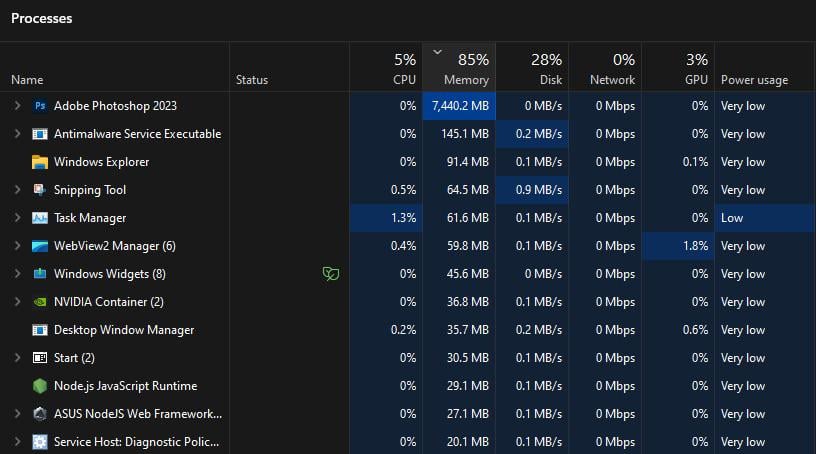
Is this normal? Low CPU usage and High memory usage in using Adobe Photoshop?
PC specs
CPU: Ryzen 7 5700x
RAM: 16gb 3200MHz
GPU: RTX 3060

Is this normal? Low CPU usage and High memory usage in using Adobe Photoshop?
PC specs
CPU: Ryzen 7 5700x
RAM: 16gb 3200MHz
GPU: RTX 3060
35 Comments
Photoshop eats ram for breakfast, lunch and dinner.
[deleted]
That’s just how image editing programs are. They use lots of ram to hold all the image data in a way that can be quickly modified as needed. Lots of things can also increase that ram usage. A larger image, a larger bit depth, number of layers, the size of the undo stack, and more.
They only use CPU and GPU when actively doing something to modify that image. If you apply a filter that takes a bit to run, you should see a spike in CPU and/or GPU usage while that filter runs, but once it is finished, GPU and CPU usage should go back down.
Try some of the steps mentioned in these Adobe Photoshop forum posts:
* [https://community.adobe.com/t5/photoshop-ecosystem-discussions/photoshop-ram-usage-out-of-control/td-p/12940581](https://community.adobe.com/t5/photoshop-ecosystem-discussions/photoshop-ram-usage-out-of-control/td-p/12940581)
* [https://community.adobe.com/t5/photoshop-ecosystem-discussions/photoshop-using-100-vram-and-ram/td-p/14108633](https://community.adobe.com/t5/photoshop-ecosystem-discussions/photoshop-using-100-vram-and-ram/td-p/14108633)
And Adobe Photoshop performance tuning: [https://helpx.adobe.com/photoshop/kb/optimize-photoshop-cc-performance.html](https://helpx.adobe.com/photoshop/kb/optimize-photoshop-cc-performance.html)
Once i played rust and only rust had 21gb of ram usage
That’s barely 7 gigs of ram used. For work related apps its not even high, mediocre at best.
That’s quite nornal. My Lightroom take up 15-17gb ram on average + Photoshop easily maxed out 32gb ram
“Adobe Photoshop” is the key phrase here
“Adobe” is a key word here
I’ve had times where Illustrator decided to gobble up 50 GB of ram because adobe products love to leak memory
Be that way sometimes
https://preview.redd.it/pzqgq0k3gavc1.jpeg?width=1098&format=pjpg&auto=webp&s=0f58deb8a3791e3fd115d176a9b0306a81893bd8
Literally any Adobe app: “Hey, you have some RAM? I’LL EAT IT WHOLE”
This is while using After Effects, and that’s pretty common sight for me.
That is totally normal for Adobe stuff unfortunately. Heck, even Acrobat reader is a beast on resources. lol
I remember once reading an article about 128 MB memory modules in which the author wrote something along the lines of “Who the fuck needs 128 MB of RAM? Well, actually *I* need it because I use Photoshop. But nobody else needs it, it’s fucking insane, what are you going to use 128 MB for?”.
Do you know what CPU, RAM, and Disk space are? Here is a simple analogy.
RAM: Is how big your desk is and RAM usage is how many things you have piled up on your desk.
CPU: Is how fast you can shuffle around your desk and organize everything.
Disk space: Is how big your drawers or file cabinets are.
So, an App like Photoshop will consume your RAM to load a ton of things onto your desk. The CPU doesn’t get used unless you are actually editing or manipulating the photos. Also, unused RAM is wasted RAM, so unless you are having issues with maxing your RAM usage to the point it has to swap things to the disk, it doesn’t really matter.
Yes, editing programs will use as much as possible
just download more ram bro 🙄
Looks normal to me. Your RAM capacity could be doubled or even quadrupled, depends on system.
For work, you need 32GB min nowdays.
Adobe apps are ram whores
You can go into photoshop’s preferences and choose how much ram you want to allow it to use. It’ll obviously affect performance, but it’s an option.
looks normal for
Photoshop: Ram Ranch Really Rocks
Photoshop’s file format can create massive files and the editor keeps the entire memory in memory so everything is fast. Photoshop will use as much ram as you let it really.
That’s not high RAM usage. If you’re a working professional, working with professional software, they will eat through as much RAM as you give them. If you need it to not do that, try going in the settings and adjusting it. For the rest of us, just buy a 64/128GB system if you do this sort of stuff regularly.
I mean, in 2024, 16GB of RAM is the new 8GB of RAM.
Production software will use as much RAM as you give it. More RAM usage means it’s able to keep more data cached, which is only going to make your experience smoother.
If you edit videos too, you will benefit hugely from 32 or 64GB of RAM.
16gb of RAM? Yeah. That’ll do it.
You can edit your preferences in Adobe to reduce the amount of RAM ANYY Adobe product uses on your machine
That doesn’t seem high at all. This is a program doing many complex tasks at once, so ram usage is expected.
Some programms reserv RAM and page it manualy. Photoshop use layers and remember many steps so just in case it reserv as much as it can. Check settings you can change remembered steps and other options if you want to release some memory, but I don’t recomend to do it.
Yeah got tired of that and went from 16gb to 64
Photoshop can eat a ton of ram. Its one of the few programs I’ve had use over 32gb
thats normal, its a gpu intensive task not cpu intensive task
Ram hungry PS, surprised it’s not higher.
It’s Photoshop