
Hi
I have a G.Skill Trident Z Neo F4-3600C16D, MSI B450 Tomahawk MAX and 5800X3D.
I'm wondering which FLCK and ULCK settings I am supposed to use? I've been reading things online, which say my FLCK = ULCK?
I'm afraid I don't really understand most of it. So I'm here asking for help on what to set. 😛
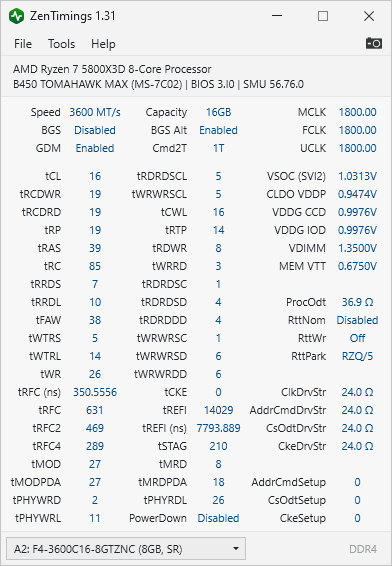
Here are my zen timings: https://i.imgur.com/W2EZJec.png, https://i.imgur.com/08HZAbq.png
I'm also looking for a good CPU fan profile, I have Arctic Freezer 33. I find that the fan profile sometimes just becomes really loud for a couple of seconds and then goes back down.
Thanks!
3 Comments
The best latency on Zen 3 is achieved with MCLK=UCLK=FCLK.
You are all good.
MCLK = RAM (memory) speed
UCLK = uncore clock which includes the memory controller
FLCK = infinity fabric
Set your MCLK (RAM speed) first. For Ryzen5000 you want to stay at or under 3600MT\s which equals 1800MHz (DDR is DOUBLE data rate, so 1800MHz = 3600MT\s). In Your case, just set XMP on your RAM so youre at 3600. This will make MCLK be set to 1800
Then Set UCLK to “UCLK == MCLK” (as opposed to UCLK = MEMCLK/2) There will only be two options for UCLK either “==” or “/2”. You want to run “==”
Then With MCLK set at 1800 and with UCLK set to == (which will make it 1800) you can now set FLCK to 1800.
You now have 1:1:1 – which you dont need to do anything, since your ZenTiming picture shows youre already at 1:1:1 (1800:1800:1800)