Speak to your doctor. Certain medications may help you not care.
Baldwinspropgun
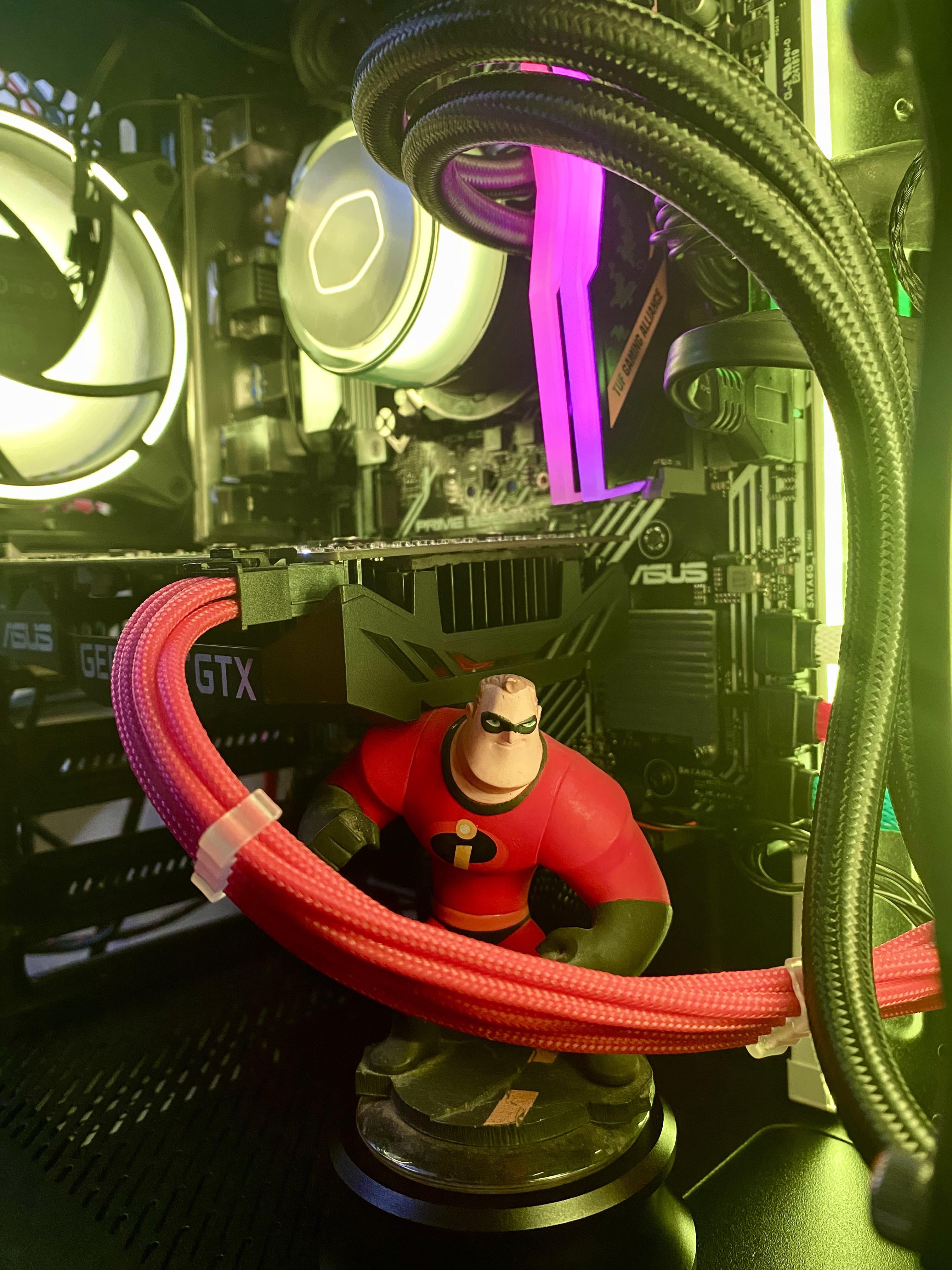
Ahhh yes. Disney infinity. Loved that game I have star lord in my tower😂
some_g00d_cheese
Does his other arm move? If so raise it up and maybe you could position the too so that his right shoulder holds the gpu and maybe his left hand could prop up the cable?
Activity_Alarming
make mr incredible hold it
Sauceman9000
Get a wireless power connector.
Unlucky_Situation
The power cable sticks out like a sore thumb from the contrast. Get a black cable and it will look a bit better in my opinion.
Mk3MaN
It looks like the rear fan in your case is backwards. That spot is typically used for an exhaust fan and right now you have it set up as an intake fan. I can’t really see the layout of the other fans though, so that might be intentional. Figured I’d give you a heads up.
MountainThorn42
You could look into a device similar to EVGA’s Power Link.
Imperial_Bouncer
Modern PC “user” cannot embrace wiring spaghetti monster. Shame.
Take it straight down and under the motherboard, that’s how I have mine.
Giant_Swigz
Lian Li RGB Strimmer ftw
Hooligans_
Solid side panel
lxnch50
Get a case without a window. Your computer is a machine, not a piece of art.
Merciless_Hobo
Run the cable through Mr.Incredibles arms so it looks like he’s fighting an Omnidroid.
BrewsJenner
The Mr. Incredible figurine is much cooler that the toilet paper roll that’s supporting my graphics card
SgtMoose42
Put a solid side panel on. Done.
Super-Chieftain5
Time to focus on something else. It looks clean af.
Zanzaclese
Depending on your case you should be able to run the power cables down under the motherboard which should make it look a bit more clean. Also, depending on your case, you could mount your AIO above the motherboard and tip tie the cables out of the way.
Creoda
Get Ice Blue ones and have Frozone sliding down it.
GTA6_1
You can drill a hole below the gpu to make the visible length shorter. There is no moving the connector but you can get a 180° adapter so you can run the wire over the gpu. That way it’s a shorter run to get it behind the motherboard.
TackyBrad
Make it blue and get a Korra figure
mandoxian
Cable combs
itsapotatosalad
180 degree adapter to take the cable over and use a black one. Will be much more subtle.
matiegaming
Route them under the gpu is possible (mine can). I also saw a prototype for no-cable gpu from msi, or gpu with cable port on back. Obviously this requires a new gpu, but its something for a future build
noeagle77
Get a wireless gpu
ZhangtheGreat
Integrated graphics. Saves you a ton of money on an overpriced GPU.

35 Comments
Dress it up as elastigirl
Remove your GPU. then no cables are needed lol.
Bluetooth cable adapter
Speak to your doctor. Certain medications may help you not care.
Ahhh yes. Disney infinity. Loved that game I have star lord in my tower😂
Does his other arm move? If so raise it up and maybe you could position the too so that his right shoulder holds the gpu and maybe his left hand could prop up the cable?
make mr incredible hold it
Get a wireless power connector.
The power cable sticks out like a sore thumb from the contrast. Get a black cable and it will look a bit better in my opinion.
It looks like the rear fan in your case is backwards. That spot is typically used for an exhaust fan and right now you have it set up as an intake fan. I can’t really see the layout of the other fans though, so that might be intentional. Figured I’d give you a heads up.
You could look into a device similar to EVGA’s Power Link.
Modern PC “user” cannot embrace wiring spaghetti monster. Shame.
https://preview.redd.it/x6hq0nl8iwtc1.jpeg?width=3769&format=pjpg&auto=webp&s=beeb62d7d32021ed376af983d02d2e16b2e8af05
Take it straight down and under the motherboard, that’s how I have mine.
Lian Li RGB Strimmer ftw
Solid side panel
Get a case without a window. Your computer is a machine, not a piece of art.
Run the cable through Mr.Incredibles arms so it looks like he’s fighting an Omnidroid.
The Mr. Incredible figurine is much cooler that the toilet paper roll that’s supporting my graphics card
Put a solid side panel on. Done.
Time to focus on something else. It looks clean af.
Depending on your case you should be able to run the power cables down under the motherboard which should make it look a bit more clean. Also, depending on your case, you could mount your AIO above the motherboard and tip tie the cables out of the way.
Get Ice Blue ones and have Frozone sliding down it.
You can drill a hole below the gpu to make the visible length shorter. There is no moving the connector but you can get a 180° adapter so you can run the wire over the gpu. That way it’s a shorter run to get it behind the motherboard.
Make it blue and get a Korra figure
Cable combs
180 degree adapter to take the cable over and use a black one. Will be much more subtle.
Route them under the gpu is possible (mine can). I also saw a prototype for no-cable gpu from msi, or gpu with cable port on back. Obviously this requires a new gpu, but its something for a future build
Get a wireless gpu
Integrated graphics. Saves you a ton of money on an overpriced GPU.
Get a dark window so you don’t have to see it
https://preview.redd.it/8984s5ai2xtc1.jpeg?width=3024&format=pjpg&auto=webp&s=e7970a06a9c6b6a64d6d444055de7953229bcb08
Sorta with you on that. I get the cooler but the graphics card with extra cable offshoots that aren’t needed
Take a picture without the cables, print it and paste it over the side panel. No need to thank me
Seriously nobody commented on AIO tubing orientation?
Get over it. It’s a functional machine, not a doll house.
I put mine under my desk where I can’t see it.
